Auto Dealer Listings Template


Edit Template Offline
2. Create new page and search for id 6644470
Edit Template Online
Create Awesome Websites


Free Nicepage Builder
Keywords
Vehicle Search, Category Tiles, and Test-Drive Actions Define the Choice
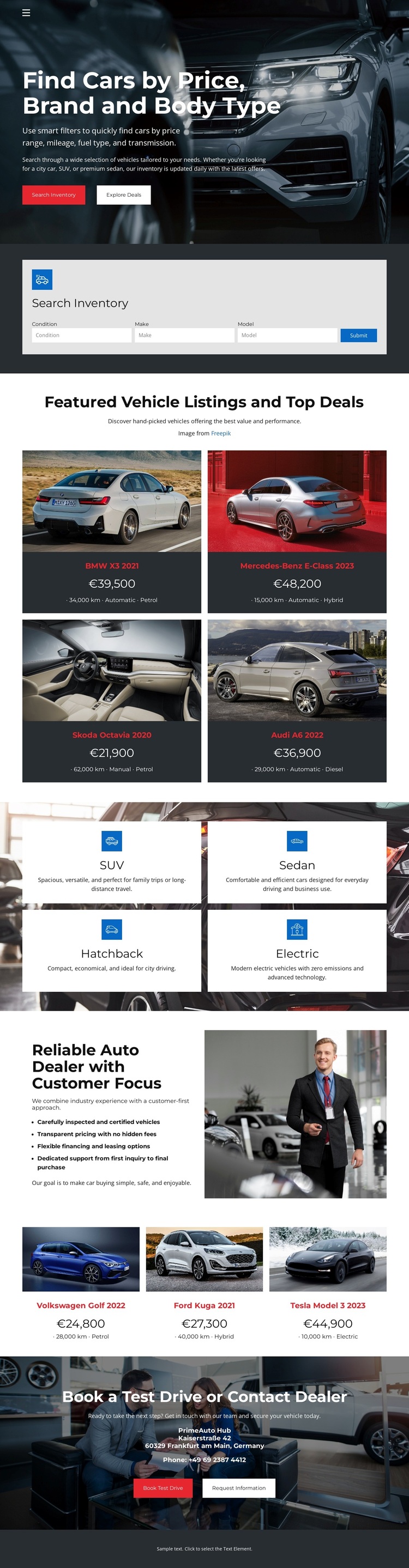
The opening combination of automotive photography and the headline “Find Cars by Price, Brand and Body Type” immediately establishes what this design is built to present. Unlike a dealership layout focused only on brand storytelling, this page places inventory search near the beginning, using condition, make, and model controls to give shoppers a practical starting point. That task-oriented opening makes the design a useful option for projects where vehicle discovery should lead the experience.
The inventory content also has enough variety to support several browsing preferences. Four repeated vehicle cards introduce featured listings with images, names, prices, and specifications, while a later group of three cards extends the same presentation pattern. Four image-backed category tiles identify SUV, Sedan, Hatchback, and Electric vehicles, adding a concise way to organize the offer by vehicle type or powertrain. Together, these sections give the template more range than a single undifferentiated product grid.
The customer-focused dealership introduction and representative image add human context between product-oriented areas. At the end, separate Book a Test Drive and Contact Dealer actions turn vehicle interest into clear next steps. The strongest reason to choose this design is therefore its connected coverage: search, compare, classify, understand the dealer, and respond, all within one focused automotive presentation.
Customize with Nicepage
Open this ready-made template in the Template Builder and customize it visually in the Nicepage editor. Replace demo content, edit page sections, and adapt the design to your project without rebuilding the template from scratch.
Start With a Ready-Made Template
Choose a Design for a New Page
Use a ready-made template as a starting point instead of creating every page from a blank canvas. When adding a new page in Nicepage, browse available designs, compare different layouts, and choose an option that already fits the general purpose and visual direction of your project.
Browse Different Page Designs
Explore Page Designs using search, thematic categories, Design Sets, and full-page previews. The collection includes layouts for different subjects and page purposes, making it easier to compare alternatives before selecting a design to customize.
Customize the Selected Template
After choosing a design, create the page and continue editing it visually in Nicepage. Replace the demo content, adjust images, typography, colors, sections, and other elements, and adapt the ready-made layout to your own content instead of rebuilding the design from the beginning.
Explore More Design Directions
If the first option does not match your project closely enough, return to the design collection and compare other templates before committing to a layout. This makes the template library useful not only for faster page creation, but also for exploring different visual approaches and finding a suitable starting point for a new project.
This workflow gives you access to a broad collection of ready-made designs that can be selected, compared, and customized according to the needs of each new page or project.