Elegant Eau de Parfum Template


Edit Template Offline
2. Create new page and search for id 6625459
Edit Template Online
Create Awesome Websites


Free Nicepage Builder
Keywords
A Bottle-Led Collection With Story, Process, and Product Proof
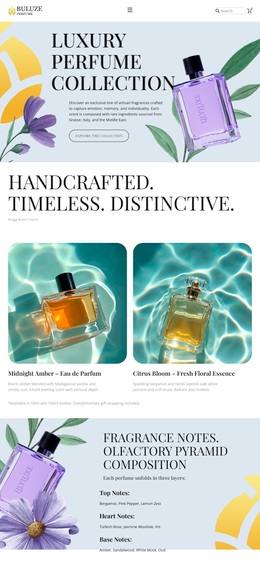
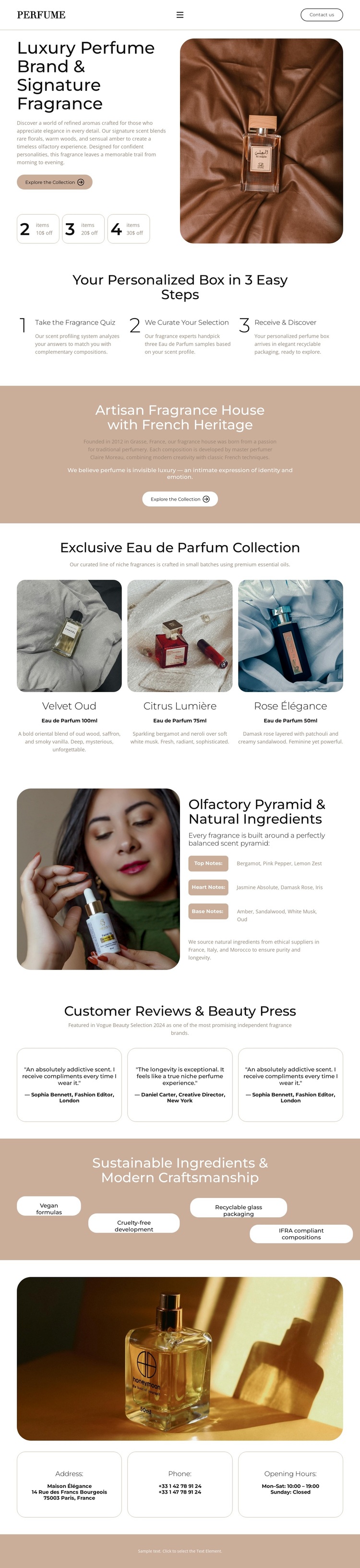
Large perfume photography is the first strong choice in this design. The hero places a featured bottle beside the signature-fragrance introduction, immediately establishing imagery as the main carrier of the brand message. That visual emphasis continues in the three product cards, where separate bottle photographs, labels, and short descriptions create a collection-focused center for the page. This makes the design a useful option for projects that need products to remain visible while surrounding content explains their character.
The three-step personalized-box section gives the template another distinctive quality. Instead of presenting only a product grid, the page explains an experience through taking a fragrance quiz, curating a selection, and receiving it. The terracotta heritage panel then adds an artisan-house narrative, creating a progression from product interest to process and brand background. The ingredient composition supports that progression with an image paired to olfactory-pyramid and natural-ingredient information.
Three testimonial cards, a sustainability feature band, and the closing contact blocks broaden the page’s coverage without changing its central fragrance direction. Reviews and displayed sustainability labels provide additional product context, while address, phone, and opening-hours cards serve visitors who want direct contact. The combination suits a premium fragrance project that depends on visual storytelling, collection presentation, and a calm editorial tone rather than dense technical copy.
Customize with Nicepage
Open this ready-made template in the Template Builder and customize it visually in the Nicepage editor. Replace demo content, edit page sections, and adapt the design to your project without rebuilding the template from scratch.
Start With a Ready-Made Template
Choose a Design for a New Page
Use a ready-made template as a starting point instead of creating every page from a blank canvas. When adding a new page in Nicepage, browse available designs, compare different layouts, and choose an option that already fits the general purpose and visual direction of your project.
Browse Different Page Designs
Explore Page Designs using search, thematic categories, Design Sets, and full-page previews. The collection includes layouts for different subjects and page purposes, making it easier to compare alternatives before selecting a design to customize.
Customize the Selected Template
After choosing a design, create the page and continue editing it visually in Nicepage. Replace the demo content, adjust images, typography, colors, sections, and other elements, and adapt the ready-made layout to your own content instead of rebuilding the design from the beginning.
Explore More Design Directions
If the first option does not match your project closely enough, return to the design collection and compare other templates before committing to a layout. This makes the template library useful not only for faster page creation, but also for exploring different visual approaches and finding a suitable starting point for a new project.
This workflow gives you access to a broad collection of ready-made designs that can be selected, compared, and customized according to the needs of each new page or project.