Play fun quizzes Template


Edit Template Offline
2. Create new page and search for id 6534796
Edit Template Online
Create Awesome Websites


Free Nicepage Builder
Keywords
Subject Variety and Visible Quiz Play Make This Design Easy to Choose
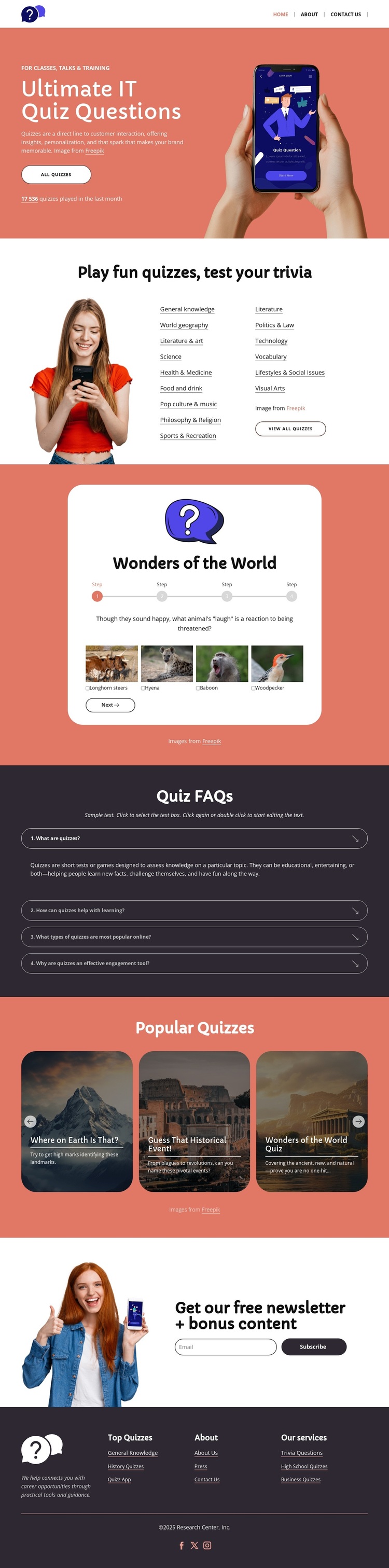
A broad set of quiz categories gives this design a clear reason to stand out among more narrowly focused page options. General Knowledge, World Geography, Literature, Science, Technology, Visual Arts, and other listed subjects appear together in the subject-navigation area, so the page can represent variety without relying on long explanatory text. The coral hero reinforces that direction by placing a quiz-entry message, an “Ask Questions” action, and a phone-and-hand image at the first point of attention.
The design also shows what the content can feel like after a visitor chooses a topic. The “Wonders of the World” preview includes a question prompt, progress indicators, image answer choices, and a “Next” control, making quiz participation visible rather than leaving the visitor with category labels alone. Three popular quiz cards extend the same idea into a repeated discovery pattern, while the four-item FAQ adds a practical information layer for common questions.
The newsletter section broadens the use case from one-time play to ongoing audience contact. Its bonus-content message, email entry control, and “Subscribe” button can support a quiz publisher that wants to maintain interest after visitors finish exploring. Rounded cards, pill-shaped controls, coral and charcoal contrast, white content areas, and playful question-mark imagery keep the page approachable. Together, the subject coverage, sample activity, popular content, FAQ, and subscription area make this a distinctive ready-made option for casual trivia and knowledge-quiz projects.
Customize with Nicepage
Open this ready-made template in the Template Builder and customize it visually in the Nicepage editor. Replace demo content, edit page sections, and adapt the design to your project without rebuilding the template from scratch.
Start With a Ready-Made Template
Choose a Design for a New Page
Use a ready-made template as a starting point instead of creating every page from a blank canvas. When adding a new page in Nicepage, browse available designs, compare different layouts, and choose an option that already fits the general purpose and visual direction of your project.
Browse Different Page Designs
Explore Page Designs using search, thematic categories, Design Sets, and full-page previews. The collection includes layouts for different subjects and page purposes, making it easier to compare alternatives before selecting a design to customize.
Customize the Selected Template
After choosing a design, create the page and continue editing it visually in Nicepage. Replace the demo content, adjust images, typography, colors, sections, and other elements, and adapt the ready-made layout to your own content instead of rebuilding the design from the beginning.
Explore More Design Directions
If the first option does not match your project closely enough, return to the design collection and compare other templates before committing to a layout. This makes the template library useful not only for faster page creation, but also for exploring different visual approaches and finding a suitable starting point for a new project.
This workflow gives you access to a broad collection of ready-made designs that can be selected, compared, and customized according to the needs of each new page or project.