Private elementary education Template


Edit Template Offline
2. Create new page and search for id 16882
Edit Template Online
Create Awesome Websites


Free Nicepage Builder
Keywords
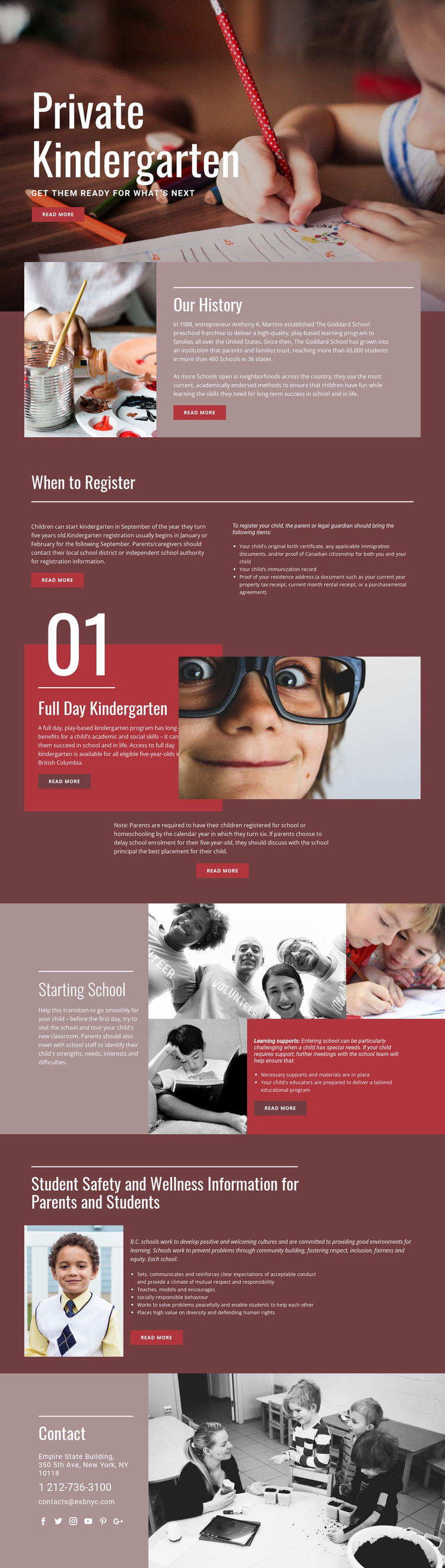
Registration details and learning support give the design practical range
The page stands out by combining an emotionally immediate opening with unusually specific family information. Large child-focused photography introduces the kindergarten subject quickly, but the design does not remain at the level of a general school presentation. Our History supplies institutional background, while When to Register addresses timing and places a three-item document list beside the explanation. That practical content makes the design useful for families who need more than a simple introductory statement.
The middle sections broaden the coverage without losing focus. Full Day Kindergarten explains the program and references British Columbia eligibility information, while Starting School addresses the transition into education through learning supports, necessary materials, and a tailored educational program. Student Safety and Wellness adds conduct, inclusion, positive school culture, and community guidance. Together, these sections create a fuller parent-oriented information path than a layout centered only on services or promotional claims.
The visual direction supports that content choice. Burgundy, muted rose, cream, and red provide warmth and contrast; bold condensed headings give each subject a strong identity; and the collage imagery keeps the page connected to children and classroom life. The closing contact panel completes the coverage with phone, email, address, and social links. This is therefore a useful option when a kindergarten project needs both visual storytelling and substantial registration, preparation, support, and safety information.
Customize with Nicepage
Open this ready-made template in the Template Builder and customize it visually in the Nicepage editor. Replace demo content, edit page sections, and adapt the design to your project without rebuilding the template from scratch.
Start With a Ready-Made Template
Choose a Design for a New Page
Use a ready-made template as a starting point instead of creating every page from a blank canvas. When adding a new page in Nicepage, browse available designs, compare different layouts, and choose an option that already fits the general purpose and visual direction of your project.
Browse Different Page Designs
Explore Page Designs using search, thematic categories, Design Sets, and full-page previews. The collection includes layouts for different subjects and page purposes, making it easier to compare alternatives before selecting a design to customize.
Customize the Selected Template
After choosing a design, create the page and continue editing it visually in Nicepage. Replace the demo content, adjust images, typography, colors, sections, and other elements, and adapt the ready-made layout to your own content instead of rebuilding the design from the beginning.
Explore More Design Directions
If the first option does not match your project closely enough, return to the design collection and compare other templates before committing to a layout. This makes the template library useful not only for faster page creation, but also for exploring different visual approaches and finding a suitable starting point for a new project.
This workflow gives you access to a broad collection of ready-made designs that can be selected, compared, and customized according to the needs of each new page or project.