Marine world Template

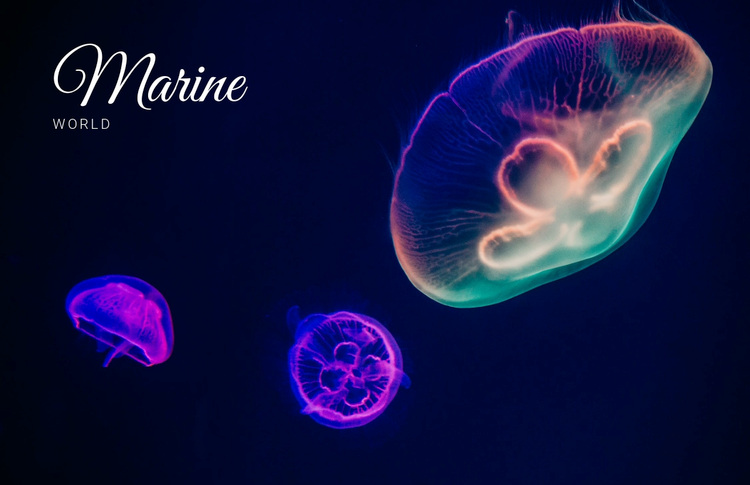
Marine world is a focused hero design for introducing a marine-life subject with minimal text and strong imagery. A full-width background image presents three luminous jellyfish against dark navy, with vivid purple, blue, pink, and teal colors shaping the scene. The large decorative “Marine” heading and smaller “world” subtitle are placed together in the upper-left, creating a simple two-level message. The static section contains no visible repeated cards or controls, making its image-and-title relationship the defining design choice.
ID : 52104   |   Category : Text On Image, Nature

A Focused Hero Choice Built Around Jellyfish Imagery

Three luminous jellyfish give this block a clear reason to stand apart from a conventional text-only introduction. Their purple, blue, pink, and teal forms occupy a full-width image field, while the dark navy background creates contrast and depth. Instead of spreading information across several cards or columns, the design concentrates attention on one marine-life scene and a short two-level title.

The large decorative “Marine” heading supplies the primary visual statement, and the smaller uppercase “world” subtitle adds a supporting cue without competing with the image. Placing both in the upper-left creates a deliberate entry point while preserving the jellyfish as the central subject. This combination is useful when a page needs a recognizable opening block that establishes atmosphere and topic before more detailed content appears.

Among ready-made section alternatives, this design suits a project that benefits from visual immersion and very limited introductory copy. Its static interaction keeps the message immediate, and its single image-led region avoids the maintenance demands of repeated components or controls. The choice is therefore based on a specific combination: marine imagery, vivid color contrast, full-width scale, and restrained upper-left typography. Those characteristics define the block’s value without expanding it into a complete page.

Customize with Nicepage

Open this ready-made template in the Template Builder and customize it visually in the Nicepage editor. Replace demo content, edit page sections, and adapt the design to your project without rebuilding the template from scratch.

Edit Template Offline

1. Download and Install the Nicepage application for Windows and Mac. Or WordPress and Joomla plugins from the download page
2. Create a new page or select existing
3. Click Add new block, search for id 52104 and click enter

Edit Template Online

Run Online Builder to edit this template on our hosting

Create Awesome Websites

WordPress Plugin WordPress
Windows Application Windows App
Joomla Plugin Joomla
Mac OS Application Mac OS App
HTML5 HTML5
Online Builder Online

Free Nicepage Builder

15,000+ Templates
Easy Drag-n-Drop
No Coding
Mobile-Friendly

Keywords


Start With a Ready-Made Template

Choose a Design for a New Page

Use a ready-made template as a starting point instead of creating every page from a blank canvas. When adding a new page in Nicepage, browse available designs, compare different layouts, and choose an option that already fits the general purpose and visual direction of your project.

Browse Different Page Designs

Explore Page Designs using search, thematic categories, Design Sets, and full-page previews. The collection includes layouts for different subjects and page purposes, making it easier to compare alternatives before selecting a design to customize.

Customize the Selected Template

After choosing a design, create the page and continue editing it visually in Nicepage. Replace the demo content, adjust images, typography, colors, sections, and other elements, and adapt the ready-made layout to your own content instead of rebuilding the design from the beginning.

Explore More Design Directions

If the first option does not match your project closely enough, return to the design collection and compare other templates before committing to a layout. This makes the template library useful not only for faster page creation, but also for exploring different visual approaches and finding a suitable starting point for a new project.

This workflow gives you access to a broad collection of ready-made designs that can be selected, compared, and customized according to the needs of each new page or project.

Template selection in the Nicepage New Page dialog

More from Nature Templates