Rating for architecture Template


Edit Template Offline
2. Create new page and search for id 27314
Edit Template Online
Create Awesome Websites


Free Nicepage Builder
Keywords
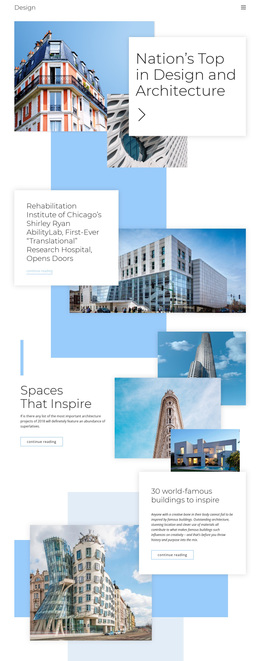
Large Images Give Architecture Stories the Lead Role
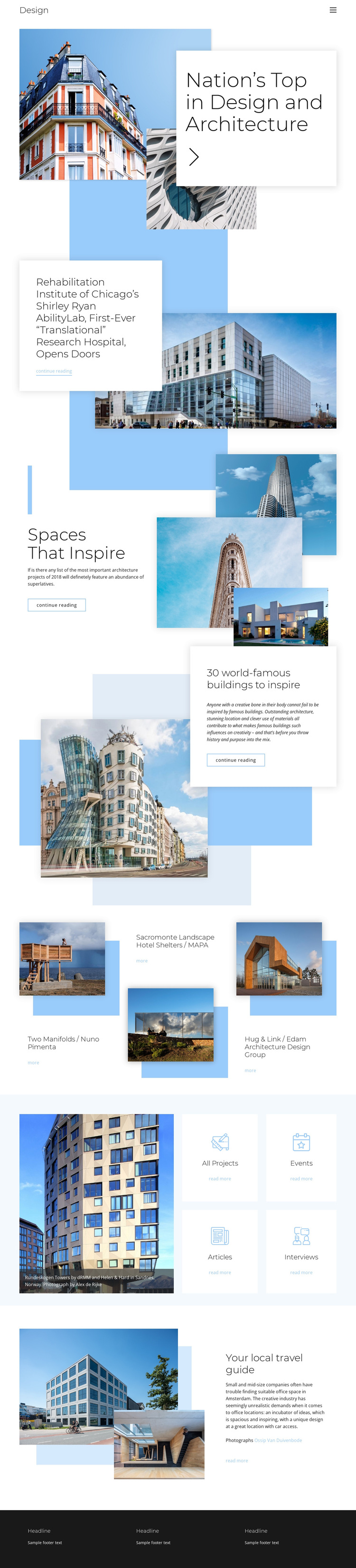
Large building photographs carry much of the page’s identity, while the surrounding text explains how visitors can move from visual interest into architecture coverage. The opening collage makes the subject immediately recognizable, and the white overlapping card creates a strong editorial contrast rather than beginning with a dense list of services or specifications. The Shirley Ryan AbilityLab feature continues that approach by pairing one substantial building image with a focused article headline and reading link.
The design is worth considering when a project needs several forms of architecture content in one visual direction. Spaces That Inspire uses a three-image vertical collage, the world-famous buildings feature balances one prominent photograph with explanatory text, and the project grid supplies three named examples in a repeated format. The four category cards extend the coverage toward projects, events, articles, and interviews, while the local travel guide adds a place-oriented closing story. Together, these relationships distinguish the template from layouts centered mainly on pricing, product catalogs, or service conversion. Its strongest choice is the combination of image-led editorial features and compact project discovery within a restrained, spacious page.
Customize with Nicepage
Open this ready-made template in the Template Builder and customize it visually in the Nicepage editor. Replace demo content, edit page sections, and adapt the design to your project without rebuilding the template from scratch.
Start With a Ready-Made Template
Choose a Design for a New Page
Use a ready-made template as a starting point instead of creating every page from a blank canvas. When adding a new page in Nicepage, browse available designs, compare different layouts, and choose an option that already fits the general purpose and visual direction of your project.
Browse Different Page Designs
Explore Page Designs using search, thematic categories, Design Sets, and full-page previews. The collection includes layouts for different subjects and page purposes, making it easier to compare alternatives before selecting a design to customize.
Customize the Selected Template
After choosing a design, create the page and continue editing it visually in Nicepage. Replace the demo content, adjust images, typography, colors, sections, and other elements, and adapt the ready-made layout to your own content instead of rebuilding the design from the beginning.
Explore More Design Directions
If the first option does not match your project closely enough, return to the design collection and compare other templates before committing to a layout. This makes the template library useful not only for faster page creation, but also for exploring different visual approaches and finding a suitable starting point for a new project.
This workflow gives you access to a broad collection of ready-made designs that can be selected, compared, and customized according to the needs of each new page or project.