News about technologies Template


Edit Template Offline
2. Create new page and search for id 17315
Edit Template Online
Create Awesome Websites


Free Nicepage Builder
Keywords
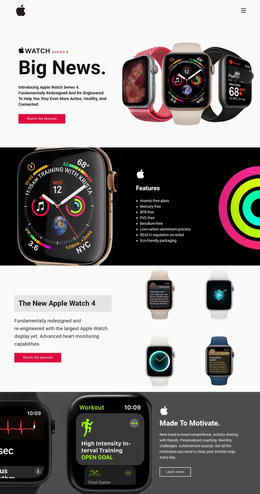
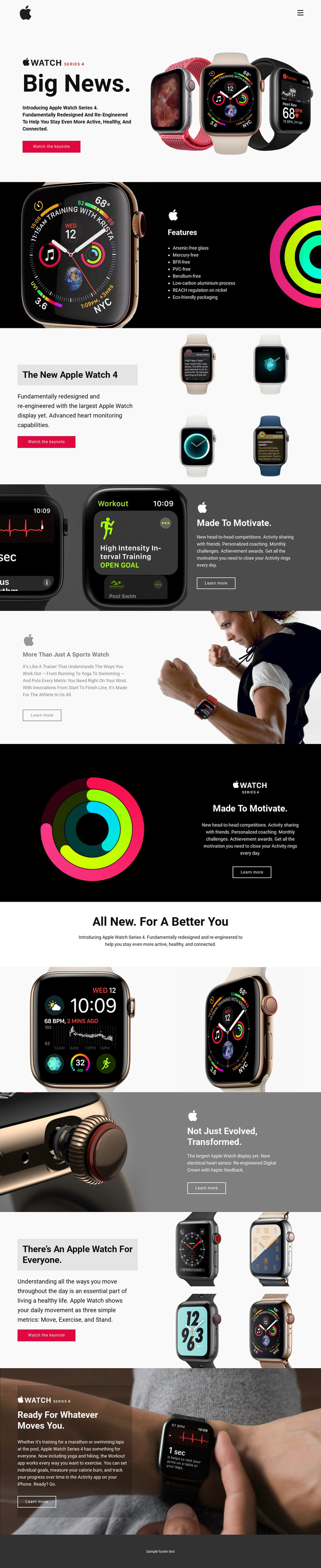
Eight environmental features meet activity-led product storytelling
The eight-item environmental feature panel is one of the design’s clearest points of distinction. It gives the Apple Watch Series 4 presentation a product-detail layer that sits alongside, rather than beneath, the large photography. The page then expands into a redesigned-product overview with four images, followed by activity motivation, sports, and hardware sections. This combination suits a project that needs to explain a device through both construction details and everyday use.
The sports references create another recognizable direction. Running, yoga, swimming, hiking, and marathon training show a broad range of movement contexts, while the Move, Exercise, and Stand metrics provide a compact visual language for activity tracking. The electrical heart sensor and redesigned Digital Crown add concrete hardware points, preventing the page from relying only on lifestyle imagery or general promotional language.
As a design choice, this template is strongest where visual storytelling should carry a substantial part of the message. Bright watch displays, activity rings, product close-ups, and athlete imagery give the page material to show, while bold headings and generous spacing keep the story readable. The repeated keynote and Learn more actions also make the content feel campaign-ready without requiring a dense corporate navigation system. It is a focused option for presenting a technology product through features, use cases, and visual proof.
Customize with Nicepage
Open this ready-made template in the Template Builder and customize it visually in the Nicepage editor. Replace demo content, edit page sections, and adapt the design to your project without rebuilding the template from scratch.
Start With a Ready-Made Template
Choose a Design for a New Page
Use a ready-made template as a starting point instead of creating every page from a blank canvas. When adding a new page in Nicepage, browse available designs, compare different layouts, and choose an option that already fits the general purpose and visual direction of your project.
Browse Different Page Designs
Explore Page Designs using search, thematic categories, Design Sets, and full-page previews. The collection includes layouts for different subjects and page purposes, making it easier to compare alternatives before selecting a design to customize.
Customize the Selected Template
After choosing a design, create the page and continue editing it visually in Nicepage. Replace the demo content, adjust images, typography, colors, sections, and other elements, and adapt the ready-made layout to your own content instead of rebuilding the design from the beginning.
Explore More Design Directions
If the first option does not match your project closely enough, return to the design collection and compare other templates before committing to a layout. This makes the template library useful not only for faster page creation, but also for exploring different visual approaches and finding a suitable starting point for a new project.
This workflow gives you access to a broad collection of ready-made designs that can be selected, compared, and customized according to the needs of each new page or project.