Outstanding quality of music Template
Edit Template Offline
2. Create new page and search for id 17189
Edit Template Online
Create Awesome Websites


Free Nicepage Builder
Keywords
A product choice built around imagery, proof, and comparison
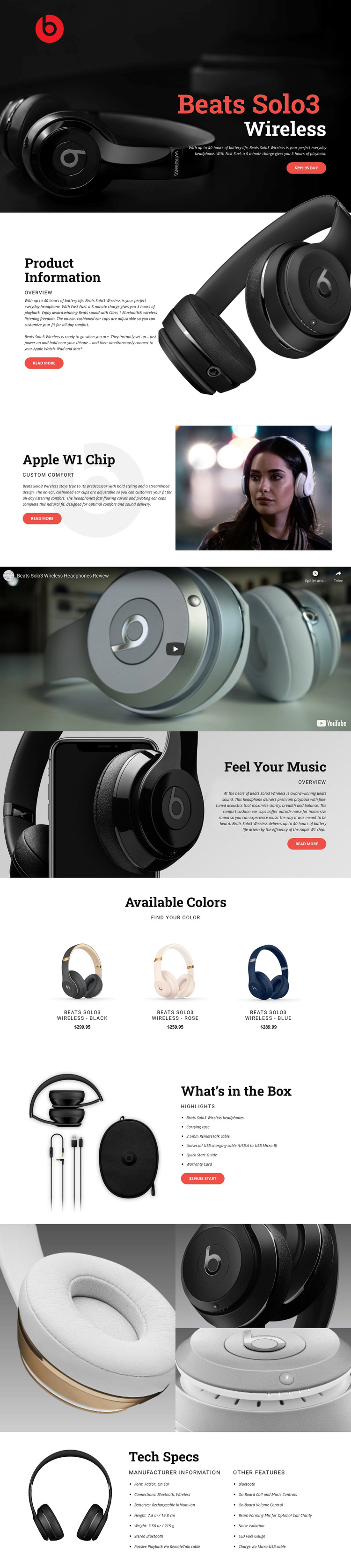
The design’s strongest selection signal is its consistent use of product imagery as the carrier of information. The opening hero gives Beats Solo3 Wireless headphones immediate visual prominence, then the Product Information and Apple W1 Chip sections connect large photographs with concise explanatory copy. This approach suits a product project where visitors need to understand the object quickly before reading deeper feature material.
The page also covers several decision stages without becoming a generic service layout. The Feel Your Music section focuses attention on sound, comfort, and battery messaging, while the full-width video introduces a more demonstrative form of product communication. The Available Colors grid adds a practical comparison point through three repeated variants—black, rose, and blue—with names and prices presented in the same visual pattern.
What distinguishes this design from a layout centered only on a hero and a Buy button is the amount of supporting product evidence. What’s in the Box turns accessories into a clear contents list, the close-up gallery shows the headphone and ear-cup details, and Tech Specs organizes manufacturer information, form factor, Bluetooth and wireless connections, rechargeable battery details, weight, dimensions, and other features. That combination makes the design worth considering for a retail presentation that needs both strong visual emphasis and enough structured information to support a considered product choice.
Customize with Nicepage
Open this ready-made template in the Template Builder and customize it visually in the Nicepage editor. Replace demo content, edit page sections, and adapt the design to your project without rebuilding the template from scratch.
Start With a Ready-Made Template
Choose a Design for a New Page
Use a ready-made template as a starting point instead of creating every page from a blank canvas. When adding a new page in Nicepage, browse available designs, compare different layouts, and choose an option that already fits the general purpose and visual direction of your project.
Browse Different Page Designs
Explore Page Designs using search, thematic categories, Design Sets, and full-page previews. The collection includes layouts for different subjects and page purposes, making it easier to compare alternatives before selecting a design to customize.
Customize the Selected Template
After choosing a design, create the page and continue editing it visually in Nicepage. Replace the demo content, adjust images, typography, colors, sections, and other elements, and adapt the ready-made layout to your own content instead of rebuilding the design from the beginning.
Explore More Design Directions
If the first option does not match your project closely enough, return to the design collection and compare other templates before committing to a layout. This makes the template library useful not only for faster page creation, but also for exploring different visual approaches and finding a suitable starting point for a new project.
This workflow gives you access to a broad collection of ready-made designs that can be selected, compared, and customized according to the needs of each new page or project.