Workshop pottery art Template


Edit Template Offline
2. Create new page and search for id 12379
Edit Template Online
Create Awesome Websites


Free Nicepage Builder
Keywords
Workshop Photography Connects Classes, Membership, and Pottery Sales
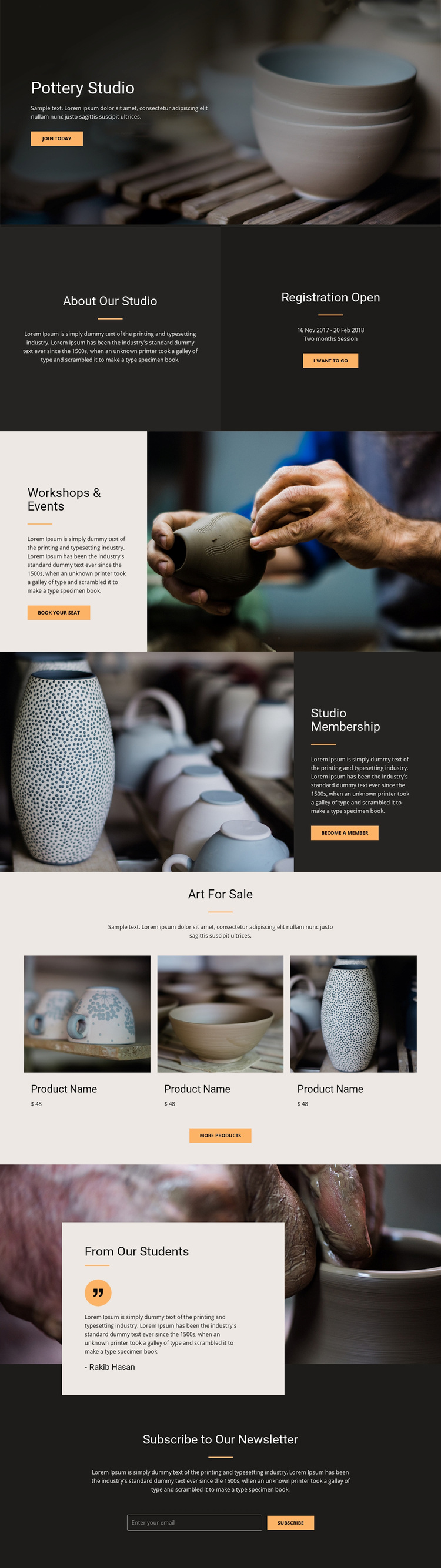
Large pottery and workshop photographs make the subject immediately recognizable, while the surrounding sections explain how visitors can participate. The opening hero establishes the studio and invites people to join. The About Our Studio and Registration Open panels then combine identity with a specific participation message, giving the design more direction than a purely decorative art portfolio. Further down, Workshops & Events and Studio Membership distinguish learning opportunities from ongoing access to the studio.
The Art For Sale section adds three repeated pottery product cards beneath an introductory heading. This broadens the design’s usefulness: it can present the studio as a place to attend, belong to, and purchase from rather than focusing on only one service. A student testimonial over a wide ceramic image reinforces the community aspect without turning the page into a dense text-led layout. The final newsletter form provides a separate way to maintain contact with interested visitors.
This combination is worth considering when a project needs tactile imagery and several related calls to action within one visual direction. The page keeps the offers distinct through alternating image-text sections, a dedicated product row, and a closing subscription area. Its strongest choice is the relationship between craft photography and practical studio content: the visuals establish atmosphere, while the sections explain participation, membership, shopping, and continued communication.
Customize with Nicepage
Open this ready-made template in the Template Builder and customize it visually in the Nicepage editor. Replace demo content, edit page sections, and adapt the design to your project without rebuilding the template from scratch.
Start With a Ready-Made Template
Choose a Design for a New Page
Use a ready-made template as a starting point instead of creating every page from a blank canvas. When adding a new page in Nicepage, browse available designs, compare different layouts, and choose an option that already fits the general purpose and visual direction of your project.
Browse Different Page Designs
Explore Page Designs using search, thematic categories, Design Sets, and full-page previews. The collection includes layouts for different subjects and page purposes, making it easier to compare alternatives before selecting a design to customize.
Customize the Selected Template
After choosing a design, create the page and continue editing it visually in Nicepage. Replace the demo content, adjust images, typography, colors, sections, and other elements, and adapt the ready-made layout to your own content instead of rebuilding the design from the beginning.
Explore More Design Directions
If the first option does not match your project closely enough, return to the design collection and compare other templates before committing to a layout. This makes the template library useful not only for faster page creation, but also for exploring different visual approaches and finding a suitable starting point for a new project.
This workflow gives you access to a broad collection of ready-made designs that can be selected, compared, and customized according to the needs of each new page or project.