IT business services Template


Edit Template Offline
2. Create new page and search for id 123213
Edit Template Online
Create Awesome Websites


Free Nicepage Builder
Keywords
Seven Named Service Areas Give This Design a Broad Starting Direction
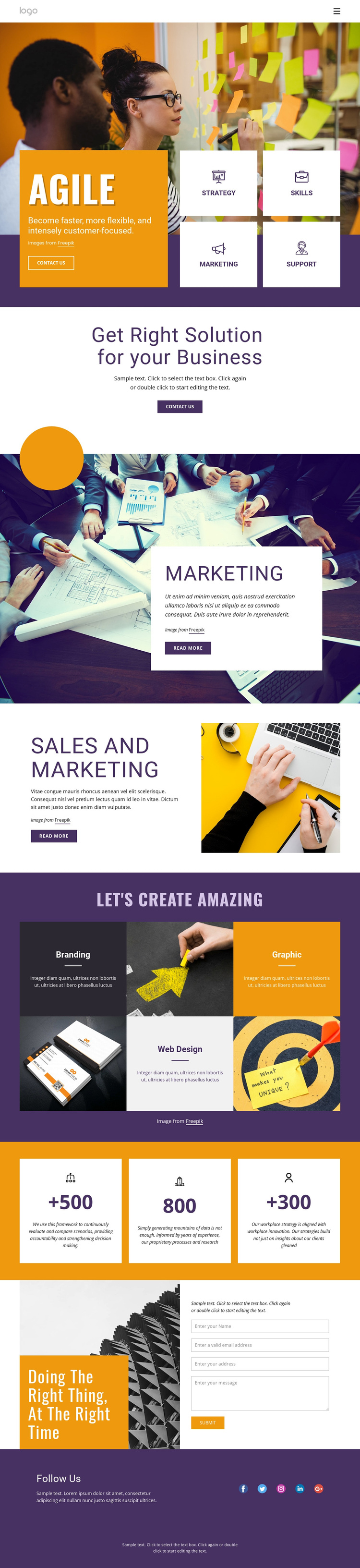
The design’s strongest selection signal is its unusually broad service coverage within one coordinated page. The Agile opening introduces Strategy, Skills, Marketing, and Support as four visible areas, giving the layout an immediate business-transformation direction. Later, the page develops Marketing and Sales and Marketing through larger image-supported sections, then adds Branding, Graphic, and Web Design in a colorful repeated tile arrangement. Together, these areas make the design suitable for projects that need to present consulting, marketing, and creative capabilities without separating every offering into a different visual concept.
The page also balances service explanation with response and proof elements. Contact us buttons appear in the hero and business-solutions section, while Read more actions accompany the more detailed service features. Three metric cards create a compact visual pause and can hold verified project evidence after the sample values are replaced. Near the bottom, the contact form is paired with a motivational heading and image, giving the layout a natural place for inquiries rather than ending immediately after the service grid.
Five social links and a straightforward footer complete the coverage. The result is a ready-made option for organizations that want a bold, content-rich business presentation with strong color contrast, large display headings, geometric accents, and a clear route from broad service categories to direct contact.
Customize with Nicepage
Open this ready-made template in the Template Builder and customize it visually in the Nicepage editor. Replace demo content, edit page sections, and adapt the design to your project without rebuilding the template from scratch.
Start With a Ready-Made Template
Choose a Design for a New Page
Use a ready-made template as a starting point instead of creating every page from a blank canvas. When adding a new page in Nicepage, browse available designs, compare different layouts, and choose an option that already fits the general purpose and visual direction of your project.
Browse Different Page Designs
Explore Page Designs using search, thematic categories, Design Sets, and full-page previews. The collection includes layouts for different subjects and page purposes, making it easier to compare alternatives before selecting a design to customize.
Customize the Selected Template
After choosing a design, create the page and continue editing it visually in Nicepage. Replace the demo content, adjust images, typography, colors, sections, and other elements, and adapt the ready-made layout to your own content instead of rebuilding the design from the beginning.
Explore More Design Directions
If the first option does not match your project closely enough, return to the design collection and compare other templates before committing to a layout. This makes the template library useful not only for faster page creation, but also for exploring different visual approaches and finding a suitable starting point for a new project.
This workflow gives you access to a broad collection of ready-made designs that can be selected, compared, and customized according to the needs of each new page or project.