Car wash services in tabs Website Template


A Four-Category Service Pattern for a Broader Automotive Site
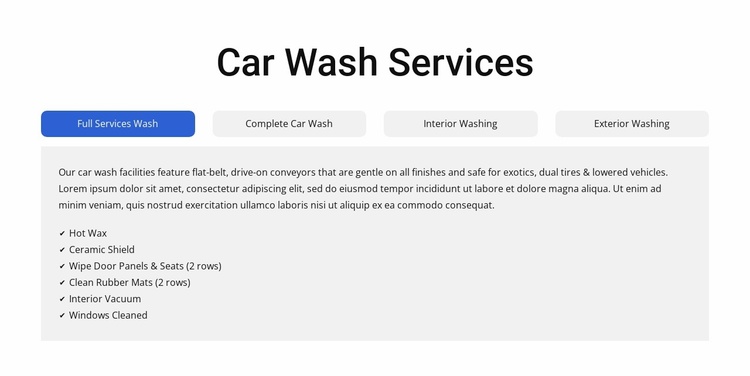
The block establishes one stable content area for a larger website project: a categorized presentation of car wash services. Its four tabs—Full Services Wash, Complete Car Wash, Interior Washing, and Exterior Washing—allow related offerings to share the same section while keeping each category’s details in its own pane. This makes the design reusable as a services pattern when other blocks are responsible for introductions, trust content, location information, or contact actions.
The section’s repeated structure supports consistency across the broader project. Each category connects a descriptive paragraph with a feature checklist, and the wide content panel gives those details a predictable place to appear. The visible pane includes Hot Wax, Ceramic Shield, Wipe Door Panels & Seats, Clean Rubber Mats, Interior Vacuum, and Windows Cleaned. Inactive panes contain additional feature sets such as Wheel Cleaner, Rain Repel, Tire Shine, Clearcoat Protectant, Foam Polish, and Spot-Free Rinse, preserving the same service-to-features relationship across categories.
Visually, the centered heading, white background, generous spacing, rounded light-gray controls, and blue active state create a recognizable section pattern. In a broader Website Template project, that pattern can be reused for the main services area while nearby pages or blocks handle deeper explanations and response points. The block contributes a focused, self-contained content role rather than implying an entire multi-page structure.
Customize with Nicepage
Open this ready-made template in the Website Template Builder and customize it visually in the Nicepage editor. Replace demo content, edit page sections, and adapt the design to your project without rebuilding the template from scratch.
Edit Template Offline
2. Create a new page or select existing
3. Click Add new block, search for id 6330410 and click enter
Edit Template Online
Create Awesome Websites


Free Nicepage Builder
Keywords
Build a Complete Website From This Template
Customize the Website Visually
Use this ready-made website template as a starting point for your project and adapt its pages visually in Nicepage. Change content, images, typography, navigation, sections, and other design elements while keeping the website together as a single editable project.
Manage Website Pages in One Project
Use the Pages panel to open, add, duplicate, and manage the pages of your website. Work on individual pages while keeping navigation and the overall site structure accessible from the same project, making it easier to develop a complete website instead of managing separate page files.
Expand the Website With Matching Designs
When you need additional pages or sections, use Page Design Sets to find Page and Block Designs created in the same visual style. Design Sets group matching designs together, making it easier to expand the website with new content while maintaining a consistent look across its pages and sections.
Organize Larger Multi-Page Websites
As the website grows, use Page Folders to organize related pages and keep larger multi-page projects easier to navigate in the editor. This is especially useful for websites with separate service pages, company information, contacts, landing pages, and other content areas.
This workflow makes the template a practical foundation for building and expanding a complete website while managing its pages, content, and visual design within one Nicepage project.