Premium Helmets Website Template


Edit Template Offline
2. Create new page and search for id 19500
Edit Template Online
Create Awesome Websites


Free Nicepage Builder
Keywords
Product Categories and Editorial Areas Form a Wider Site Foundation
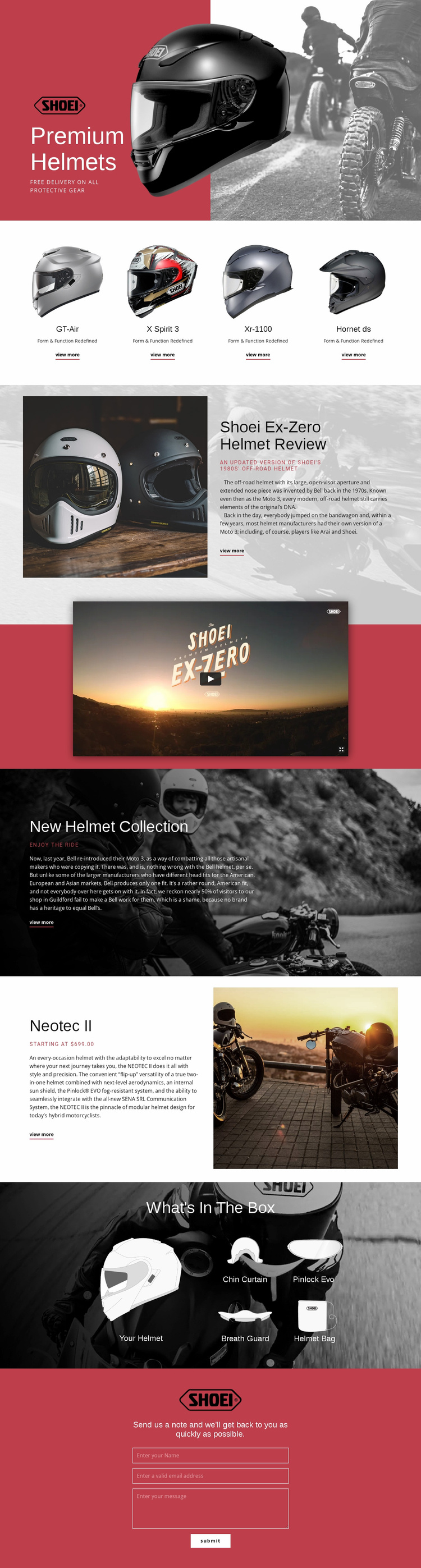
The design establishes several content categories that could support a broader helmet website project. The opening hero introduces the motorcycle gear subject, and the four-card row creates a clear collection area for GT-Air, X Spirit 3, Xr-1100, and Hornet ds. Those named model entries can serve as a starting information structure, while the Ex-Zero review demonstrates how longer editorial product content can sit alongside collection-focused material.
The New Helmet Collection section broadens the subject beyond one model, whereas the Neotec II feature narrows it again to a specific modular helmet with flip-up functionality, internal sun shield, description, and starting price. This contrast gives a larger project both a collection-level direction and a detailed product-level example. The What's In The Box gallery adds another reusable content category by associating the main helmet with the Chin Curtain, Pinlock Evo, Breath Guard, and Helmet Bag.
The video and contact sections extend the foundation into media and communication. A future site could use the same visual direction for related model information, review content, accessories, or fit guidance without losing the established relationship between imagery, headings, cards, and red panels. The template does not need to be treated as an already completed multi-page site; its value is that the existing content areas provide a coherent starting structure for expanding one helmet-focused project into a broader website.
Customize with Nicepage
Open this ready-made template in the Website Template Builder and customize it visually in the Nicepage editor. Replace demo content, edit page sections, and adapt the design to your project without rebuilding the template from scratch.
Build a Complete Website From This Template
Customize the Website Visually
Use this ready-made website template as a starting point for your project and adapt its pages visually in Nicepage. Change content, images, typography, navigation, sections, and other design elements while keeping the website together as a single editable project.
Manage Website Pages in One Project
Use the Pages panel to open, add, duplicate, and manage the pages of your website. Work on individual pages while keeping navigation and the overall site structure accessible from the same project, making it easier to develop a complete website instead of managing separate page files.
Expand the Website With Matching Designs
When you need additional pages or sections, use Page Design Sets to find Page and Block Designs created in the same visual style. Design Sets group matching designs together, making it easier to expand the website with new content while maintaining a consistent look across its pages and sections.
Organize Larger Multi-Page Websites
As the website grows, use Page Folders to organize related pages and keep larger multi-page projects easier to navigate in the editor. This is especially useful for websites with separate service pages, company information, contacts, landing pages, and other content areas.
This workflow makes the template a practical foundation for building and expanding a complete website while managing its pages, content, and visual design within one Nicepage project.