Bronco Rc Car Website Template


Edit Template Offline
2. Create new page and search for id 14117
Edit Template Online
Create Awesome Websites


Free Nicepage Builder
Keywords
Product, Mechanical, and Chassis Areas Establish a Site Foundation
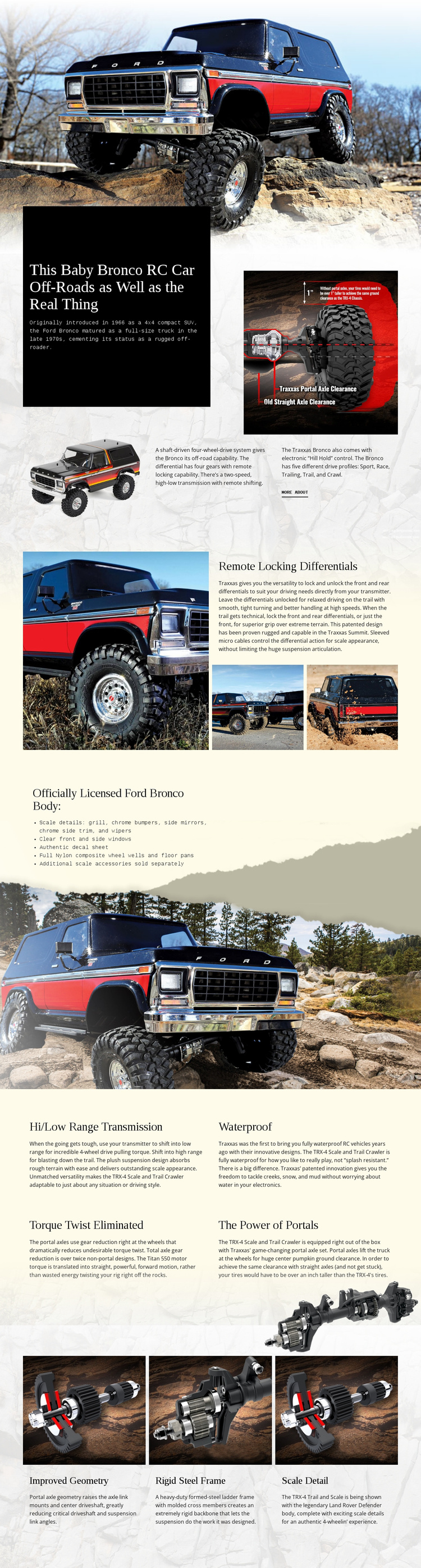
The design already defines several major content areas that could anchor a broader RC vehicle website. The opening and introduction provide the core product context through a Ford Bronco RC headline, historical information, vehicle photography, drivetrain description, and a More About link. This gives a project a recognizable starting area before related content is added around the product.
The middle sections supply more specialized categories. Remote locking differentials receives a dedicated feature treatment with explanatory text and multiple images, while the licensed body section organizes exterior and scale details into a concise list beside a vehicle background. Four repeated blocks then cover hi/low range transmission, waterproof construction, torque twist elimination, and portal power. These regions could inform related content areas about capabilities, durability, or construction while keeping the same visual direction.
The final three cards extend the foundation into chassis and appearance information through improved geometry, a rigid steel frame, and scale detail. Because the page uses repeated image-and-text patterns as well as a stable palette, related project content could be added without abandoning its product identity. Nicepage’s Pages panel can help manage additional pages in a larger project, but no extra pages are claimed here. The verified value is the existing information architecture: product introduction, feature evidence, body authenticity, mechanical explanation, and chassis detail.
Customize with Nicepage
Open this ready-made template in the Website Template Builder and customize it visually in the Nicepage editor. Replace demo content, edit page sections, and adapt the design to your project without rebuilding the template from scratch.
Build a Complete Website From This Template
Customize the Website Visually
Use this ready-made website template as a starting point for your project and adapt its pages visually in Nicepage. Change content, images, typography, navigation, sections, and other design elements while keeping the website together as a single editable project.
Manage Website Pages in One Project
Use the Pages panel to open, add, duplicate, and manage the pages of your website. Work on individual pages while keeping navigation and the overall site structure accessible from the same project, making it easier to develop a complete website instead of managing separate page files.
Expand the Website With Matching Designs
When you need additional pages or sections, use Page Design Sets to find Page and Block Designs created in the same visual style. Design Sets group matching designs together, making it easier to expand the website with new content while maintaining a consistent look across its pages and sections.
Organize Larger Multi-Page Websites
As the website grows, use Page Folders to organize related pages and keep larger multi-page projects easier to navigate in the editor. This is especially useful for websites with separate service pages, company information, contacts, landing pages, and other content areas.
This workflow makes the template a practical foundation for building and expanding a complete website while managing its pages, content, and visual design within one Nicepage project.