Spring in fashion collection Website Template


A Paired Image Section for a Broader Visual Project
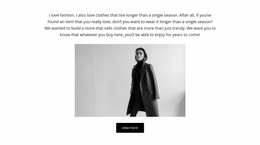
The block defines one self-contained visual area through a simple repeated pattern: two equal-width image panels joined by a central circular mark. The left panel’s person and gray facade offer an architectural, human-scale view, while the right panel’s pink blossoms and pale blue background provide a lighter botanical counterpoint. Because the images have matching weight, the section can be reused as a complete visual statement without depending on a large amount of supporting copy.
The white circle crossing the seam gives the section a stable identifying feature. The words “The greenery” and “Pure nature” sit inside that circle, so the block carries a visible nature-oriented label while keeping the image fields unobstructed. This combination can help a broader website project separate an introductory visual area from later content such as descriptions, galleries, product information, or contact material, without claiming that any of those neighboring sections already exist.
Within a Website Template context, the block is valuable as a repeatable design unit with a defined content role and recognizable visual behavior. It can be coordinated with other sections by carrying forward its image contrast, circular geometry, or restrained spacing, while remaining independent from the project’s page management and wider architecture. The block contributes one visual chapter; surrounding pages and sections determine the complete website experience.
Customize with Nicepage
Open this ready-made template in the Website Template Builder and customize it visually in the Nicepage editor. Replace demo content, edit page sections, and adapt the design to your project without rebuilding the template from scratch.
Edit Template Offline
2. Create a new page or select existing
3. Click Add new block, search for id 50567 and click enter
Edit Template Online
Create Awesome Websites


Free Nicepage Builder
Keywords
Build a Complete Website From This Template
Customize the Website Visually
Use this ready-made website template as a starting point for your project and adapt its pages visually in Nicepage. Change content, images, typography, navigation, sections, and other design elements while keeping the website together as a single editable project.
Manage Website Pages in One Project
Use the Pages panel to open, add, duplicate, and manage the pages of your website. Work on individual pages while keeping navigation and the overall site structure accessible from the same project, making it easier to develop a complete website instead of managing separate page files.
Expand the Website With Matching Designs
When you need additional pages or sections, use Page Design Sets to find Page and Block Designs created in the same visual style. Design Sets group matching designs together, making it easier to expand the website with new content while maintaining a consistent look across its pages and sections.
Organize Larger Multi-Page Websites
As the website grows, use Page Folders to organize related pages and keep larger multi-page projects easier to navigate in the editor. This is especially useful for websites with separate service pages, company information, contacts, landing pages, and other content areas.
This workflow makes the template a practical foundation for building and expanding a complete website while managing its pages, content, and visual design within one Nicepage project.