Atelier of modern fashion Website Template


Edit Template Offline
2. Create new page and search for id 38010
Edit Template Online
Create Awesome Websites


Free Nicepage Builder
Keywords
Collection Categories and Featured Apparel Establish a Site Foundation
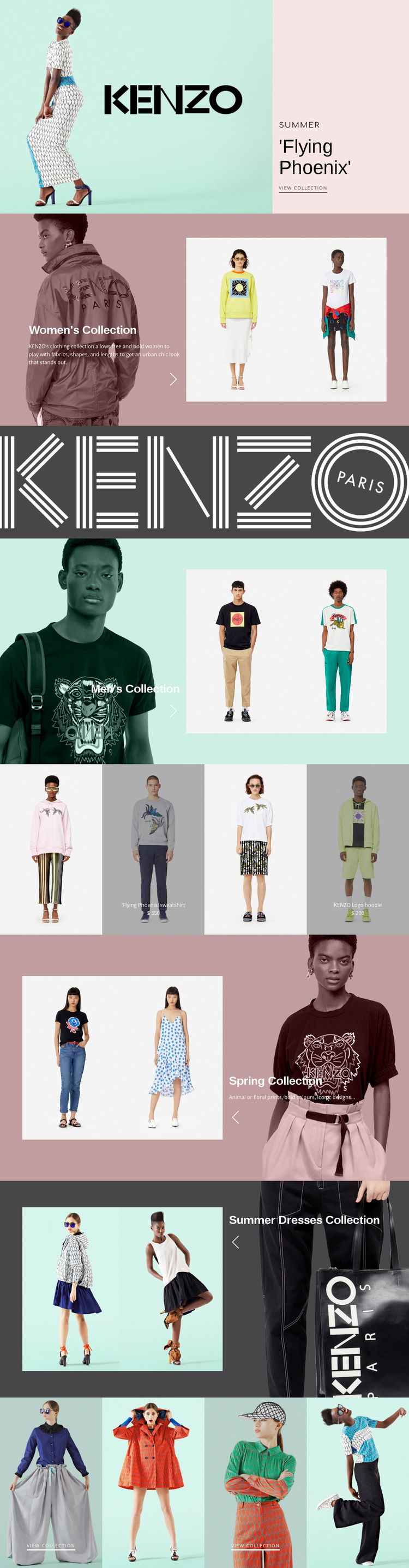
The design already defines several major content areas that a broader fashion website could build upon. The Flying Phoenix hero can introduce a seasonal direction, while the Women’s Collection and Men’s Collection sections establish two broad category areas with their own imagery and descriptive panels. Because each section has a recognizable visual pattern, additional category or editorial content could follow the same design language without making the starting page feel disconnected from future expansion.
The coral KENZO wordmark creates a shared brand region, and the four-panel apparel row introduces a merchandising layer between collection storytelling and later seasonal sections. The displayed Flying Phoenix sweatshirt and KENZO Logo hoodie prices are sample values, but the repeated panels show how selected products can occupy a distinct content area. Spring Collection and Summer Dresses Collection then add seasonal categories that widen the foundation beyond one promotional theme.
The closing gallery contributes another reusable pattern: four image tiles with selected view collection links. This can support further collection-oriented navigation as the project grows, although the analysis confirms one page rather than a complete multi-page site. The value of the design as a website foundation comes from its content coverage—promotion, category introductions, brand identity, featured apparel, seasonal sections, and gallery selection. It gives a larger project an initial information structure rather than only a styled homepage with no defined expansion path.
Customize with Nicepage
Open this ready-made template in the Website Template Builder and customize it visually in the Nicepage editor. Replace demo content, edit page sections, and adapt the design to your project without rebuilding the template from scratch.
Build a Complete Website From This Template
Customize the Website Visually
Use this ready-made website template as a starting point for your project and adapt its pages visually in Nicepage. Change content, images, typography, navigation, sections, and other design elements while keeping the website together as a single editable project.
Manage Website Pages in One Project
Use the Pages panel to open, add, duplicate, and manage the pages of your website. Work on individual pages while keeping navigation and the overall site structure accessible from the same project, making it easier to develop a complete website instead of managing separate page files.
Expand the Website With Matching Designs
When you need additional pages or sections, use Page Design Sets to find Page and Block Designs created in the same visual style. Design Sets group matching designs together, making it easier to expand the website with new content while maintaining a consistent look across its pages and sections.
Organize Larger Multi-Page Websites
As the website grows, use Page Folders to organize related pages and keep larger multi-page projects easier to navigate in the editor. This is especially useful for websites with separate service pages, company information, contacts, landing pages, and other content areas.
This workflow makes the template a practical foundation for building and expanding a complete website while managing its pages, content, and visual design within one Nicepage project.