Happiness Website Template


Edit Template Offline
2. Create new page and search for id 18701
Edit Template Online
Create Awesome Websites


Free Nicepage Builder
Keywords
Wellbeing Topics Establish a Foundation for Broader Content
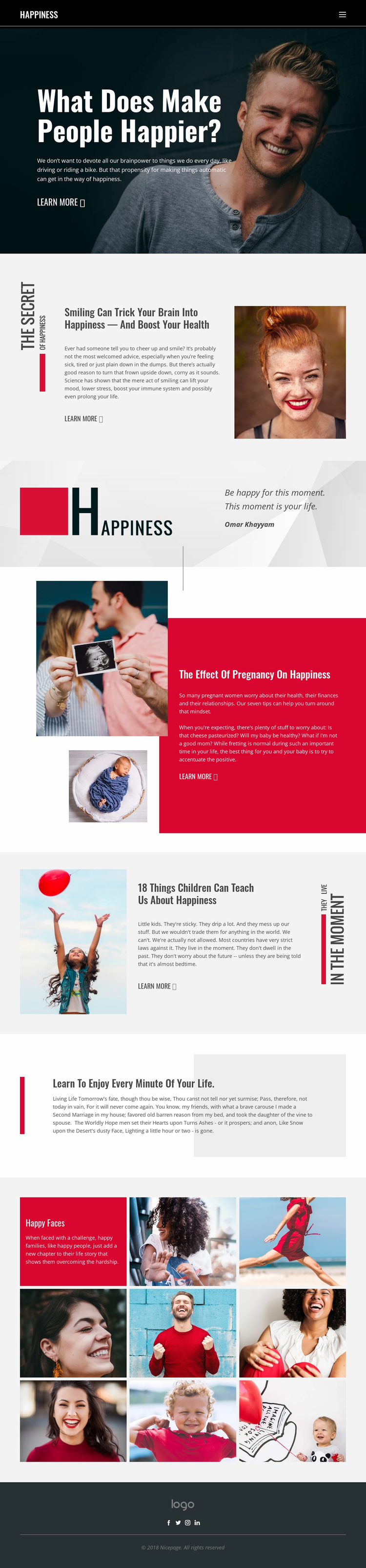
The design already identifies several meaningful content areas that could anchor a larger wellbeing website. The opening happiness feature provides an introductory direction, while the articles about smiling and health, pregnancy, and children suggest separate subject pathways for related information. Their repeated combination of headline, short explanatory copy, image, and learn-more link creates a visual pattern that could be carried into additional editorial sections without losing the page’s established character.
The design also balances topic coverage with shared site regions. The dark header and horizontal navigation provide a place for broader project orientation, and the dark footer supplies a consistent closing area with branding and social links. The quotation attributed to Omar Khayyam can function as a reflective content category, while the gray passage about enjoying every minute of life offers a different long-form reading format. The Happy Faces gallery adds a visual storytelling area built from eight portrait and family tiles, giving the project a clear image-led direction alongside its articles.
These verified areas make the page a practical starting point for a broader site structure, but they do not prove that additional pages already exist. Future pages could be planned around the same distinctions—health explanations, family and children, reflective writing, and photographic collections—while repeating the charcoal frame, red accents, bold editorial headings, and compact link treatments. The foundation is therefore the relationship between topics, navigation, shared visual rules, and reusable content patterns, not an unsupported claim of a complete multi-page set.
Customize with Nicepage
Open this ready-made template in the Website Template Builder and customize it visually in the Nicepage editor. Replace demo content, edit page sections, and adapt the design to your project without rebuilding the template from scratch.
Build a Complete Website From This Template
Customize the Website Visually
Use this ready-made website template as a starting point for your project and adapt its pages visually in Nicepage. Change content, images, typography, navigation, sections, and other design elements while keeping the website together as a single editable project.
Manage Website Pages in One Project
Use the Pages panel to open, add, duplicate, and manage the pages of your website. Work on individual pages while keeping navigation and the overall site structure accessible from the same project, making it easier to develop a complete website instead of managing separate page files.
Expand the Website With Matching Designs
When you need additional pages or sections, use Page Design Sets to find Page and Block Designs created in the same visual style. Design Sets group matching designs together, making it easier to expand the website with new content while maintaining a consistent look across its pages and sections.
Organize Larger Multi-Page Websites
As the website grows, use Page Folders to organize related pages and keep larger multi-page projects easier to navigate in the editor. This is especially useful for websites with separate service pages, company information, contacts, landing pages, and other content areas.
This workflow makes the template a practical foundation for building and expanding a complete website while managing its pages, content, and visual design within one Nicepage project.