Ski Resorts Website Template


Edit Template Offline
2. Create new page and search for id 16827
Edit Template Online
Create Awesome Websites


Free Nicepage Builder
Keywords
Experiences and regions establish a foundation for resort expansion
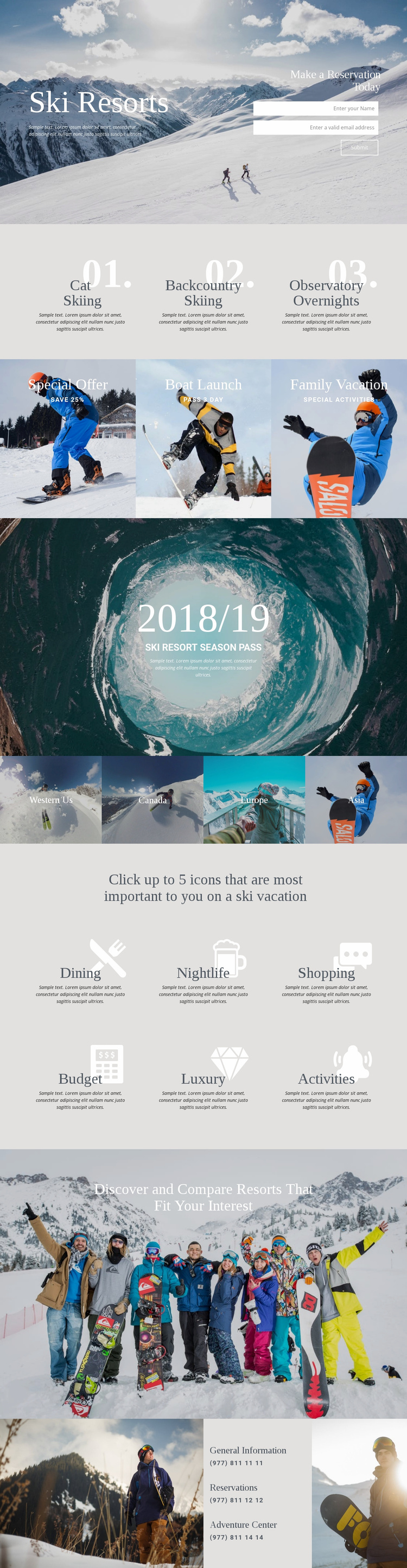
The design already identifies several major content categories that can support a larger ski-tourism project. The three experience entries—Cat Skiing, Backcountry Skiing, and Observatory Overnights—can serve as the core of an activities or resort-services area, while the four regional tiles create a separate destination structure for Western Us, Canada, Europe, and Asia. Because these categories have different roles, they provide more useful expansion points than a page built around one undifferentiated promotional block.
The reservation hero and the closing contact panel add practical project areas around that content foundation. The hero introduces the inquiry path with a form, while General Information, Reservations, and Adventure Center entries give the site distinct contact subjects. Between them, the three offer panels and the six preference labels broaden the information architecture: Special Offer, Boat Launch, Family Vacation, Dining, Nightlife, Shopping, Budget, Luxury, and Activities can guide future resort, package, or destination content without claiming that additional pages already exist. The “Discover and Compare Resorts That Fit Your Interest” section provides a natural organizing idea for such growth, although the analysis verifies the message rather than a complete comparison feature. As a website template, the design is therefore valuable as a structured starting point: it supplies navigation-worthy content categories, a consistent scenic direction, and a clear relationship between experiences, destinations, preferences, reservations, and supporting contact information.
Customize with Nicepage
Open this ready-made template in the Website Template Builder and customize it visually in the Nicepage editor. Replace demo content, edit page sections, and adapt the design to your project without rebuilding the template from scratch.
Build a Complete Website From This Template
Customize the Website Visually
Use this ready-made website template as a starting point for your project and adapt its pages visually in Nicepage. Change content, images, typography, navigation, sections, and other design elements while keeping the website together as a single editable project.
Manage Website Pages in One Project
Use the Pages panel to open, add, duplicate, and manage the pages of your website. Work on individual pages while keeping navigation and the overall site structure accessible from the same project, making it easier to develop a complete website instead of managing separate page files.
Expand the Website With Matching Designs
When you need additional pages or sections, use Page Design Sets to find Page and Block Designs created in the same visual style. Design Sets group matching designs together, making it easier to expand the website with new content while maintaining a consistent look across its pages and sections.
Organize Larger Multi-Page Websites
As the website grows, use Page Folders to organize related pages and keep larger multi-page projects easier to navigate in the editor. This is especially useful for websites with separate service pages, company information, contacts, landing pages, and other content areas.
This workflow makes the template a practical foundation for building and expanding a complete website while managing its pages, content, and visual design within one Nicepage project.