Eat best organic food One Page Template


Edit Template Offline
2. Create new page and search for id 17318
Edit Template Online
Create Awesome Websites


Free Nicepage Builder
Keywords
From Organic Introduction to Map in One Continuous Flow
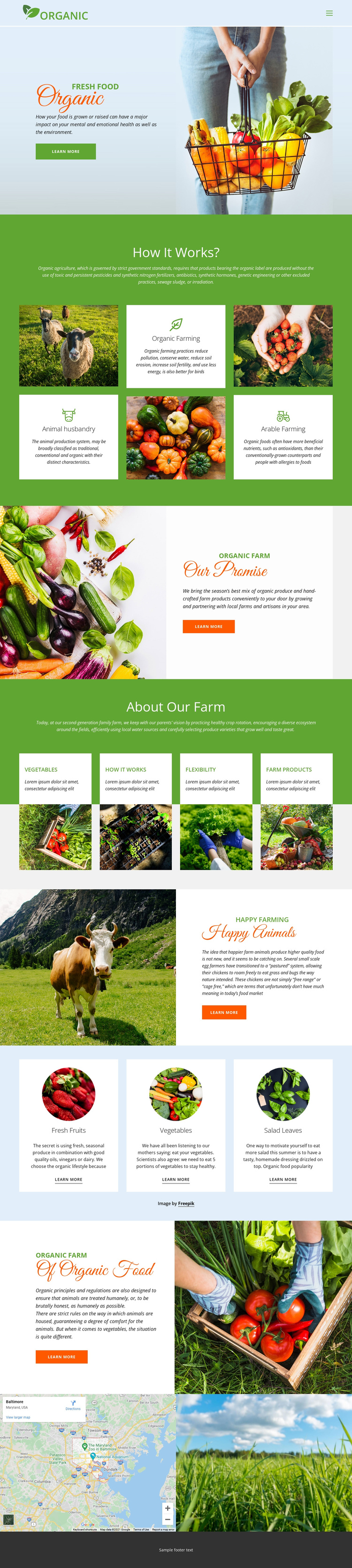
The page’s sections create a clear content journey without requiring the farm story to be divided into separate documents. The green branded header establishes the navigation point, and the Organic hero opens with produce imagery, introductory text, and a learn-more action. The visitor can then move into How it Works?, where animal husbandry, organic farming, and arable farming function as three meaningful information destinations rather than one undifferentiated paragraph.
The sequence continues from methods to values through Our Promise and About Our Farm. The latter introduces crop rotation, ecosystem, and water-use ideas against a green full-width background, giving the page a change in visual density as well as subject matter. A grid of agricultural images and four labeled feature cards broadens the farm overview before the Happy Animals section adds a focused animal-care story. The light blue produce band then provides three separate destinations for fresh fruits, vegetables, and salad leaves. Of Organic Food, the map, and agricultural landscape image lead toward the footer, preserving the continuous narrative. This structure suits a one-page presentation because several topics remain individually recognizable while the visitor can explore the complete farm message on one URL.
Customize with Nicepage
Open this ready-made template in the One Page Template Builder and customize it visually in the Nicepage editor. Replace demo content, edit page sections, and adapt the design to your project without rebuilding the template from scratch.
Build a Navigable One-Page Website
Connect the Menu to Page Sections
Organize the website as a sequence of sections on a single page and use the Menu For One-Page Site to connect menu items with individual page Blocks. Visitors can jump directly to sections such as About, Services, Testimonials, or Contact without opening separate pages.
Keep the Website on One URL
A one-page template can combine several parts of a small website within one continuous page. Arrange the Header, introduction, services, portfolio, company information, reviews, contact details, and other relevant sections in the order that fits the project while keeping them accessible through the same page navigation.
Make Long Pages Easier to Navigate
For longer one-page websites, keep navigation labels short and connected to meaningful sections so visitors can move through the page without relying only on scrolling. You can also use the Back To Top element to provide a quick way back to the beginning after longer sections.
This workflow makes the template suitable for compact websites that need several distinct content sections while keeping the complete visitor experience on one URL.