Fashion Jewelry Store Joomla Template


Edit Template Offline
2. Create new page and search for id 6684038
Edit Template Online
Create Awesome Websites


Free Nicepage Builder
Keywords
Collection, Product, and Boutique Regions Suit Structured CMS Content
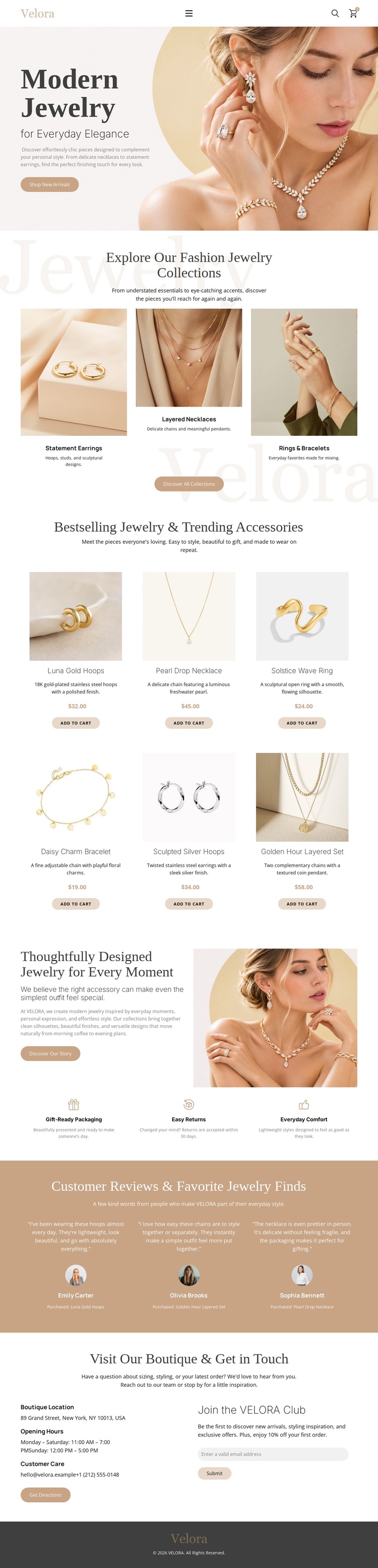
The collection tiles and product list divide the storefront into useful content regions. The three category items introduce statement earrings, layered necklaces, and rings or bracelets as separate discovery subjects, while the six product presentations provide more detailed retail content with names, descriptions, prices, images, and purchase actions. That distinction gives a CMS-managed project room to organize broad collection information separately from individual merchandise information.
The lower sections add structured site content beyond shopping. The brand-story area combines explanatory text, an image, and three customer benefits. The review band groups three customer review profiles, and the closing contact block gathers boutique information, opening hours, customer care, directions, and the “Join the VELORA Club” signup. Mobile navigation and the dark footer provide shared regions that can remain visually consistent while the page content changes.
In a Joomla project, these areas can be interpreted as coordinated content regions rather than as a generic collection of design elements. The Joomla Extension is a relevant Nicepage bridge for creating and designing Joomla articles, but the template analysis does not prove that Joomla Articles already exist here. Its verified contribution is the well-divided retail structure: collections, merchandise, story content, reviews, and contact communication are already separated into recognizable areas.
Customize with Nicepage
Open this ready-made template in the Joomla Page Builder and customize it visually in the Nicepage editor. Replace demo content, edit page sections, and adapt the design to your project without rebuilding the template from scratch.
Work With This Template in Joomla
Customize and Install the Joomla Template
Start with this ready-made template instead of building the Joomla design from scratch. Customize its layout, content, typography, images, sections, and other design elements visually in the Nicepage application, then export and install the Joomla Template, Nicepage Extension, and supported content on your Joomla website.
Edit the Template Directly in Joomla
After installation, you can edit the Joomla Template directly in Joomla with the Nicepage Joomla Extension. Customize the Header, Footer, Colors, Fonts, typography, and Page Templates from the Joomla workflow while keeping the site design connected with your CMS content.
Edit Joomla Articles Visually
Use the Nicepage Joomla Extension to open and edit Joomla Articles visually from the Joomla Administrator. Change text, images, sections, layouts, and other page content in the Nicepage editor while continuing to manage the Articles through Joomla.
Joomla Content and Template Integration
Use the customized template together with Joomla Articles, module Positions, menus, forms, Blog Pages, and other supported CMS elements. With the Nicepage Extension used as the Site Style Source, shared design settings can be applied across Joomla Articles while Joomla continues to provide the CMS environment for managing site content.
This workflow combines a ready-made Joomla Template with visual customization, direct template editing in Joomla, and continued content management through the Nicepage Joomla Extension.