Online Cinema Movies Joomla Template



Edit Template Offline
2. Create new page and search for id 6637729
Edit Template Online
Create Awesome Websites


Free Nicepage Builder
Keywords
Genre Regions and Service Content Suit Structured Joomla Organization
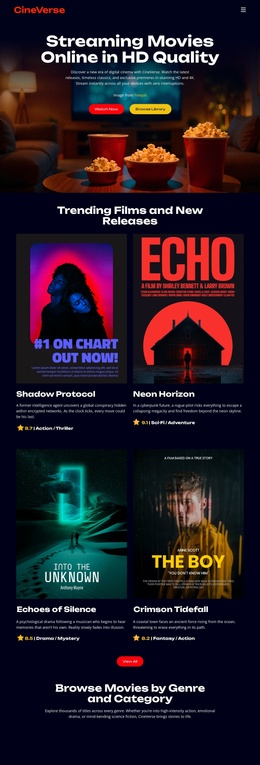
The five genre categories create the clearest content divisions in this design. Action & Adventure, Drama & Romance, Sci-Fi & Fantasy, Horror & Thriller, and Documentary are presented as repeated pill-shaped controls, giving a Joomla-managed project recognizable regions for organizing movie-related information without claiming that Joomla categories or articles already exist. The four movie cards provide a separate featured-content area, pairing poster artwork with titles, genre labels, and release or feature metadata.
The hero and closing Watch Now blocks give the page shared response regions, while the three benefit items form a compact service-information group around Ultra HD Streaming, No Ads Experience, and Multi-Device Access. This separation is useful when the visual page needs to coexist with structured site content: navigation can lead visitors from the introductory streaming message toward featured films, genre-oriented information, and the final viewing prompt. The dark background, white headings, and red and yellow accents keep these regions visibly related even as their content roles differ. In a Joomla project, the design can therefore serve as a coordinated presentation for recurring movie information, navigation, and contact or viewing-related content. The important point is the relationship between the page’s content regions and a CMS-managed site, not an assumption that specific Joomla Articles, module Positions, or filtering systems are already present.
Customize with Nicepage
Open this ready-made template in the Joomla Page Builder and customize it visually in the Nicepage editor. Replace demo content, edit page sections, and adapt the design to your project without rebuilding the template from scratch.
Work With This Template in Joomla
Customize and Install the Joomla Template
Start with this ready-made template instead of building the Joomla design from scratch. Customize its layout, content, typography, images, sections, and other design elements visually in the Nicepage application, then export and install the Joomla Template, Nicepage Extension, and supported content on your Joomla website.
Edit the Template Directly in Joomla
After installation, you can edit the Joomla Template directly in Joomla with the Nicepage Joomla Extension. Customize the Header, Footer, Colors, Fonts, typography, and Page Templates from the Joomla workflow while keeping the site design connected with your CMS content.
Edit Joomla Articles Visually
Use the Nicepage Joomla Extension to open and edit Joomla Articles visually from the Joomla Administrator. Change text, images, sections, layouts, and other page content in the Nicepage editor while continuing to manage the Articles through Joomla.
Joomla Content and Template Integration
Use the customized template together with Joomla Articles, module Positions, menus, forms, Blog Pages, and other supported CMS elements. With the Nicepage Extension used as the Site Style Source, shared design settings can be applied across Joomla Articles while Joomla continues to provide the CMS environment for managing site content.
This workflow combines a ready-made Joomla Template with visual customization, direct template editing in Joomla, and continued content management through the Nicepage Joomla Extension.