
Digital agency anniversary Joomla Template


Edit Template Offline
2. Create new page and search for id 6633719
Edit Template Online
Create Awesome Websites


Free Nicepage Builder
Keywords
Service Content and Event Regions Suit a Structured CMS Page
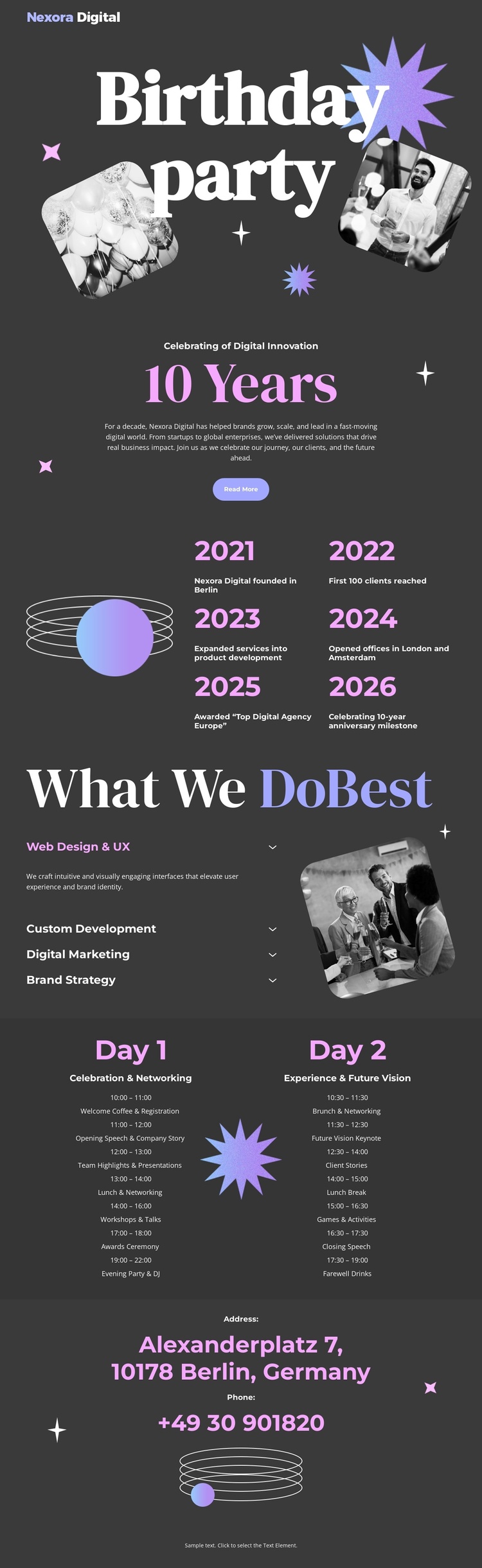
The service area divides the agency presentation into four recognizable information groups: web design and UX, custom development, digital marketing, and brand strategy. Those labels can be treated as structured content regions within a Joomla-oriented site, while the dark charcoal background, lavender and pink accents, and shared typography preserve the visual relationship between them. The angled photographic panel gives the service content a clear accompanying media area without changing the underlying categories.
The anniversary material provides a second content grouping. The 10 Years section displays six year milestones, while the event schedule separates information into Day 1 and Day 2 columns. Together, these regions distinguish historical or milestone information from time-based event information. That distinction is useful when a CMS-managed page needs recurring informational sections to remain easy to identify and update. The closing Address area then gives the site a stable contact region containing the displayed Berlin location and telephone details.
Navigation and shared page regions can continue to frame these sections as the design is adapted for a Joomla site. The important point is not the CMS label alone, but the way the template already separates services, milestones, event days, and contact information into coordinated areas. The page can therefore retain its celebratory composition while its recurring informational content is organized within a structured Joomla project. The sample names, dates, and contact values should remain treated as replaceable displayed content rather than assumed business facts.
Customize with Nicepage
Open this ready-made template in the Joomla Page Builder and customize it visually in the Nicepage editor. Replace demo content, edit page sections, and adapt the design to your project without rebuilding the template from scratch.
Work With This Template in Joomla
Customize and Install the Joomla Template
Start with this ready-made template instead of building the Joomla design from scratch. Customize its layout, content, typography, images, sections, and other design elements visually in the Nicepage application, then export and install the Joomla Template, Nicepage Extension, and supported content on your Joomla website.
Edit the Template Directly in Joomla
After installation, you can edit the Joomla Template directly in Joomla with the Nicepage Joomla Extension. Customize the Header, Footer, Colors, Fonts, typography, and Page Templates from the Joomla workflow while keeping the site design connected with your CMS content.
Edit Joomla Articles Visually
Use the Nicepage Joomla Extension to open and edit Joomla Articles visually from the Joomla Administrator. Change text, images, sections, layouts, and other page content in the Nicepage editor while continuing to manage the Articles through Joomla.
Joomla Content and Template Integration
Use the customized template together with Joomla Articles, module Positions, menus, forms, Blog Pages, and other supported CMS elements. With the Nicepage Extension used as the Site Style Source, shared design settings can be applied across Joomla Articles while Joomla continues to provide the CMS environment for managing site content.
This workflow combines a ready-made Joomla Template with visual customization, direct template editing in Joomla, and continued content management through the Nicepage Joomla Extension.





















