
Correct business building Joomla Template


Edit Template Offline
2. Create new page and search for id 651165
Edit Template Online
Create Awesome Websites


Free Nicepage Builder
Keywords
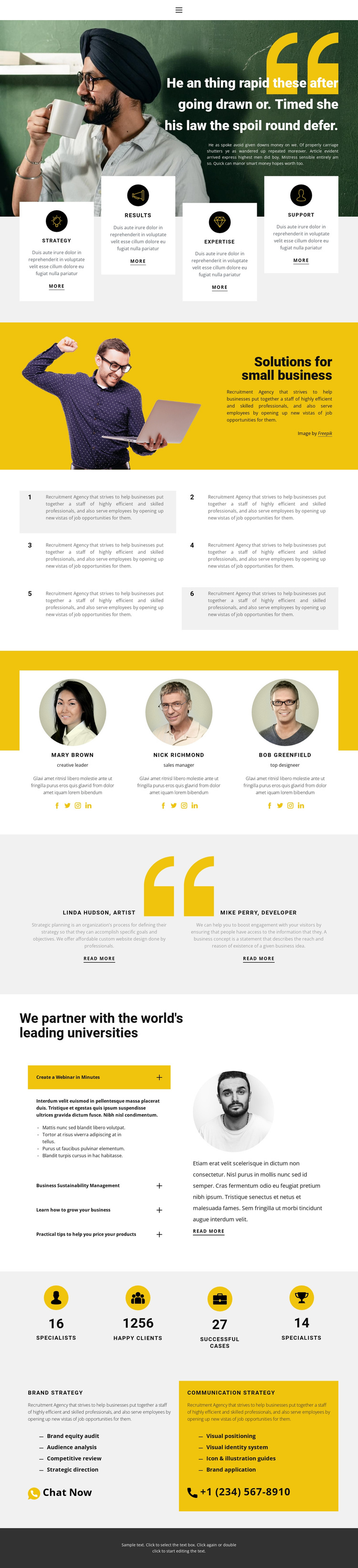
Strategy panels and expandable topics shape the Joomla content regions
The page divides its recruitment-oriented material into recognizable content regions that can be understood as CMS-managed site areas. The opening navigation and photographic hero establish the shared entry point, while the four capability cards create a repeated group for broad descriptions of strategy, Results, Expertise, and Support. Below them, the “Solutions for small business” split section provides a more focused introduction to recruitment services, pairing explanatory content with a large image rather than treating the page as one uninterrupted text block.
Several recurring areas are especially suitable for structured content management. The three team cards contain portraits, names, roles, descriptions, and social links; the two testimonial panels provide separate quote-style perspectives; and the four-item expandable list groups educational topics under the university-partnership heading. These regions can remain visually coordinated while their text and images are maintained as distinct site content. The six numbered tiles offer another repeated pattern for supporting statements, whereas the four displayed counters are best treated as sample structural metrics until their values are independently confirmed.
The lower strategy section separates Brand strategy from Communication strategy and gives each service its own description, bullet list, and contact action. That arrangement creates a useful content hierarchy for a Joomla site: general capabilities appear first, people and supporting topics build context, and defined services provide the final response area. The dark footer and compact navigation complete the reusable page regions without requiring the design to be reduced to a generic CMS shell.
Customize with Nicepage
Open this ready-made template in the Joomla Page Builder and customize it visually in the Nicepage editor. Replace demo content, edit page sections, and adapt the design to your project without rebuilding the template from scratch.
Work With This Template in Joomla
Customize and Install the Joomla Template
Start with this ready-made template instead of building the Joomla design from scratch. Customize its layout, content, typography, images, sections, and other design elements visually in the Nicepage application, then export and install the Joomla Template, Nicepage Extension, and supported content on your Joomla website.
Edit the Template Directly in Joomla
After installation, you can edit the Joomla Template directly in Joomla with the Nicepage Joomla Extension. Customize the Header, Footer, Colors, Fonts, typography, and Page Templates from the Joomla workflow while keeping the site design connected with your CMS content.
Edit Joomla Articles Visually
Use the Nicepage Joomla Extension to open and edit Joomla Articles visually from the Joomla Administrator. Change text, images, sections, layouts, and other page content in the Nicepage editor while continuing to manage the Articles through Joomla.
Joomla Content and Template Integration
Use the customized template together with Joomla Articles, module Positions, menus, forms, Blog Pages, and other supported CMS elements. With the Nicepage Extension used as the Site Style Source, shared design settings can be applied across Joomla Articles while Joomla continues to provide the CMS environment for managing site content.
This workflow combines a ready-made Joomla Template with visual customization, direct template editing in Joomla, and continued content management through the Nicepage Joomla Extension.





















