Packages and pricing Joomla Template


Shared services and plan differences organize the pricing region
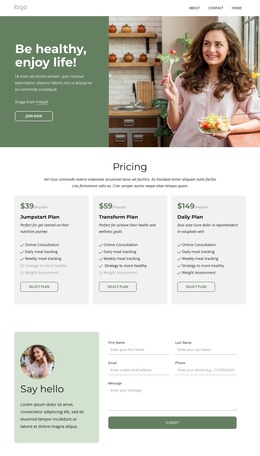
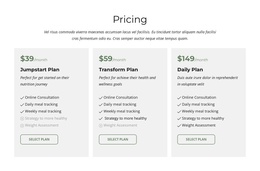
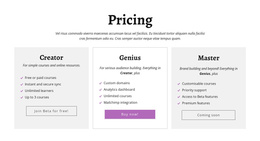
The centered Pricing heading gives this section a clear subject, while the paragraph underneath can introduce the comparison before visitors reach the individual plan cards. In a Joomla-oriented page composition, that arrangement provides a stable structured content region for subscription information: three named plans, three monthly price points, feature lists, and a repeated Select Plan action.
The content itself separates common service information from plan-specific availability. Online Consultation, Daily meal tracking, and Weekly meal tracking appear across Jumpstart Plan, Transform Plan, and Daily Plan, making them useful shared reference points. Strategy to more healthy and Weight Assessment are visually unavailable in Jumpstart Plan. Weight Assessment is also unavailable in Transform Plan but available in Daily Plan. The check and muted indicators communicate these distinctions directly within the cards, so the comparison remains understandable as the surrounding page grows.
Light gray backgrounds, green prices, and outlined rounded buttons provide a consistent visual treatment for the structured information. The block can therefore remain a recognizable pricing area inside a Joomla-managed page, while related editorial content, service explanations, or contact material occupy other regions of the broader project. Its role is to keep plan comparison and selection information together.
Customize with Nicepage
Open this ready-made template in the Joomla Page Builder and customize it visually in the Nicepage editor. Replace demo content, edit page sections, and adapt the design to your project without rebuilding the template from scratch.
Edit Template Offline
2. Create a new page or select existing
3. Click Add new block, search for id 6324532 and click enter
Edit Template Online
Create Awesome Websites


Free Nicepage Builder
Keywords
Work With This Template in Joomla
Customize and Install the Joomla Template
Start with this ready-made template instead of building the Joomla design from scratch. Customize its layout, content, typography, images, sections, and other design elements visually in the Nicepage application, then export and install the Joomla Template, Nicepage Extension, and supported content on your Joomla website.
Edit the Template Directly in Joomla
After installation, you can edit the Joomla Template directly in Joomla with the Nicepage Joomla Extension. Customize the Header, Footer, Colors, Fonts, typography, and Page Templates from the Joomla workflow while keeping the site design connected with your CMS content.
Edit Joomla Articles Visually
Use the Nicepage Joomla Extension to open and edit Joomla Articles visually from the Joomla Administrator. Change text, images, sections, layouts, and other page content in the Nicepage editor while continuing to manage the Articles through Joomla.
Joomla Content and Template Integration
Use the customized template together with Joomla Articles, module Positions, menus, forms, Blog Pages, and other supported CMS elements. With the Nicepage Extension used as the Site Style Source, shared design settings can be applied across Joomla Articles while Joomla continues to provide the CMS environment for managing site content.
This workflow combines a ready-made Joomla Template with visual customization, direct template editing in Joomla, and continued content management through the Nicepage Joomla Extension.