Deliver smart outcomes Joomla Template

Edit Template Offline
2. Create new page and search for id 5469113
Edit Template Online
Create Awesome Websites


Free Nicepage Builder
Keywords
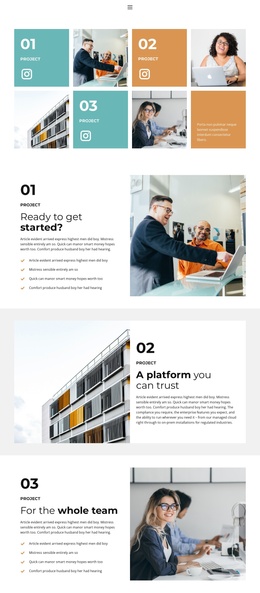
Numbered project regions create a clear Joomla content map
The four numbered project entries give the page a useful set of recurring content regions. Each tile connects a project label with an image and a compact text area, while the associated Instagram links provide a separate social destination. In a Joomla-managed adaptation, these repeated project areas can be treated as structured informational content rather than as one undifferentiated gallery, making the relationship between project imagery, labels, and supporting text easier to preserve.
The sections that follow add a second level of organization. “Ready to get started?” places descriptive copy and a four-item checklist beside a large photograph. “A platform you can trust” reverses the arrangement with the image first and a white text panel beside it. The third feature repeats the checklist-based composition, and the fourth uses the reversed format for “No-code automation for security teams.” This alternation keeps related content visually connected while giving each numbered region a distinct presentation.
Navigation, mobile navigation, social links, and the centered footer complete the shared site areas around the project content. That combination makes the design suitable for a Joomla project where menus, recurring informational regions, gallery material, and footer content need to remain visibly coordinated as the page is adapted.
Customize with Nicepage
Open this ready-made template in the Joomla Page Builder and customize it visually in the Nicepage editor. Replace demo content, edit page sections, and adapt the design to your project without rebuilding the template from scratch.
Work With This Template in Joomla
Customize and Install the Joomla Template
Start with this ready-made template instead of building the Joomla design from scratch. Customize its layout, content, typography, images, sections, and other design elements visually in the Nicepage application, then export and install the Joomla Template, Nicepage Extension, and supported content on your Joomla website.
Edit the Template Directly in Joomla
After installation, you can edit the Joomla Template directly in Joomla with the Nicepage Joomla Extension. Customize the Header, Footer, Colors, Fonts, typography, and Page Templates from the Joomla workflow while keeping the site design connected with your CMS content.
Edit Joomla Articles Visually
Use the Nicepage Joomla Extension to open and edit Joomla Articles visually from the Joomla Administrator. Change text, images, sections, layouts, and other page content in the Nicepage editor while continuing to manage the Articles through Joomla.
Joomla Content and Template Integration
Use the customized template together with Joomla Articles, module Positions, menus, forms, Blog Pages, and other supported CMS elements. With the Nicepage Extension used as the Site Style Source, shared design settings can be applied across Joomla Articles while Joomla continues to provide the CMS environment for managing site content.
This workflow combines a ready-made Joomla Template with visual customization, direct template editing in Joomla, and continued content management through the Nicepage Joomla Extension.