Apron for women and men Joomla Template


Product Copy Organized Into Distinct Joomla Content Areas
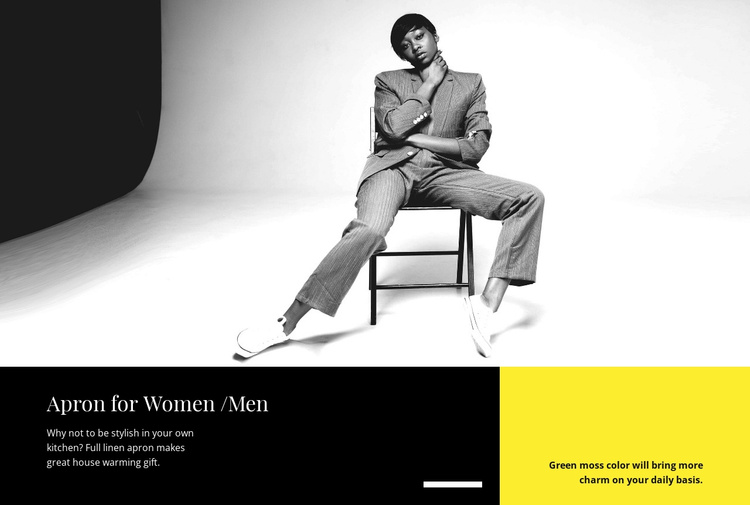
The upper photograph gives the section an immediate product focus, while the lower panel organizes the accompanying information into two related content areas. The heading “Apron for Women /Men” and the full linen apron description form the principal informational group in the larger black panel. Beside it, the separate green moss color note works as a concise supporting detail rather than competing with the main product explanation.
This structure suits a Joomla-managed page when one product detail section needs a clear visual and editorial boundary. The wide composition can preserve the photograph as the opening context, then lead into the darker text region and the smaller accent region below. The strong horizontal division, large serif heading, and lighter supporting type help distinguish the product identity from its secondary color information. The bright yellow panel also gives the supporting note a readily recognizable position within the section.
In a broader Joomla project, this block can remain a reusable content region for a featured apparel item while other page areas handle related products, categories, purchasing information, or contact details. Its value lies in the way one visual subject and two levels of product information are grouped together, not in turning the section into a complete CMS template or site.
Customize with Nicepage
Open this ready-made template in the Joomla Page Builder and customize it visually in the Nicepage editor. Replace demo content, edit page sections, and adapt the design to your project without rebuilding the template from scratch.
Edit Template Offline
2. Create a new page or select existing
3. Click Add new block, search for id 44170 and click enter
Edit Template Online
Create Awesome Websites


Free Nicepage Builder
Keywords
Work With This Template in Joomla
Customize and Install the Joomla Template
Start with this ready-made template instead of building the Joomla design from scratch. Customize its layout, content, typography, images, sections, and other design elements visually in the Nicepage application, then export and install the Joomla Template, Nicepage Extension, and supported content on your Joomla website.
Edit the Template Directly in Joomla
After installation, you can edit the Joomla Template directly in Joomla with the Nicepage Joomla Extension. Customize the Header, Footer, Colors, Fonts, typography, and Page Templates from the Joomla workflow while keeping the site design connected with your CMS content.
Edit Joomla Articles Visually
Use the Nicepage Joomla Extension to open and edit Joomla Articles visually from the Joomla Administrator. Change text, images, sections, layouts, and other page content in the Nicepage editor while continuing to manage the Articles through Joomla.
Joomla Content and Template Integration
Use the customized template together with Joomla Articles, module Positions, menus, forms, Blog Pages, and other supported CMS elements. With the Nicepage Extension used as the Site Style Source, shared design settings can be applied across Joomla Articles while Joomla continues to provide the CMS environment for managing site content.
This workflow combines a ready-made Joomla Template with visual customization, direct template editing in Joomla, and continued content management through the Nicepage Joomla Extension.