Global modern architecture Joomla Template


Edit Template Offline
2. Create new page and search for id 34994
Edit Template Online
Create Awesome Websites


Free Nicepage Builder
Keywords
Property Information Divides Naturally Into Managed Site Regions
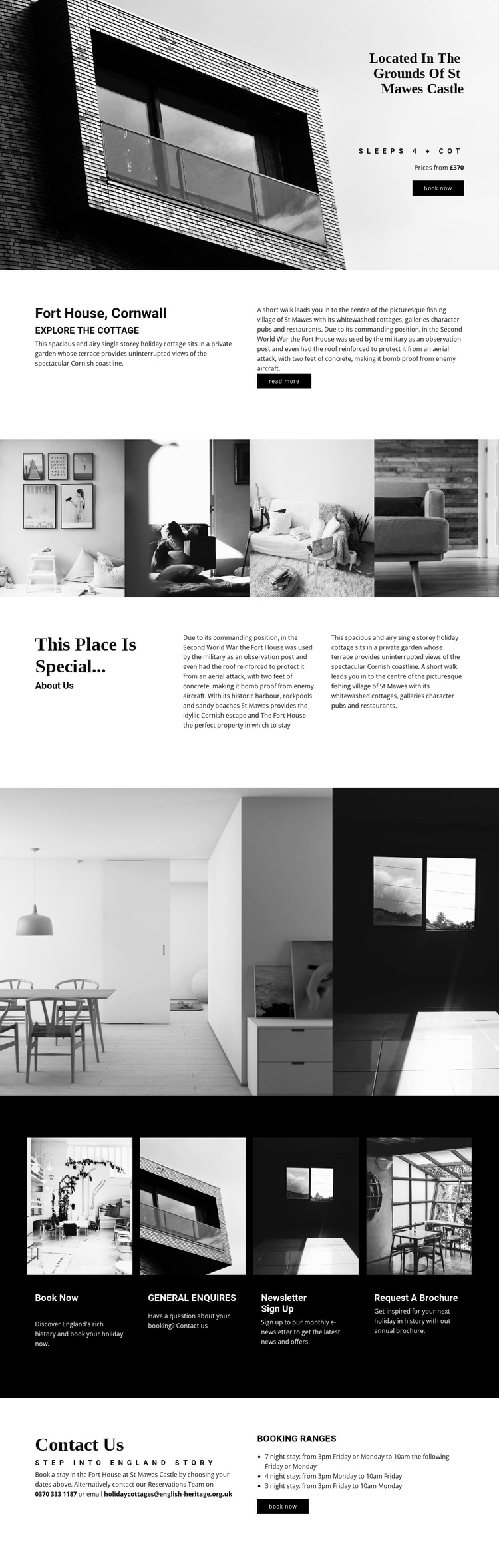
Fort House’s content is already divided into regions that suit a structured accommodation website. The opening block carries the essential property introduction: the St Mawes Castle setting, the cottage name, occupancy for four people plus a cot, a price reference, and a Book now action. The split overview then separates the short description of the coastal accommodation from historical background, giving editorial information two related but distinct areas.
The gallery sections add another kind of content region. One four-image strip presents the property broadly, while the later two-image group focuses on bright interior spaces and architectural details. Between them, the “This place is special...” section provides a longer story about the building’s military history and St Mawes as a coastal escape. The four dark cards then identify recurring informational destinations for booking, general enquiries, newsletter sign-up, and brochure requests. The closing Contact Us area concentrates reservations details and booking ranges in a final region.
This division can help a Joomla project keep navigation, accommodation information, visual material, and contact content coordinated without treating the page as one undifferentiated text area. The design does not prove that Joomla Articles or module positions already exist. It simply provides clear regions that can be mapped to CMS-managed content. Nicepage’s Joomla Extension supports creating and designing Joomla Articles when that interpretation is relevant.
Customize with Nicepage
Open this ready-made template in the Joomla Page Builder and customize it visually in the Nicepage editor. Replace demo content, edit page sections, and adapt the design to your project without rebuilding the template from scratch.
Work With This Template in Joomla
Customize and Install the Joomla Template
Start with this ready-made template instead of building the Joomla design from scratch. Customize its layout, content, typography, images, sections, and other design elements visually in the Nicepage application, then export and install the Joomla Template, Nicepage Extension, and supported content on your Joomla website.
Edit the Template Directly in Joomla
After installation, you can edit the Joomla Template directly in Joomla with the Nicepage Joomla Extension. Customize the Header, Footer, Colors, Fonts, typography, and Page Templates from the Joomla workflow while keeping the site design connected with your CMS content.
Edit Joomla Articles Visually
Use the Nicepage Joomla Extension to open and edit Joomla Articles visually from the Joomla Administrator. Change text, images, sections, layouts, and other page content in the Nicepage editor while continuing to manage the Articles through Joomla.
Joomla Content and Template Integration
Use the customized template together with Joomla Articles, module Positions, menus, forms, Blog Pages, and other supported CMS elements. With the Nicepage Extension used as the Site Style Source, shared design settings can be applied across Joomla Articles while Joomla continues to provide the CMS environment for managing site content.
This workflow combines a ready-made Joomla Template with visual customization, direct template editing in Joomla, and continued content management through the Nicepage Joomla Extension.