
Luxury homes for sale Joomla Template


Edit Template Offline
2. Create new page and search for id 34934
Edit Template Online
Create Awesome Websites


Free Nicepage Builder
Keywords
Project Areas and Studio Regions Create Structured CMS Content Zones
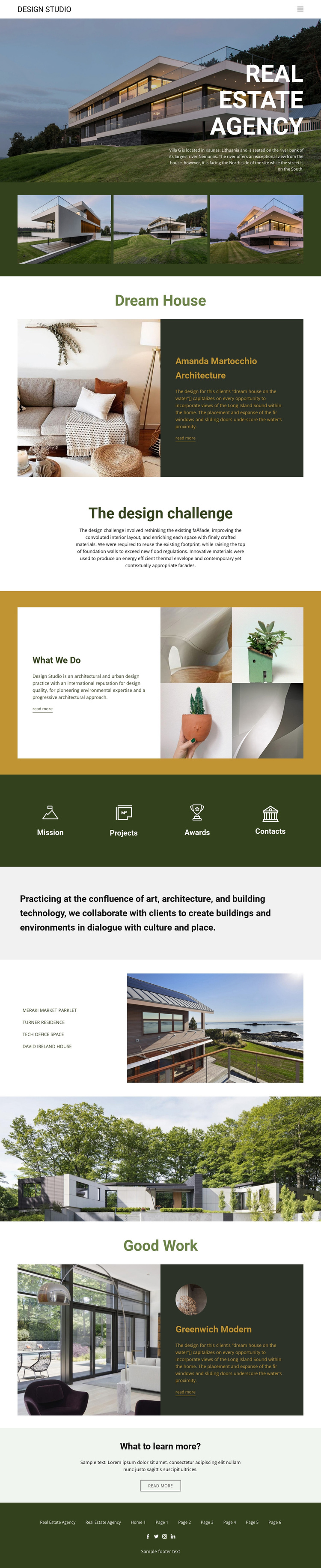
The page divides the studio presentation into content regions that can remain visually coordinated while information is maintained through a CMS. The header and navigation provide a shared entry point, while the hero introduces the featured project through an image, title, and description. Dream House and Good Work are separate project-oriented areas, each pairing imagery with explanatory text and a read more link. Their repeated pattern makes the page’s project content easier to recognize as related but distinct entries.
The What We Do section supplies a different kind of structured information. Its architecture and urban design statement is placed beside four images, giving the studio’s capabilities a clear editorial region. The four-item band for Mission, Projects, Awards, and Contacts provides compact destinations for recurring studio information, while the selected-work list names Meraki Market Parklet, Turner Residence, Tech Office Space, and David Ireland House as separate project links. The footer adds navigation and social regions that can remain consistent across a wider site.
For a Joomla implementation, these relationships are more significant than simply applying a CMS label. The design offers project content, service-oriented information, navigation, gallery material, and contact-oriented areas that can be organized as managed site content. The visual system can therefore support structured editorial updates without changing the page’s architectural storytelling.
Customize with Nicepage
Open this ready-made template in the Joomla Page Builder and customize it visually in the Nicepage editor. Replace demo content, edit page sections, and adapt the design to your project without rebuilding the template from scratch.
Work With This Template in Joomla
Customize and Install the Joomla Template
Start with this ready-made template instead of building the Joomla design from scratch. Customize its layout, content, typography, images, sections, and other design elements visually in the Nicepage application, then export and install the Joomla Template, Nicepage Extension, and supported content on your Joomla website.
Edit the Template Directly in Joomla
After installation, you can edit the Joomla Template directly in Joomla with the Nicepage Joomla Extension. Customize the Header, Footer, Colors, Fonts, typography, and Page Templates from the Joomla workflow while keeping the site design connected with your CMS content.
Edit Joomla Articles Visually
Use the Nicepage Joomla Extension to open and edit Joomla Articles visually from the Joomla Administrator. Change text, images, sections, layouts, and other page content in the Nicepage editor while continuing to manage the Articles through Joomla.
Joomla Content and Template Integration
Use the customized template together with Joomla Articles, module Positions, menus, forms, Blog Pages, and other supported CMS elements. With the Nicepage Extension used as the Site Style Source, shared design settings can be applied across Joomla Articles while Joomla continues to provide the CMS environment for managing site content.
This workflow combines a ready-made Joomla Template with visual customization, direct template editing in Joomla, and continued content management through the Nicepage Joomla Extension.
