Digital Art Museum Joomla Template


Edit Template Offline
2. Create new page and search for id 14287
Edit Template Online
Create Awesome Websites


Free Nicepage Builder
Keywords
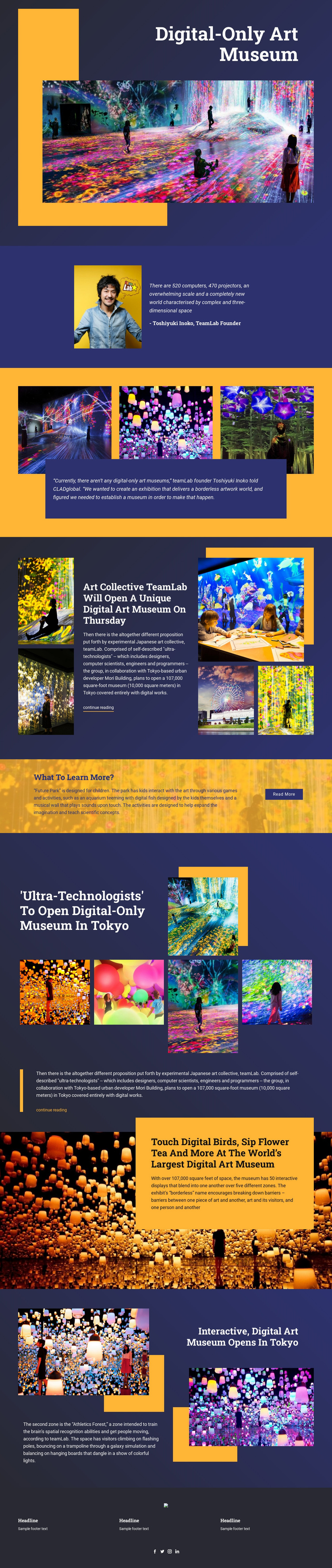
Tokyo Coverage Divides Museum Content Into Reusable Editorial Regions
The opening museum statement, founder quotation, exhibition imagery, and experience descriptions divide the page into content areas that can be maintained as structured cultural information. The first section establishes the Digital Art Museum in Tokyo, while the portrait-and-quotation area gives the story a named editorial perspective through Toshiyuki Inoko, identified as a teamLab founder. The three-image gallery and its central quotation create a separate visual statement that can sit alongside the surrounding article material without collapsing everything into one text block.
Further sections provide distinct subject groupings for a CMS-managed site. The teamLab article explains the museum proposal and includes a continue-reading link, while Future Park introduces content designed for children. Later Tokyo coverage combines an article excerpt with a featured image and four additional artwork images. The immersive experience section and the Athletics Forest description add more structured information about interactive displays and a zone focused on spatial recognition and movement. These relationships give the page several natural editorial regions for museum updates or related cultural coverage.
The footer reinforces the shared site area with three information columns and Facebook, Twitter, Instagram, and LinkedIn icons. In a Joomla project, this combination of navigation-oriented editorial content, repeated image groups, feature descriptions, and shared footer material provides a coherent CMS-facing foundation without requiring the design to be treated as a generic gallery.
Customize with Nicepage
Open this ready-made template in the Joomla Page Builder and customize it visually in the Nicepage editor. Replace demo content, edit page sections, and adapt the design to your project without rebuilding the template from scratch.
Work With This Template in Joomla
Customize and Install the Joomla Template
Start with this ready-made template instead of building the Joomla design from scratch. Customize its layout, content, typography, images, sections, and other design elements visually in the Nicepage application, then export and install the Joomla Template, Nicepage Extension, and supported content on your Joomla website.
Edit the Template Directly in Joomla
After installation, you can edit the Joomla Template directly in Joomla with the Nicepage Joomla Extension. Customize the Header, Footer, Colors, Fonts, typography, and Page Templates from the Joomla workflow while keeping the site design connected with your CMS content.
Edit Joomla Articles Visually
Use the Nicepage Joomla Extension to open and edit Joomla Articles visually from the Joomla Administrator. Change text, images, sections, layouts, and other page content in the Nicepage editor while continuing to manage the Articles through Joomla.
Joomla Content and Template Integration
Use the customized template together with Joomla Articles, module Positions, menus, forms, Blog Pages, and other supported CMS elements. With the Nicepage Extension used as the Site Style Source, shared design settings can be applied across Joomla Articles while Joomla continues to provide the CMS environment for managing site content.
This workflow combines a ready-made Joomla Template with visual customization, direct template editing in Joomla, and continued content management through the Nicepage Joomla Extension.