Perfecting styles of art Joomla Template


Edit Template Offline
2. Create new page and search for id 91273
Edit Template Online
Create Awesome Websites


Free Nicepage Builder
Keywords
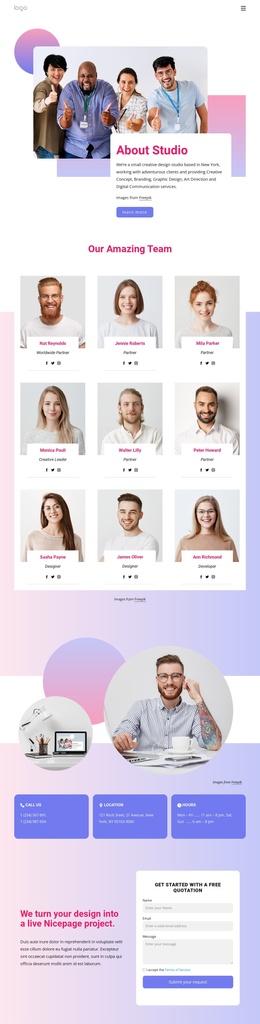
Team, Partnerships, and Contact Form Divide the Studio Content
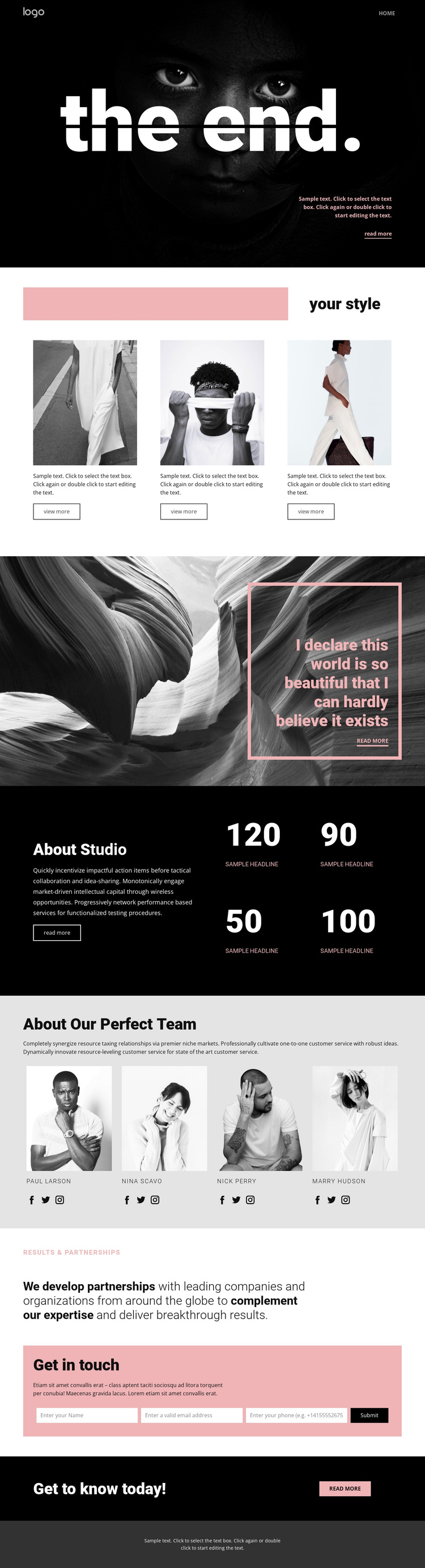
The four-person team section gives the design a natural people-focused content area: portraits, names, and social links can represent the studio’s visible creative group while keeping the presentation visually consistent. The preceding About Studio block supplies broader context through introductory copy and four displayed result figures. Because those figures are sample content, they should be replaced with verified project information, but their arrangement demonstrates how structured studio information can sit beside visual editorial material.
The partnership section adds another distinct content region. Its emphasized statement and pale pink Get in touch strip create a transition from studio presentation to direct communication. The contact form then provides the clearest managed content area on the page, with explanatory copy, multiple inputs, and a Send button grouped inside a pink panel. This combination gives a Joomla-oriented project identifiable regions for informational content, people, partnerships, and inquiries without requiring the visual system to be rebuilt.
Navigation, shared page styling, and the dark footer help connect these regions into one recognizable site presentation. The fashion photography and black, white, and pale pink palette remain important because they coordinate different content types: images carry the editorial character, while text panels and form areas handle explanation and response. The result is a design whose structured sections can support CMS-managed studio content while preserving its original visual relationships.
Customize with Nicepage
Open this ready-made template in the Joomla Page Builder and customize it visually in the Nicepage editor. Replace demo content, edit page sections, and adapt the design to your project without rebuilding the template from scratch.
Work With This Template in Joomla
Customize and Install the Joomla Template
Start with this ready-made template instead of building the Joomla design from scratch. Customize its layout, content, typography, images, sections, and other design elements visually in the Nicepage application, then export and install the Joomla Template, Nicepage Extension, and supported content on your Joomla website.
Edit the Template Directly in Joomla
After installation, you can edit the Joomla Template directly in Joomla with the Nicepage Joomla Extension. Customize the Header, Footer, Colors, Fonts, typography, and Page Templates from the Joomla workflow while keeping the site design connected with your CMS content.
Edit Joomla Articles Visually
Use the Nicepage Joomla Extension to open and edit Joomla Articles visually from the Joomla Administrator. Change text, images, sections, layouts, and other page content in the Nicepage editor while continuing to manage the Articles through Joomla.
Joomla Content and Template Integration
Use the customized template together with Joomla Articles, module Positions, menus, forms, Blog Pages, and other supported CMS elements. With the Nicepage Extension used as the Site Style Source, shared design settings can be applied across Joomla Articles while Joomla continues to provide the CMS environment for managing site content.
This workflow combines a ready-made Joomla Template with visual customization, direct template editing in Joomla, and continued content management through the Nicepage Joomla Extension.