Features with colored background WordPress Theme


A Reusable Feature Group for WordPress Page Content
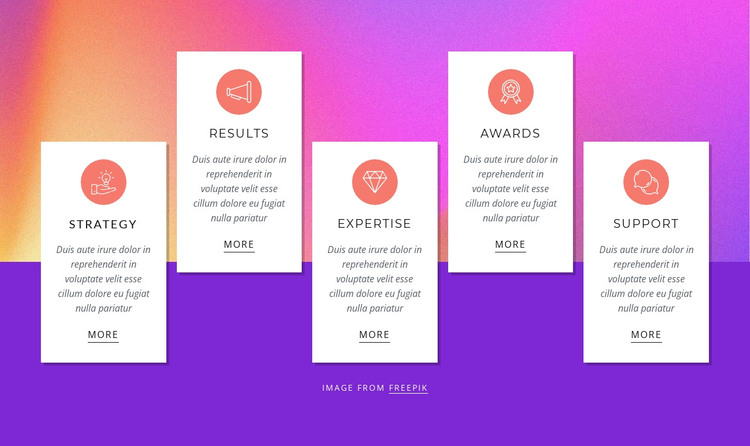
The five-card group reads as stable page content because each item presents one named focus area: Strategy, Results, Expertise, Awards, or Support. A circular icon badge introduces the card, the heading identifies its subject, and the supporting paragraph leads toward a More link. This repeated sequence creates a dependable content pattern that can remain visually consistent when the surrounding WordPress-managed page contains other sections or changing site content.
The section’s visual identity comes from relationships among the cards and their background. White rectangular cards with strong shadows sit over a full-width background image, while bright pink, orange, and purple gradients transition into a solid purple lower area. The cards are positioned at alternating vertical levels, giving the feature group a staggered rhythm instead of a uniform strip. Compact italic text keeps the supporting descriptions visually light, and the circular coral icon badges provide a repeated accent across all five items.
In a WordPress-oriented project, this block can serve as a reusable features area within permanent page content. The broader site can manage additional pages and content around it, while this section continues to explain five distinct focus areas through a consistent visual pattern. Its static presentation places the emphasis on scannable labels and linked card destinations, not on dynamic filtering or expandable content. That makes the block suitable for a page section that introduces several capabilities before visitors continue to another content area.
Customize with Nicepage
Open this ready-made template in the WordPress Website Builder and customize it visually in the Nicepage editor. Replace demo content, edit page sections, and adapt the design to your project without rebuilding the template from scratch.
Edit Template Offline
2. Create a new page or select existing
3. Click Add new block, search for id 913297 and click enter
Edit Template Online
Create Awesome Websites


Free Nicepage Builder
Keywords
Manage and Edit This Theme in WordPress
Customize and Install the WordPress Theme
Start with this ready-made theme instead of building the WordPress design from scratch. Customize its layout, content, typography, images, sections, and other design elements visually in Nicepage editor, then export and install the WordPress Theme, Plugin, and Pages on your WordPress site. The Nicepage WordPress Plugin lets you continue working with the site after installation.
Edit the Theme Directly in WordPress
After installation, you can edit the WordPress Theme directly in WordPress with the Nicepage WordPress Plugin. Use Site Style to customize site Colors, Fonts, Header, Footer, Blog, and Post Page Templates while working within your WordPress website.
Edit WordPress Pages Visually
Use the Nicepage WordPress Plugin to edit page content directly from the WordPress admin area. Open a WordPress Page with Nicepage and visually change its text, images, sections, and other page elements while continuing to manage the Page through WordPress.
WordPress Content and Theme Integration
Use the customized theme with WordPress Pages, Posts, Blog and Post Templates, menus, widgets, and other CMS-managed content. Shared theme elements such as Colors, Fonts, Header, Footer, Blog, and Post Page Templates can be managed as part of the overall site design, while WordPress provides the CMS environment for managing site content.
This workflow combines a ready-made WordPress Theme with visual customization, direct theme editing in WordPress, and continued content management through the Nicepage WordPress Plugin.