Picing Table WordPress Theme


Plan Periods and Feature Rows Create Stable Page Content
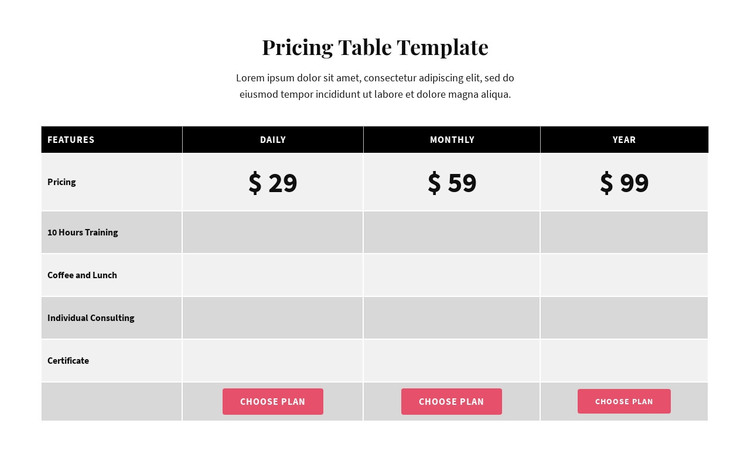
The table reads as durable page content because it organizes one pricing subject into a consistent comparison rather than a time-based list of updates. The Features column names five included items, including 10 Hours Training, Coffee and Lunch, Individual Consulting, and Certificate. Daily, Monthly, and Year then provide three plan-oriented content columns, each with a large centered value and a choose-plan action below.
In a WordPress-managed page, this section can remain a recognizable pricing area while other content around it handles introductions, service details, testimonials, or contact information. The black header and alternating light-gray body rows support a predictable reading pattern, and white dividers keep the feature cells visually separated. Pink rounded buttons give the three plan choices a shared visual treatment, making it clear that the actions belong to the comparison rather than to the introductory paragraph. The centered serif heading establishes the section’s subject before the table begins. This interpretation focuses on the block as publishable, reusable page content: a compact area for comparing included offerings and directing visitors toward one of three plan selections within the wider CMS-managed page.
Customize with Nicepage
Open this ready-made template in the WordPress Website Builder and customize it visually in the Nicepage editor. Replace demo content, edit page sections, and adapt the design to your project without rebuilding the template from scratch.
Edit Template Offline
2. Create a new page or select existing
3. Click Add new block, search for id 87275 and click enter
Edit Template Online
Create Awesome Websites


Free Nicepage Builder
Keywords
Manage and Edit This Theme in WordPress
Customize and Install the WordPress Theme
Start with this ready-made theme instead of building the WordPress design from scratch. Customize its layout, content, typography, images, sections, and other design elements visually in Nicepage editor, then export and install the WordPress Theme, Plugin, and Pages on your WordPress site. The Nicepage WordPress Plugin lets you continue working with the site after installation.
Edit the Theme Directly in WordPress
After installation, you can edit the WordPress Theme directly in WordPress with the Nicepage WordPress Plugin. Use Site Style to customize site Colors, Fonts, Header, Footer, Blog, and Post Page Templates while working within your WordPress website.
Edit WordPress Pages Visually
Use the Nicepage WordPress Plugin to edit page content directly from the WordPress admin area. Open a WordPress Page with Nicepage and visually change its text, images, sections, and other page elements while continuing to manage the Page through WordPress.
WordPress Content and Theme Integration
Use the customized theme with WordPress Pages, Posts, Blog and Post Templates, menus, widgets, and other CMS-managed content. Shared theme elements such as Colors, Fonts, Header, Footer, Blog, and Post Page Templates can be managed as part of the overall site design, while WordPress provides the CMS environment for managing site content.
This workflow combines a ready-made WordPress Theme with visual customization, direct theme editing in WordPress, and continued content management through the Nicepage WordPress Plugin.