Creative Team WordPress Theme



Stable Page Content With a Visual Team Cue
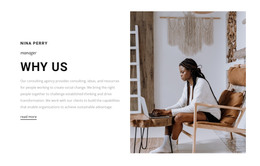
The paragraph beneath “Why Us?” reads as stable organizational page content: it explains consulting, collaboration, social change, transformation, and the development of capabilities for sustainable advantage. That makes the block suitable for a WordPress-oriented about or organization page where this message can remain visible while the surrounding project grows with additional page content. The text panel keeps the explanatory material concentrated and easy to distinguish from the imagery.
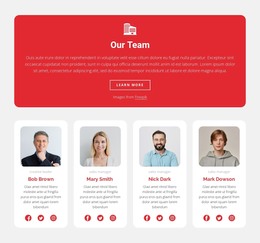
The adjacent tile arrangement gives the section a second content function. Three portrait images occupy the visual grid, and the red lower-right tile is labeled “Our Team.” Rather than treating the portraits as proof of named staff members, the layout uses them as a people-focused signal that can lead into fuller team information elsewhere. The red tile acts as a visual content marker, while the white panel carries the primary explanation. This division helps the section communicate organizational identity without requiring every team detail inside one block.
In a WordPress-managed site, the block can serve as permanent page content within a broader theme and page structure. Other areas can handle services, articles, resources, or contact information, while this section preserves its own heading, paragraph, portraits, and visual hierarchy. The light gray outer field and strong red accent can also be retained when the page’s other content is edited, keeping the section recognizable as a reusable about or team-related component.
Customize with Nicepage
Open this ready-made template in the WordPress Website Builder and customize it visually in the Nicepage editor. Replace demo content, edit page sections, and adapt the design to your project without rebuilding the template from scratch.
Edit Template Offline
2. Create a new page or select existing
3. Click Add new block, search for id 70949 and click enter
Edit Template Online
Create Awesome Websites


Free Nicepage Builder
Keywords
Manage and Edit This Theme in WordPress
Customize and Install the WordPress Theme
Start with this ready-made theme instead of building the WordPress design from scratch. Customize its layout, content, typography, images, sections, and other design elements visually in Nicepage editor, then export and install the WordPress Theme, Plugin, and Pages on your WordPress site. The Nicepage WordPress Plugin lets you continue working with the site after installation.
Edit the Theme Directly in WordPress
After installation, you can edit the WordPress Theme directly in WordPress with the Nicepage WordPress Plugin. Use Site Style to customize site Colors, Fonts, Header, Footer, Blog, and Post Page Templates while working within your WordPress website.
Edit WordPress Pages Visually
Use the Nicepage WordPress Plugin to edit page content directly from the WordPress admin area. Open a WordPress Page with Nicepage and visually change its text, images, sections, and other page elements while continuing to manage the Page through WordPress.
WordPress Content and Theme Integration
Use the customized theme with WordPress Pages, Posts, Blog and Post Templates, menus, widgets, and other CMS-managed content. Shared theme elements such as Colors, Fonts, Header, Footer, Blog, and Post Page Templates can be managed as part of the overall site design, while WordPress provides the CMS environment for managing site content.
This workflow combines a ready-made WordPress Theme with visual customization, direct theme editing in WordPress, and continued content management through the Nicepage WordPress Plugin.