
How I protect your data WordPress Theme


Edit Template Offline
2. Create new page and search for id 6542959
Edit Template Online
Create Awesome Websites


Free Nicepage Builder
Keywords
Author Pages and Subscriber Content Share One Visual Direction
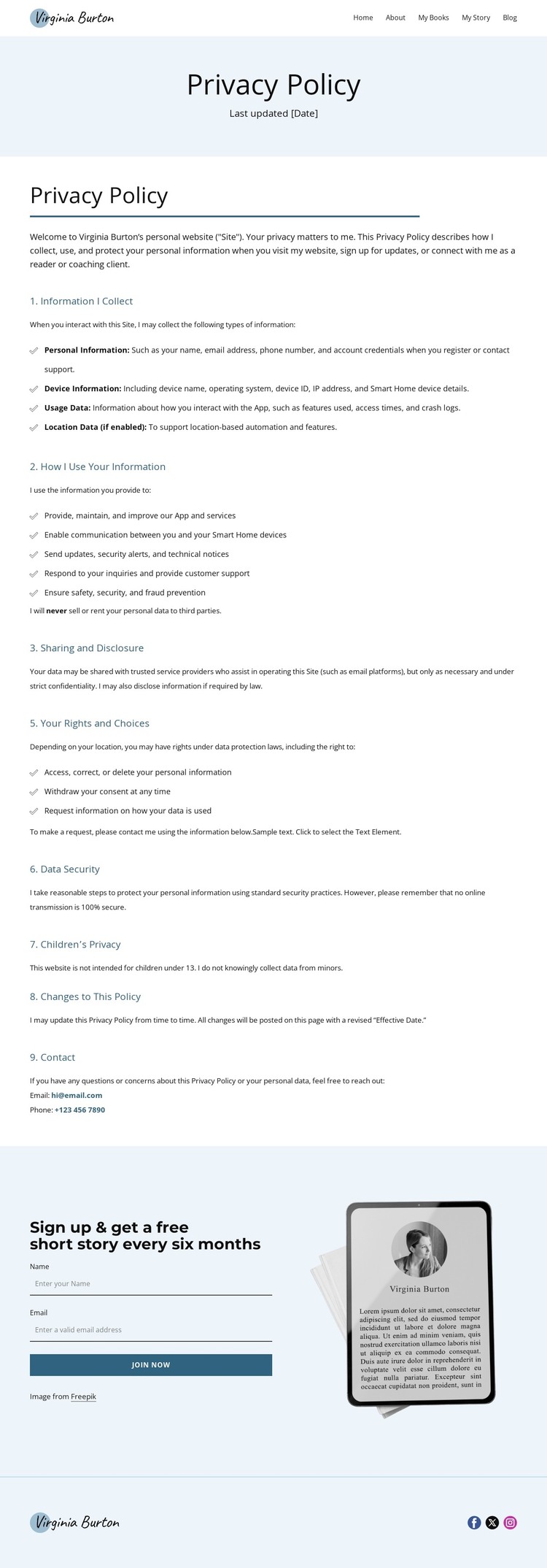
The page-oriented content is well suited to a WordPress-managed author site because it separates permanent informational material from a recurring audience relationship. The privacy document functions as a stable page area: its numbered sections explain information collection, use, sharing and disclosure, rights and choices, data security, children’s privacy, policy changes, and contact. The verified statement that personal data will not be sold or rented to third parties gives that page content a specific editorial position rather than leaving it as empty placeholder structure.
Around that permanent document, the header identifies other page-oriented destinations—Home, About, My Books, My Story, and Blog. The footer repeats the Virginia Burton logo and connects visitors with Facebook, Twitter, and Instagram, creating shared site elements that can remain recognizable as additional author content is published. The design therefore reads as a theme concept for both fixed pages and an expanding body of reader-facing material, without claiming that blog posts or other WordPress content already exist in this template.
The newsletter area provides a different content relationship. Its free short story every six months, subscription form, Join Now action, and device illustration create a focused place for ongoing reader communication after the policy text. In a WordPress project, that block could remain the visual bridge between permanent policy content and regularly maintained author outreach. Nicepage’s WordPress Plugin is a relevant product bridge for editing page content in WordPress, but the theme’s core value lies in its clear division between policy, navigation, subscription, and social areas.
Customize with Nicepage
Open this ready-made template in the WordPress Website Builder and customize it visually in the Nicepage editor. Replace demo content, edit page sections, and adapt the design to your project without rebuilding the template from scratch.
Manage and Edit This Theme in WordPress
Customize and Install the WordPress Theme
Start with this ready-made theme instead of building the WordPress design from scratch. Customize its layout, content, typography, images, sections, and other design elements visually in Nicepage editor, then export and install the WordPress Theme, Plugin, and Pages on your WordPress site. The Nicepage WordPress Plugin lets you continue working with the site after installation.
Edit the Theme Directly in WordPress
After installation, you can edit the WordPress Theme directly in WordPress with the Nicepage WordPress Plugin. Use Site Style to customize site Colors, Fonts, Header, Footer, Blog, and Post Page Templates while working within your WordPress website.
Edit WordPress Pages Visually
Use the Nicepage WordPress Plugin to edit page content directly from the WordPress admin area. Open a WordPress Page with Nicepage and visually change its text, images, sections, and other page elements while continuing to manage the Page through WordPress.
WordPress Content and Theme Integration
Use the customized theme with WordPress Pages, Posts, Blog and Post Templates, menus, widgets, and other CMS-managed content. Shared theme elements such as Colors, Fonts, Header, Footer, Blog, and Post Page Templates can be managed as part of the overall site design, while WordPress provides the CMS environment for managing site content.
This workflow combines a ready-made WordPress Theme with visual customization, direct theme editing in WordPress, and continued content management through the Nicepage WordPress Plugin.





















