Talented specialists WordPress Theme


A Two-Row Metrics Grid for WordPress Page Content
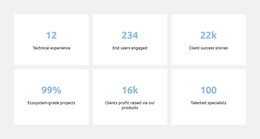
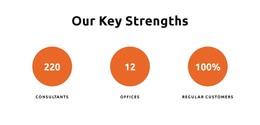
The prominent values and descriptive labels make this block suitable for stable statistics content within a WordPress-managed page. Rather than relying on a single statement, the section separates six measures into individual cards, allowing each figure to retain a clear relationship with its label. The three-column arrangement places three items across the first row and three across the second, producing a compact content area that can sit alongside other page sections.
Its visual treatment supports that content role without adding interaction: white rectangular cards stand against a light gray section background, and centered blue numbers establish a repeated emphasis pattern. Smaller black labels provide the explanatory context beneath each value. The displayed examples include experience, users, projects, profit, and team-scale wording, but their sample figures should be treated as replaceable content when the section is adapted for a real site. The 99% entry demonstrates how a percentage can share the same card system.
In a WordPress project, this section can remain a reusable page-content unit for summarizing performance, reach, or organizational scale, while other CMS-managed content handles fuller explanations. Its value comes from the relationship between concise labels and visually prominent figures, giving visitors a quick overview before they continue to more detailed information elsewhere on the page.
Customize with Nicepage
Open this ready-made template in the WordPress Website Builder and customize it visually in the Nicepage editor. Replace demo content, edit page sections, and adapt the design to your project without rebuilding the template from scratch.
Edit Template Offline
2. Create a new page or select existing
3. Click Add new block, search for id 6288082 and click enter
Edit Template Online
Create Awesome Websites


Free Nicepage Builder
Keywords
Manage and Edit This Theme in WordPress
Customize and Install the WordPress Theme
Start with this ready-made theme instead of building the WordPress design from scratch. Customize its layout, content, typography, images, sections, and other design elements visually in Nicepage editor, then export and install the WordPress Theme, Plugin, and Pages on your WordPress site. The Nicepage WordPress Plugin lets you continue working with the site after installation.
Edit the Theme Directly in WordPress
After installation, you can edit the WordPress Theme directly in WordPress with the Nicepage WordPress Plugin. Use Site Style to customize site Colors, Fonts, Header, Footer, Blog, and Post Page Templates while working within your WordPress website.
Edit WordPress Pages Visually
Use the Nicepage WordPress Plugin to edit page content directly from the WordPress admin area. Open a WordPress Page with Nicepage and visually change its text, images, sections, and other page elements while continuing to manage the Page through WordPress.
WordPress Content and Theme Integration
Use the customized theme with WordPress Pages, Posts, Blog and Post Templates, menus, widgets, and other CMS-managed content. Shared theme elements such as Colors, Fonts, Header, Footer, Blog, and Post Page Templates can be managed as part of the overall site design, while WordPress provides the CMS environment for managing site content.
This workflow combines a ready-made WordPress Theme with visual customization, direct theme editing in WordPress, and continued content management through the Nicepage WordPress Plugin.