Specialists and their directions WordPress Theme



Three Stable Service Categories for WordPress Page Content
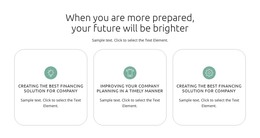
The repeated card pattern makes this section read as stable, publishable page content rather than a changing list of updates. “For your family” gathers protection for vehicles, property, pets, and events. “For your business” shifts the emphasis to businesses, employees, company property, and vehicles. “For your future” presents investments, retirements, and financial dreams. These three content groups are different in subject but equal in visual treatment, allowing the section to explain several related directions without losing its shared structure.
Above the cards, the heading “Insurance and investing for your many sides” and its supporting statement provide the wider context, including a reference to protecting people, businesses, and futures for more than 90 years. The centered typography establishes a clear entry point, while the three-column row lets visitors compare the categories at a glance. Circular portrait images add a human visual element, and the alternating lavender and white treatments distinguish neighboring cards without suggesting different functions.
In a WordPress-managed project, this block can occupy a stable services or information area on a page while other site content develops around it. The section itself remains one reusable visual unit, not a complete WordPress Theme. Its concise descriptions can introduce the categories before a separate section supplies fuller details, resources, or contact options. The consistent card structure also makes the block easy to recognize when similar page content follows the same visual direction.
Customize with Nicepage
Open this ready-made template in the WordPress Website Builder and customize it visually in the Nicepage editor. Replace demo content, edit page sections, and adapt the design to your project without rebuilding the template from scratch.
Edit Template Offline
2. Create a new page or select existing
3. Click Add new block, search for id 498221 and click enter
Edit Template Online
Create Awesome Websites


Free Nicepage Builder
Keywords
Manage and Edit This Theme in WordPress
Customize and Install the WordPress Theme
Start with this ready-made theme instead of building the WordPress design from scratch. Customize its layout, content, typography, images, sections, and other design elements visually in Nicepage editor, then export and install the WordPress Theme, Plugin, and Pages on your WordPress site. The Nicepage WordPress Plugin lets you continue working with the site after installation.
Edit the Theme Directly in WordPress
After installation, you can edit the WordPress Theme directly in WordPress with the Nicepage WordPress Plugin. Use Site Style to customize site Colors, Fonts, Header, Footer, Blog, and Post Page Templates while working within your WordPress website.
Edit WordPress Pages Visually
Use the Nicepage WordPress Plugin to edit page content directly from the WordPress admin area. Open a WordPress Page with Nicepage and visually change its text, images, sections, and other page elements while continuing to manage the Page through WordPress.
WordPress Content and Theme Integration
Use the customized theme with WordPress Pages, Posts, Blog and Post Templates, menus, widgets, and other CMS-managed content. Shared theme elements such as Colors, Fonts, Header, Footer, Blog, and Post Page Templates can be managed as part of the overall site design, while WordPress provides the CMS environment for managing site content.
This workflow combines a ready-made WordPress Theme with visual customization, direct theme editing in WordPress, and continued content management through the Nicepage WordPress Plugin.