Let's Start Something Great WordPress Theme


Edit Template Offline
2. Create new page and search for id 4522707
Edit Template Online
Create Awesome Websites


Free Nicepage Builder
Keywords
Office Information and Contact Content Fit a Managed Page Structure
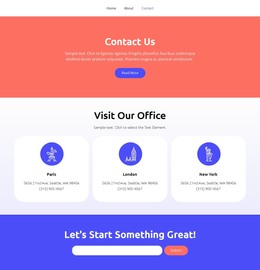
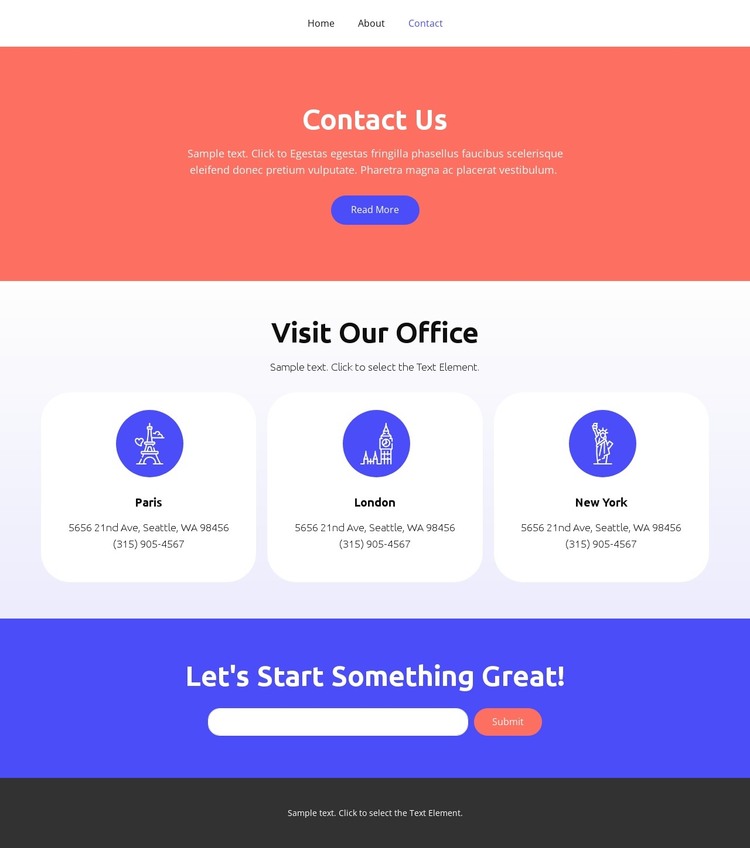
The page separates permanent contact information into two strong content groups. First, the Visit Our Office section uses three rounded cards for Paris, London, and New York, with address and phone details assigned to each location. This card-based arrangement gives location content a repeatable pattern that can be maintained without blending all offices into one dense paragraph.
Second, the full-width colored form section provides a dedicated area for email inquiries. The Contact Us introduction and Read More action establish the page message, while the form's Submit action marks the point where visitors can send a request. The navigation row—Home, Landing, About, Team, and Contact—also shows how this page can sit beside other page-oriented content within the same visual system. The dark footer adds a shared closing region with centered text.
For a WordPress-managed project, these areas can be interpreted as page content that remains visually coordinated while the underlying text and contact details are maintained through the CMS. The verified analysis does not show posts, blog sections, categories, or other editorial structures, so none should be assumed from this design. The city labels, sample contact values, and response messages are structural examples and should be replaced with accurate project information.
Customize with Nicepage
Open this ready-made template in the WordPress Website Builder and customize it visually in the Nicepage editor. Replace demo content, edit page sections, and adapt the design to your project without rebuilding the template from scratch.
Manage and Edit This Theme in WordPress
Customize and Install the WordPress Theme
Start with this ready-made theme instead of building the WordPress design from scratch. Customize its layout, content, typography, images, sections, and other design elements visually in Nicepage editor, then export and install the WordPress Theme, Plugin, and Pages on your WordPress site. The Nicepage WordPress Plugin lets you continue working with the site after installation.
Edit the Theme Directly in WordPress
After installation, you can edit the WordPress Theme directly in WordPress with the Nicepage WordPress Plugin. Use Site Style to customize site Colors, Fonts, Header, Footer, Blog, and Post Page Templates while working within your WordPress website.
Edit WordPress Pages Visually
Use the Nicepage WordPress Plugin to edit page content directly from the WordPress admin area. Open a WordPress Page with Nicepage and visually change its text, images, sections, and other page elements while continuing to manage the Page through WordPress.
WordPress Content and Theme Integration
Use the customized theme with WordPress Pages, Posts, Blog and Post Templates, menus, widgets, and other CMS-managed content. Shared theme elements such as Colors, Fonts, Header, Footer, Blog, and Post Page Templates can be managed as part of the overall site design, while WordPress provides the CMS environment for managing site content.
This workflow combines a ready-made WordPress Theme with visual customization, direct theme editing in WordPress, and continued content management through the Nicepage WordPress Plugin.