My experiences WordPress Theme


Stable education content for a WordPress-managed profile page
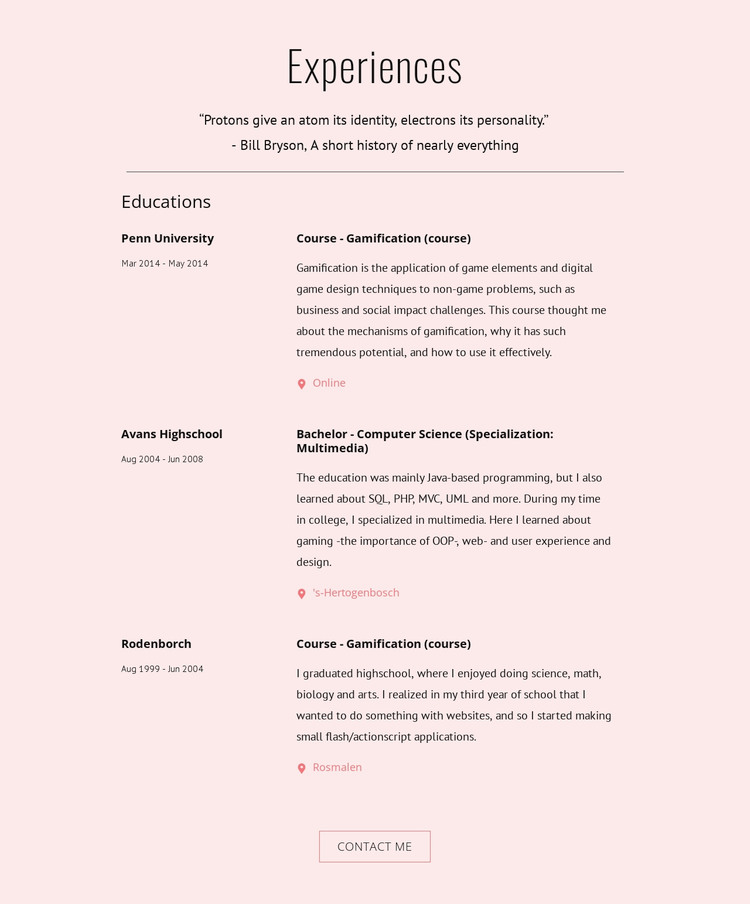
The education history reads as durable page content rather than a stream of dated updates. The Experiences heading and quotation establish the personal context, and the Educations subheading introduces three records that can remain part of a stable profile area. Each record has a predictable content relationship: institution and date range identify the period, while the title, descriptive paragraph, and location or delivery label explain it.
The visible history includes a Penn University gamification course, a Computer Science bachelor specialization in Multimedia, and high-school education with early website-related interests. These displayed entries create a coherent background narrative while remaining separate from any wider publishing structure around the page. The two-column layout also makes the records easy to scan, which is useful when the section shares a page with other profile information.
The pale pink background, dark typography, muted accents, and generous vertical spacing preserve the section's visual identity as it participates in a broader WordPress-managed site. The Contact Me button sits after the informational content, giving visitors a direct next step without interrupting the history. In that context, the block works well as a permanent education section alongside other page content, while the surrounding site handles navigation and additional profile areas.
Customize with Nicepage
Open this ready-made template in the WordPress Website Builder and customize it visually in the Nicepage editor. Replace demo content, edit page sections, and adapt the design to your project without rebuilding the template from scratch.
Edit Template Offline
2. Create a new page or select existing
3. Click Add new block, search for id 366365 and click enter
Edit Template Online
Create Awesome Websites


Free Nicepage Builder
Keywords
Manage and Edit This Theme in WordPress
Customize and Install the WordPress Theme
Start with this ready-made theme instead of building the WordPress design from scratch. Customize its layout, content, typography, images, sections, and other design elements visually in Nicepage editor, then export and install the WordPress Theme, Plugin, and Pages on your WordPress site. The Nicepage WordPress Plugin lets you continue working with the site after installation.
Edit the Theme Directly in WordPress
After installation, you can edit the WordPress Theme directly in WordPress with the Nicepage WordPress Plugin. Use Site Style to customize site Colors, Fonts, Header, Footer, Blog, and Post Page Templates while working within your WordPress website.
Edit WordPress Pages Visually
Use the Nicepage WordPress Plugin to edit page content directly from the WordPress admin area. Open a WordPress Page with Nicepage and visually change its text, images, sections, and other page elements while continuing to manage the Page through WordPress.
WordPress Content and Theme Integration
Use the customized theme with WordPress Pages, Posts, Blog and Post Templates, menus, widgets, and other CMS-managed content. Shared theme elements such as Colors, Fonts, Header, Footer, Blog, and Post Page Templates can be managed as part of the overall site design, while WordPress provides the CMS environment for managing site content.
This workflow combines a ready-made WordPress Theme with visual customization, direct theme editing in WordPress, and continued content management through the Nicepage WordPress Plugin.