
Develop your business WordPress Theme


Edit Template Offline
2. Create new page and search for id 32351
Edit Template Online
Create Awesome Websites


Free Nicepage Builder
Keywords
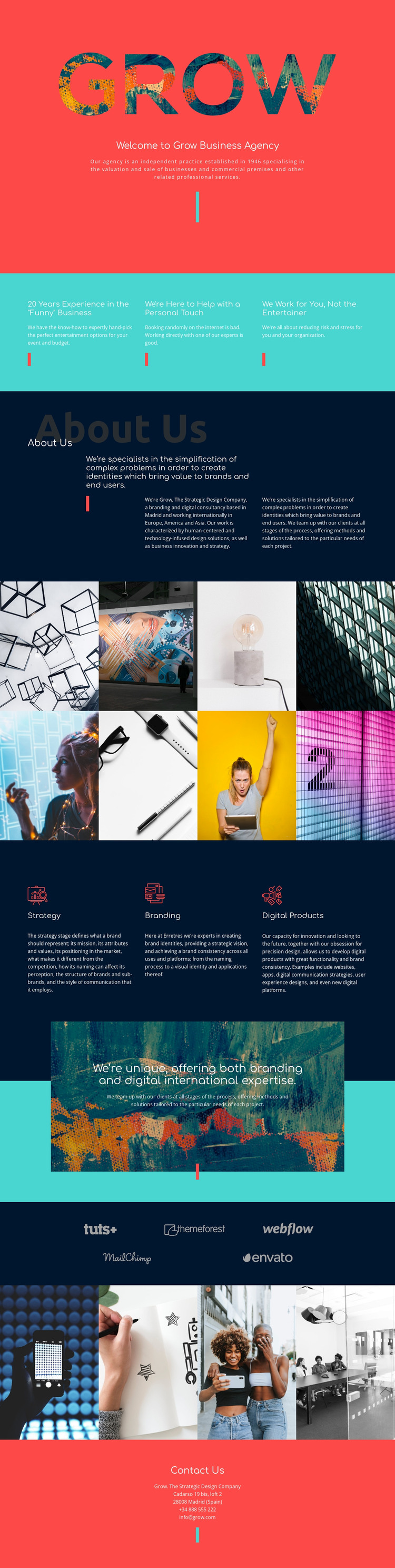
Service content and visual proof fit a WordPress-managed agency theme
The three capability columns for Strategy, Branding, and Digital Products provide permanent page content that can explain the agency’s main areas of work. Their position after the introductory value statements creates a useful relationship between approach and offering: the page first describes experience, personal support, and client focus, then identifies the services through which that approach is expressed. This gives a WordPress-oriented project a clear basis for organizing page content without claiming that specific posts or categories already exist.
The About Us section supplies additional editorial material through aligned text columns, including the Madrid base and the stated international scope across Europe, America, and Asia. The two photographic panels can carry project or brand imagery, while the separate five-logo display offers another recurring content area for selected client or partner marks. Together, these visual sections create places where changing agency material can sit alongside stable explanatory content while remaining within the same theme character.
The closing Contact Us block brings the page-oriented information to a practical endpoint with an address, telephone number, and email. In a WordPress project, permanent agency information could remain visually connected to future editorial updates or expanded service descriptions through the same coral, turquoise, and navy system. The theme’s value lies in that relationship between structured page content, repeatable visual areas, and a clear final contact destination.
Customize with Nicepage
Open this ready-made template in the WordPress Website Builder and customize it visually in the Nicepage editor. Replace demo content, edit page sections, and adapt the design to your project without rebuilding the template from scratch.
Manage and Edit This Theme in WordPress
Customize and Install the WordPress Theme
Start with this ready-made theme instead of building the WordPress design from scratch. Customize its layout, content, typography, images, sections, and other design elements visually in Nicepage editor, then export and install the WordPress Theme, Plugin, and Pages on your WordPress site. The Nicepage WordPress Plugin lets you continue working with the site after installation.
Edit the Theme Directly in WordPress
After installation, you can edit the WordPress Theme directly in WordPress with the Nicepage WordPress Plugin. Use Site Style to customize site Colors, Fonts, Header, Footer, Blog, and Post Page Templates while working within your WordPress website.
Edit WordPress Pages Visually
Use the Nicepage WordPress Plugin to edit page content directly from the WordPress admin area. Open a WordPress Page with Nicepage and visually change its text, images, sections, and other page elements while continuing to manage the Page through WordPress.
WordPress Content and Theme Integration
Use the customized theme with WordPress Pages, Posts, Blog and Post Templates, menus, widgets, and other CMS-managed content. Shared theme elements such as Colors, Fonts, Header, Footer, Blog, and Post Page Templates can be managed as part of the overall site design, while WordPress provides the CMS environment for managing site content.
This workflow combines a ready-made WordPress Theme with visual customization, direct theme editing in WordPress, and continued content management through the Nicepage WordPress Plugin.





















