
The Outside WordPress Theme


Edit Template Offline
2. Create new page and search for id 32177
Edit Template Online
Create Awesome Websites


Free Nicepage Builder
Keywords
Brand Pages and Repeated Fashion Content Fit the Theme’s Editorial Structure
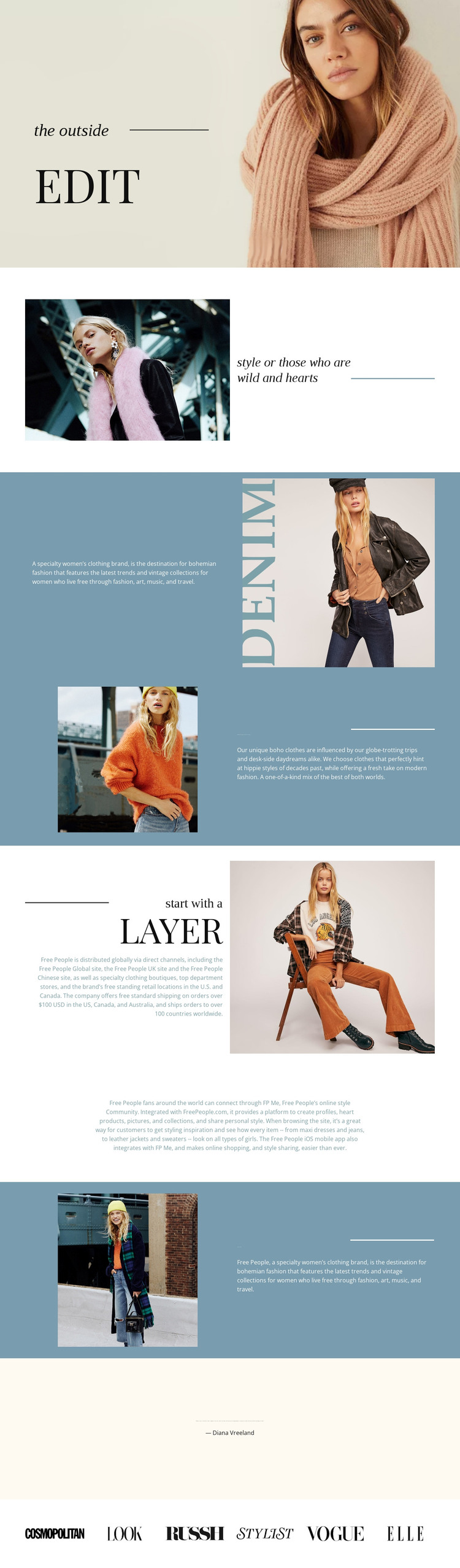
The page-oriented content is especially clear in the way The Outside separates permanent fashion information into distinct areas. The opening portrait and style statement can introduce the brand, while the sections on bohemian clothing, travel and vintage influence, distribution, and street style provide separate subjects for page-based content. Their shared image-and-text treatment keeps these subjects connected even when the copy or photography changes.
The centered community description adds another content role: it speaks about a style-sharing experience rather than only describing clothing. That distinction leaves room for future editorial material to sit beside the core brand information without disrupting the visual system. The Diana Vreeland quotation and six publication marks then work as closing context and recognition-oriented content. Their presence shows how the theme can accommodate short editorial statements and structured visual marks alongside longer descriptive sections.
For a WordPress-managed project, these areas can be interpreted as permanent fashion pages and regularly updated content while preserving the same theme character. The supplied analysis does not verify existing WordPress Posts, categories, or blog structures, so none should be presented as already included. What is confirmed is the reusable relationship between navigation-ready subject areas, repeated photography, serif editorial typography, and shared color treatment. That relationship gives future page content a stable visual home instead of treating each addition as a separate design.
Customize with Nicepage
Open this ready-made template in the WordPress Website Builder and customize it visually in the Nicepage editor. Replace demo content, edit page sections, and adapt the design to your project without rebuilding the template from scratch.
Manage and Edit This Theme in WordPress
Customize and Install the WordPress Theme
Start with this ready-made theme instead of building the WordPress design from scratch. Customize its layout, content, typography, images, sections, and other design elements visually in Nicepage editor, then export and install the WordPress Theme, Plugin, and Pages on your WordPress site. The Nicepage WordPress Plugin lets you continue working with the site after installation.
Edit the Theme Directly in WordPress
After installation, you can edit the WordPress Theme directly in WordPress with the Nicepage WordPress Plugin. Use Site Style to customize site Colors, Fonts, Header, Footer, Blog, and Post Page Templates while working within your WordPress website.
Edit WordPress Pages Visually
Use the Nicepage WordPress Plugin to edit page content directly from the WordPress admin area. Open a WordPress Page with Nicepage and visually change its text, images, sections, and other page elements while continuing to manage the Page through WordPress.
WordPress Content and Theme Integration
Use the customized theme with WordPress Pages, Posts, Blog and Post Templates, menus, widgets, and other CMS-managed content. Shared theme elements such as Colors, Fonts, Header, Footer, Blog, and Post Page Templates can be managed as part of the overall site design, while WordPress provides the CMS environment for managing site content.
This workflow combines a ready-made WordPress Theme with visual customization, direct theme editing in WordPress, and continued content management through the Nicepage WordPress Plugin.





















