
Creative Arts WordPress Theme


Edit Template Offline
2. Create new page and search for id 31336
Edit Template Online
Create Awesome Websites


Free Nicepage Builder
Keywords
Portrait Projects Create Clear WordPress Content Areas
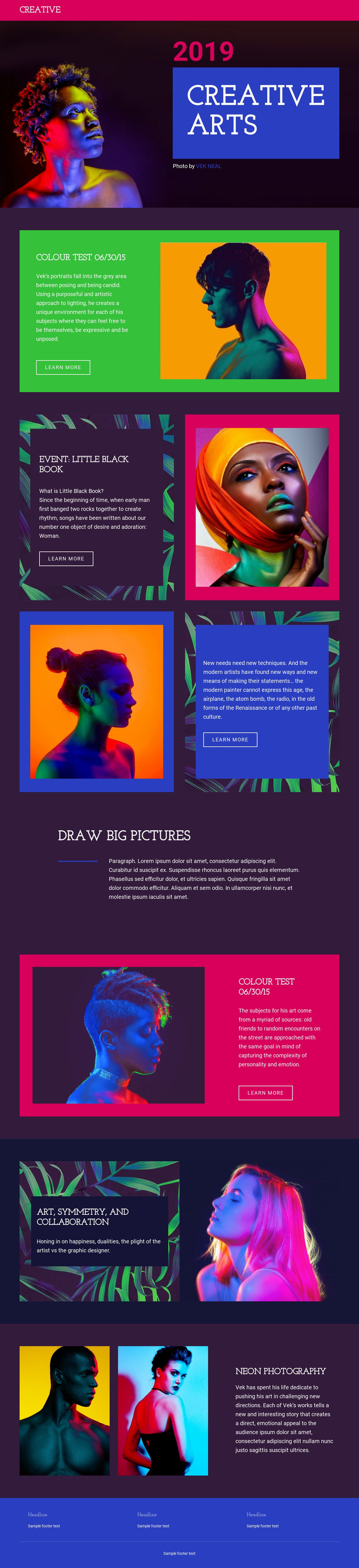
The opening Creative Arts hero provides a natural permanent page area for introducing the portfolio, with its large title, year label, dark image-led background, and portrait imagery working together as the site’s first visual statement. The Colour Test sections then establish a repeatable project presentation: descriptive text and a Learn More action sit beside a prominent portrait, giving each featured work a recognizable content pattern without treating the sample wording as fixed business information.
Event: Little Black Book offers a different content relationship through four alternating image-and-text parts. That arrangement can accommodate a group of related project summaries or editorial entries while preserving the same visual direction. The Art, Symmetry, and Collaboration section adds a thematic area built from two image-led panels, and Neon photography supplies a distinct photography focus with two portraits and supporting copy. These areas can be interpreted as page content and recurring project material in a WordPress-managed site, while the shared header, navigation, and footer keep movement between content areas visually consistent.
The analysis does not verify existing WordPress Posts, categories, or a blog. Instead, the design offers clearly defined page sections that could support permanent portfolio pages and, where needed, additional publishable project content. Its strongest WordPress value is the separation of visual topics into reusable content areas without losing the dark plum, magenta, blue, green, cyan, and orange identity.
Customize with Nicepage
Open this ready-made template in the WordPress Website Builder and customize it visually in the Nicepage editor. Replace demo content, edit page sections, and adapt the design to your project without rebuilding the template from scratch.
Manage and Edit This Theme in WordPress
Customize and Install the WordPress Theme
Start with this ready-made theme instead of building the WordPress design from scratch. Customize its layout, content, typography, images, sections, and other design elements visually in Nicepage editor, then export and install the WordPress Theme, Plugin, and Pages on your WordPress site. The Nicepage WordPress Plugin lets you continue working with the site after installation.
Edit the Theme Directly in WordPress
After installation, you can edit the WordPress Theme directly in WordPress with the Nicepage WordPress Plugin. Use Site Style to customize site Colors, Fonts, Header, Footer, Blog, and Post Page Templates while working within your WordPress website.
Edit WordPress Pages Visually
Use the Nicepage WordPress Plugin to edit page content directly from the WordPress admin area. Open a WordPress Page with Nicepage and visually change its text, images, sections, and other page elements while continuing to manage the Page through WordPress.
WordPress Content and Theme Integration
Use the customized theme with WordPress Pages, Posts, Blog and Post Templates, menus, widgets, and other CMS-managed content. Shared theme elements such as Colors, Fonts, Header, Footer, Blog, and Post Page Templates can be managed as part of the overall site design, while WordPress provides the CMS environment for managing site content.
This workflow combines a ready-made WordPress Theme with visual customization, direct theme editing in WordPress, and continued content management through the Nicepage WordPress Plugin.





















