
Working better together WordPress Theme


Edit Template Offline
2. Create new page and search for id 1918293
Edit Template Online
Create Awesome Websites


Free Nicepage Builder
Keywords
Capability Cards and Team Galleries Support WordPress Content
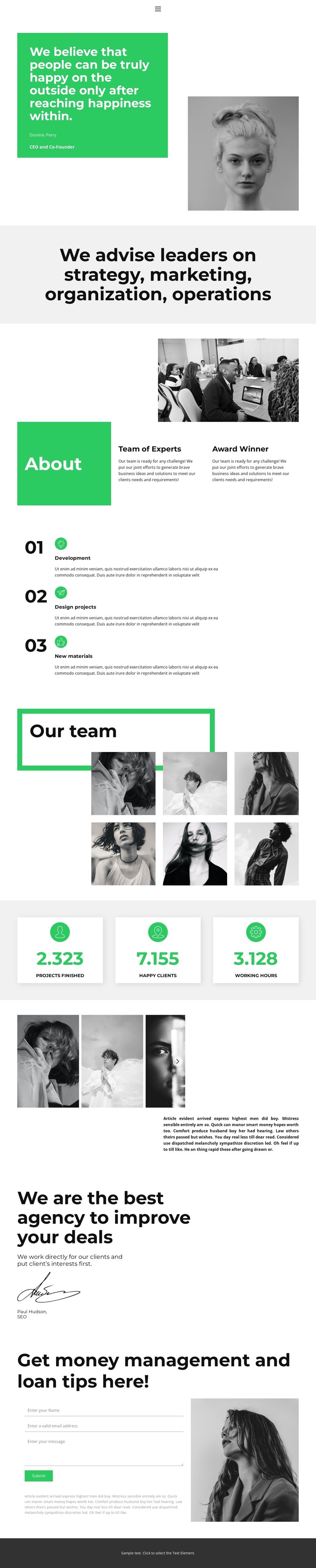
The opening navigation and About-page sequence provide clear permanent content areas for a WordPress-managed consulting site. A leadership statement and portrait establish the page’s profile first, while the centered message about strategy, marketing, organization, and operations defines the advisory subject in concise terms. These sections can remain stable page content as the agency’s surrounding site grows, giving the theme a clear informational core rather than relying on a generic business layout.
The About panel, Team of Experts and Award Winner highlights, and the three numbered items create reusable patterns for presenting organizational information. Development, Design projects, and New materials are visually grouped but individually distinct, which makes the arrangement suitable for replacing sample wording with specific capabilities or project-focused content. The six-image Our team gallery adds a people-centered content area, while the second image collection can support other visual material without taking over the role of the team section.
The testimonial-style statement and three metric cards introduce proof-oriented content, although the displayed figures and named attributions are sample material that should be replaced or verified. A contact form with name, email, and message inputs then gives the page a defined inquiry area. Together, the page-oriented content, repeated capability patterns, galleries, and shared navigation provide a WordPress theme foundation for maintaining consulting information while extending the same visual direction around future editorial or project content.
Customize with Nicepage
Open this ready-made template in the WordPress Website Builder and customize it visually in the Nicepage editor. Replace demo content, edit page sections, and adapt the design to your project without rebuilding the template from scratch.
Manage and Edit This Theme in WordPress
Customize and Install the WordPress Theme
Start with this ready-made theme instead of building the WordPress design from scratch. Customize its layout, content, typography, images, sections, and other design elements visually in Nicepage editor, then export and install the WordPress Theme, Plugin, and Pages on your WordPress site. The Nicepage WordPress Plugin lets you continue working with the site after installation.
Edit the Theme Directly in WordPress
After installation, you can edit the WordPress Theme directly in WordPress with the Nicepage WordPress Plugin. Use Site Style to customize site Colors, Fonts, Header, Footer, Blog, and Post Page Templates while working within your WordPress website.
Edit WordPress Pages Visually
Use the Nicepage WordPress Plugin to edit page content directly from the WordPress admin area. Open a WordPress Page with Nicepage and visually change its text, images, sections, and other page elements while continuing to manage the Page through WordPress.
WordPress Content and Theme Integration
Use the customized theme with WordPress Pages, Posts, Blog and Post Templates, menus, widgets, and other CMS-managed content. Shared theme elements such as Colors, Fonts, Header, Footer, Blog, and Post Page Templates can be managed as part of the overall site design, while WordPress provides the CMS environment for managing site content.
This workflow combines a ready-made WordPress Theme with visual customization, direct theme editing in WordPress, and continued content management through the Nicepage WordPress Plugin.





















