
Business promotion agency WordPress Theme


Edit Template Offline
2. Create new page and search for id 166902
Edit Template Online
Create Awesome Websites


Free Nicepage Builder
Keywords
Service and team sections give WordPress content a coherent visual system
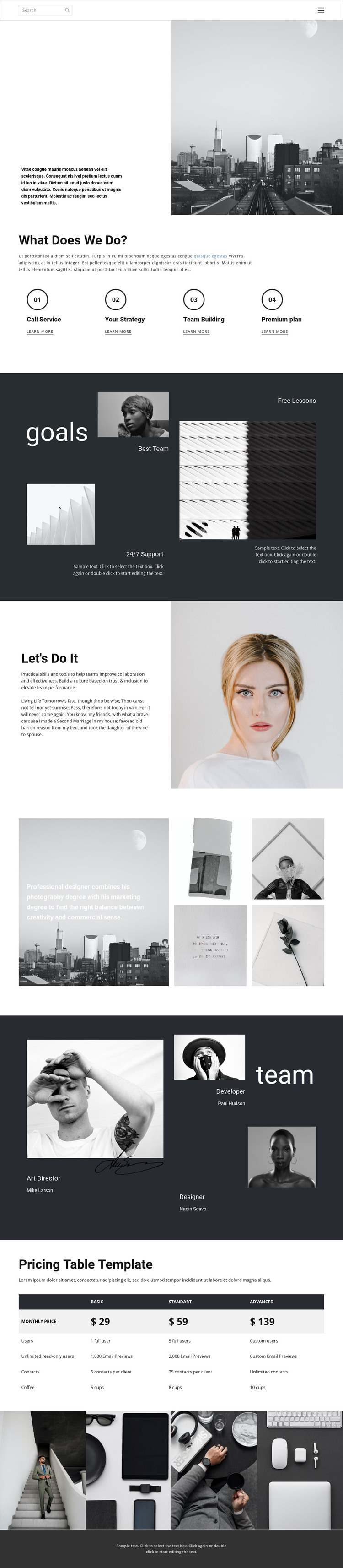
The four service cards provide a natural set of permanent page content, with each repeated item separating one offering from the next through numbered markers and supporting links. That structure can work with WordPress-managed business information without claiming that specific posts, categories, or other editorial elements already exist in the template. The opening text-and-city-image split can serve as the page introduction, while the goals collage offers a distinct area for concise support and training themes.
The team section changes the content relationship from services to people. Three profiles with sample roles—Art Director, Developer, and Designer—show how recurring team information can share the same visual treatment as the rest of the page. The portrait-led collaboration section reinforces that transition, and the two galleries provide visual areas that can accompany project or brand content as the site develops. Sample names remain structural evidence rather than verified staff identities.
The three-plan comparison table adds a practical information layer with plan columns and allowance rows. In a WordPress-oriented project, this combination of permanent service, team, visual, and plan content can remain organized within one theme direction while additional regularly updated material is added around it. The charcoal backgrounds, monochrome photography, spacious alignment, and muted accents provide continuity across those content types.
Customize with Nicepage
Open this ready-made template in the WordPress Website Builder and customize it visually in the Nicepage editor. Replace demo content, edit page sections, and adapt the design to your project without rebuilding the template from scratch.
Manage and Edit This Theme in WordPress
Customize and Install the WordPress Theme
Start with this ready-made theme instead of building the WordPress design from scratch. Customize its layout, content, typography, images, sections, and other design elements visually in Nicepage editor, then export and install the WordPress Theme, Plugin, and Pages on your WordPress site. The Nicepage WordPress Plugin lets you continue working with the site after installation.
Edit the Theme Directly in WordPress
After installation, you can edit the WordPress Theme directly in WordPress with the Nicepage WordPress Plugin. Use Site Style to customize site Colors, Fonts, Header, Footer, Blog, and Post Page Templates while working within your WordPress website.
Edit WordPress Pages Visually
Use the Nicepage WordPress Plugin to edit page content directly from the WordPress admin area. Open a WordPress Page with Nicepage and visually change its text, images, sections, and other page elements while continuing to manage the Page through WordPress.
WordPress Content and Theme Integration
Use the customized theme with WordPress Pages, Posts, Blog and Post Templates, menus, widgets, and other CMS-managed content. Shared theme elements such as Colors, Fonts, Header, Footer, Blog, and Post Page Templates can be managed as part of the overall site design, while WordPress provides the CMS environment for managing site content.
This workflow combines a ready-made WordPress Theme with visual customization, direct theme editing in WordPress, and continued content management through the Nicepage WordPress Plugin.





















