
Hard work good result WordPress Theme


Edit Template Offline
2. Create new page and search for id 160154
Edit Template Online
Create Awesome Websites


Free Nicepage Builder
Keywords
Firm Content Areas Fit a Visual WordPress Page Structure
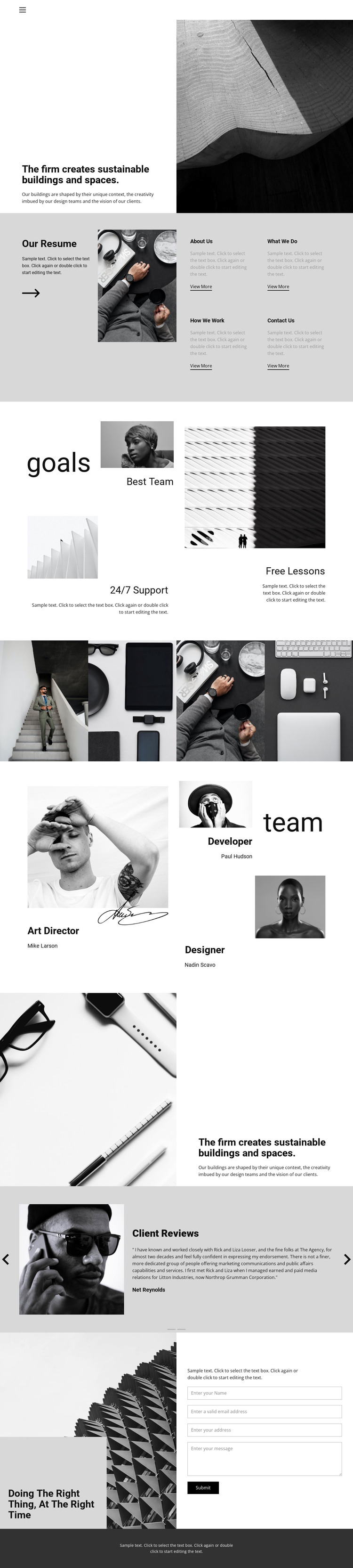
The template separates several kinds of permanent studio content into recognizable areas. The opening statement about sustainable buildings and spaces can introduce the firm’s page-oriented identity, while the large architectural image establishes a visual context for that message. Four compact cards—About Us, What We Do, How We Work, and Contact Us—create distinct destinations for core information, and the resume feature provides a second place to explain the studio through text and imagery.
The gallery and team sections give the page different content relationships to maintain around the same visual direction. A four-image gallery can present selected architectural or lifestyle work as a dedicated visual area, while the three-profile team presentation gives roles and people their own context. The goals section adds three feature highlights, and the reversed statement block repeats the central focus with a changed image-text arrangement rather than introducing an unrelated visual language.
Client Reviews supplies a separate two-slide area for testimonial content, followed by the final image, statement, and inquiry form. This arrangement is useful for a WordPress-managed studio page because informational content, visual work, people, reviews, and contact response are already divided into clear sections. The design can therefore support ongoing page-content editing while preserving a recognizable architecture-focused presentation.
Customize with Nicepage
Open this ready-made template in the WordPress Website Builder and customize it visually in the Nicepage editor. Replace demo content, edit page sections, and adapt the design to your project without rebuilding the template from scratch.
Manage and Edit This Theme in WordPress
Customize and Install the WordPress Theme
Start with this ready-made theme instead of building the WordPress design from scratch. Customize its layout, content, typography, images, sections, and other design elements visually in Nicepage editor, then export and install the WordPress Theme, Plugin, and Pages on your WordPress site. The Nicepage WordPress Plugin lets you continue working with the site after installation.
Edit the Theme Directly in WordPress
After installation, you can edit the WordPress Theme directly in WordPress with the Nicepage WordPress Plugin. Use Site Style to customize site Colors, Fonts, Header, Footer, Blog, and Post Page Templates while working within your WordPress website.
Edit WordPress Pages Visually
Use the Nicepage WordPress Plugin to edit page content directly from the WordPress admin area. Open a WordPress Page with Nicepage and visually change its text, images, sections, and other page elements while continuing to manage the Page through WordPress.
WordPress Content and Theme Integration
Use the customized theme with WordPress Pages, Posts, Blog and Post Templates, menus, widgets, and other CMS-managed content. Shared theme elements such as Colors, Fonts, Header, Footer, Blog, and Post Page Templates can be managed as part of the overall site design, while WordPress provides the CMS environment for managing site content.
This workflow combines a ready-made WordPress Theme with visual customization, direct theme editing in WordPress, and continued content management through the Nicepage WordPress Plugin.





















