
Architect resume WordPress Theme


Edit Template Offline
2. Create new page and search for id 1528855
Edit Template Online
Create Awesome Websites


Free Nicepage Builder
Keywords
Profile Content and Portfolio Evidence Create a Reusable Theme Structure
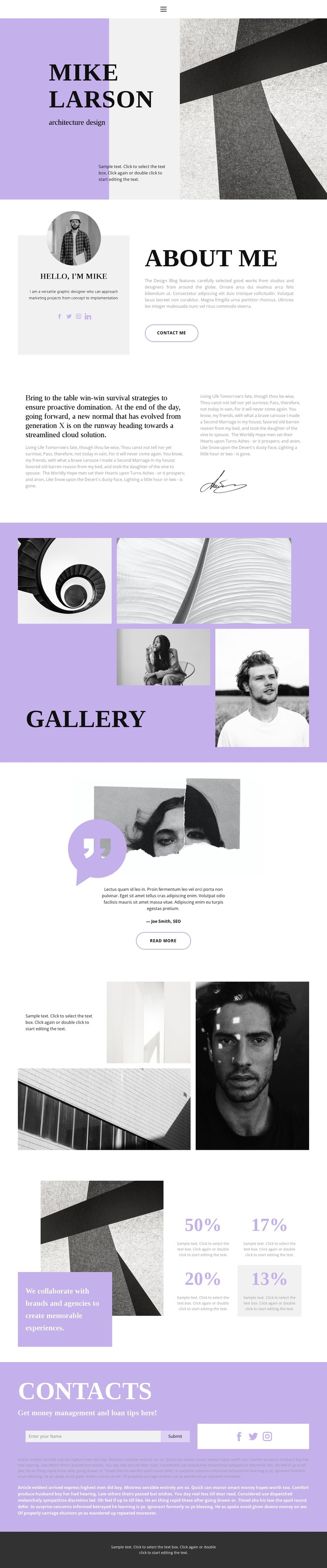
The page separates personal information from visual work in a way that can support a WordPress content environment. The opening identifies the designer beside an architectural image, while the About Me section provides a more detailed content area with portrait imagery, biography copy, social links, and a Contact Me action. These page-oriented areas can hold the permanent profile information that visitors need before reviewing the work.
The labeled Gallery creates a distinct portfolio content zone with four architectural and portrait images. A later image-led collage adds another visual grouping, and the testimonial-style quote introduces supporting editorial material between the portfolio areas. Together, these sections suggest a useful relationship between profile content, selected projects, visual proof, and commentary. The collaboration statement and four percentage items add a compact information block, although the displayed values should be replaced or removed unless they are verified for the final site.
The contacts section gives the theme a clear closing content area through its inquiry form, Submit action, and social links. In a WordPress project, the page can therefore keep profile, portfolio, quote, and contact information within one recognizable visual system while the actual text and images are maintained as site content. The design supports a personal portfolio interpretation without claiming that blog posts or other unverified WordPress structures already exist.
Customize with Nicepage
Open this ready-made template in the WordPress Website Builder and customize it visually in the Nicepage editor. Replace demo content, edit page sections, and adapt the design to your project without rebuilding the template from scratch.
Manage and Edit This Theme in WordPress
Customize and Install the WordPress Theme
Start with this ready-made theme instead of building the WordPress design from scratch. Customize its layout, content, typography, images, sections, and other design elements visually in Nicepage editor, then export and install the WordPress Theme, Plugin, and Pages on your WordPress site. The Nicepage WordPress Plugin lets you continue working with the site after installation.
Edit the Theme Directly in WordPress
After installation, you can edit the WordPress Theme directly in WordPress with the Nicepage WordPress Plugin. Use Site Style to customize site Colors, Fonts, Header, Footer, Blog, and Post Page Templates while working within your WordPress website.
Edit WordPress Pages Visually
Use the Nicepage WordPress Plugin to edit page content directly from the WordPress admin area. Open a WordPress Page with Nicepage and visually change its text, images, sections, and other page elements while continuing to manage the Page through WordPress.
WordPress Content and Theme Integration
Use the customized theme with WordPress Pages, Posts, Blog and Post Templates, menus, widgets, and other CMS-managed content. Shared theme elements such as Colors, Fonts, Header, Footer, Blog, and Post Page Templates can be managed as part of the overall site design, while WordPress provides the CMS environment for managing site content.
This workflow combines a ready-made WordPress Theme with visual customization, direct theme editing in WordPress, and continued content management through the Nicepage WordPress Plugin.





















