
Alicia Keys WordPress Theme


Edit Template Offline
2. Create new page and search for id 12861
Edit Template Online
Create Awesome Websites


Free Nicepage Builder
Keywords
Editorial Sections Give the Alicia Keys Feature a WordPress Content Shape
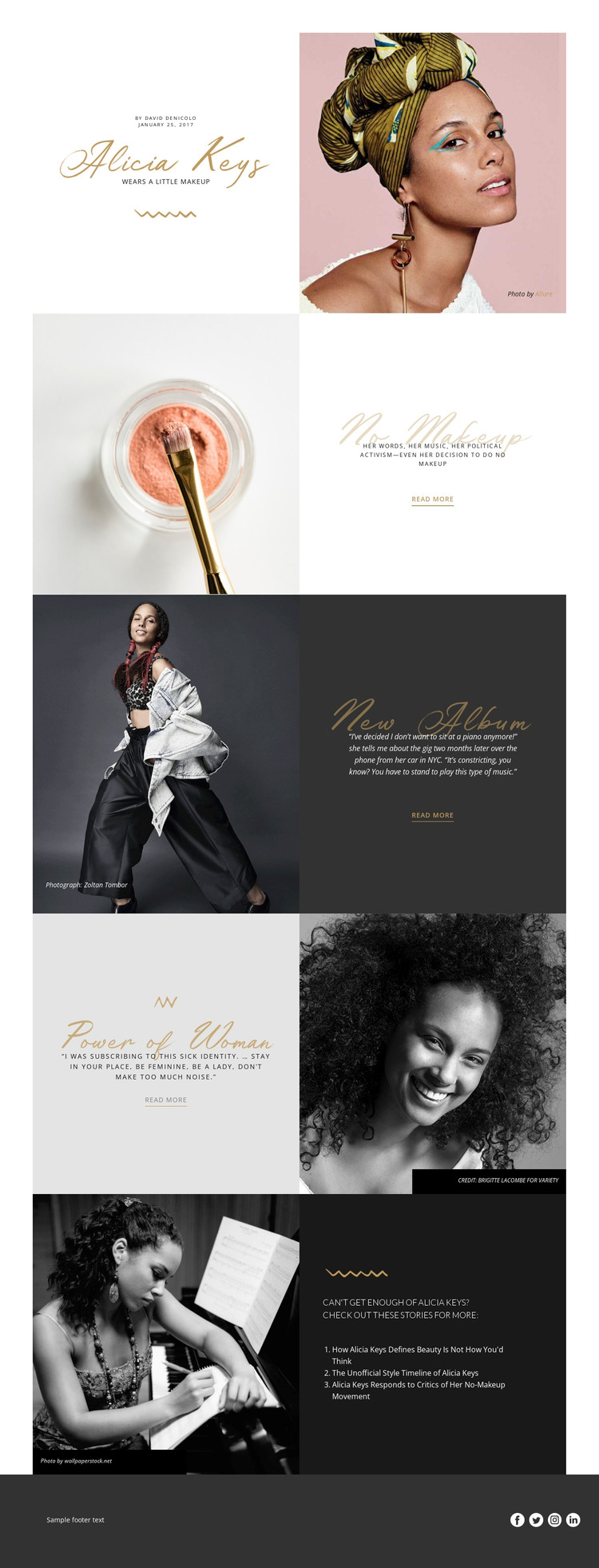
The page separates its subject matter into page-oriented editorial areas that can translate naturally into a WordPress-managed content environment. The opening feature combines the Alicia Keys wordmark, “Wears A Little Makeup” heading, author information, January 25, 2017 date, and portrait as a clear primary article introduction. The next sections provide distinct supporting content: one connects beauty imagery with music, activism, and makeup, another frames a quotation about performing at the piano, and a third places a statement about feminine identity beside portrait and fashion photography.
That separation matters for a site that may need permanent feature content alongside regularly updated editorial material. The three related story titles in the closing panel create a visible connection between the main article and additional coverage, while the Read more links provide onward paths without changing the page’s visual character. Photography credits for Zoltan Tombor and Brigitte Lacombe also show where supporting attribution belongs within the content presentation rather than being hidden from the reader.
The footer adds a shared site region with text and Facebook, Twitter, Instagram, and LinkedIn links. A WordPress project could use this design as the visual framework for page content and related editorial entries, but the analysis does not verify existing WordPress Posts, categories, or blog archives. Its confirmed strength is the clear relationship between a primary feature, supporting sections, related story references, credited imagery, and reusable social content.
Customize with Nicepage
Open this ready-made template in the WordPress Website Builder and customize it visually in the Nicepage editor. Replace demo content, edit page sections, and adapt the design to your project without rebuilding the template from scratch.
Manage and Edit This Theme in WordPress
Customize and Install the WordPress Theme
Start with this ready-made theme instead of building the WordPress design from scratch. Customize its layout, content, typography, images, sections, and other design elements visually in Nicepage editor, then export and install the WordPress Theme, Plugin, and Pages on your WordPress site. The Nicepage WordPress Plugin lets you continue working with the site after installation.
Edit the Theme Directly in WordPress
After installation, you can edit the WordPress Theme directly in WordPress with the Nicepage WordPress Plugin. Use Site Style to customize site Colors, Fonts, Header, Footer, Blog, and Post Page Templates while working within your WordPress website.
Edit WordPress Pages Visually
Use the Nicepage WordPress Plugin to edit page content directly from the WordPress admin area. Open a WordPress Page with Nicepage and visually change its text, images, sections, and other page elements while continuing to manage the Page through WordPress.
WordPress Content and Theme Integration
Use the customized theme with WordPress Pages, Posts, Blog and Post Templates, menus, widgets, and other CMS-managed content. Shared theme elements such as Colors, Fonts, Header, Footer, Blog, and Post Page Templates can be managed as part of the overall site design, while WordPress provides the CMS environment for managing site content.
This workflow combines a ready-made WordPress Theme with visual customization, direct theme editing in WordPress, and continued content management through the Nicepage WordPress Plugin.





















