
Corporate retreats WordPress Theme


Edit Template Offline
2. Create new page and search for id 1057809
Edit Template Online
Create Awesome Websites


Free Nicepage Builder
Keywords
Page Content That Separates Events, Capabilities, and Participant Proof
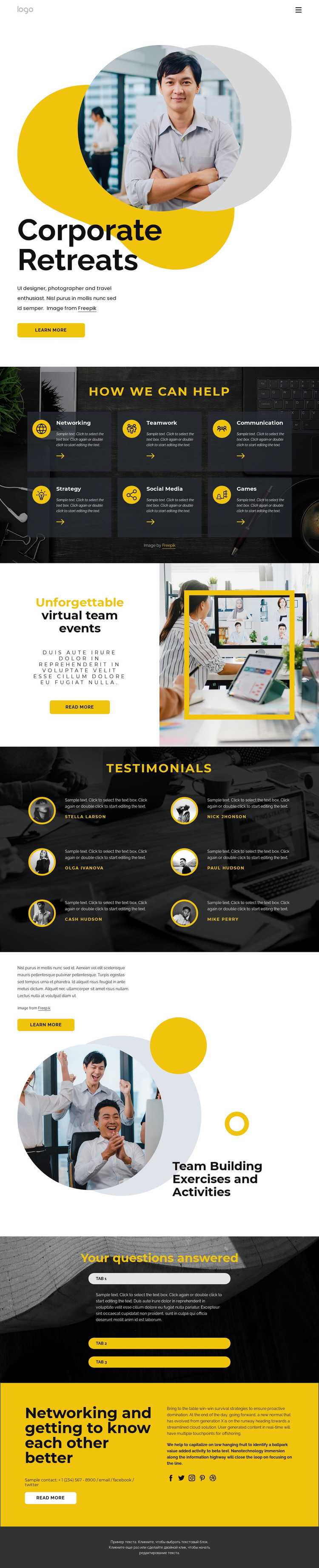
The design divides its information into clear page-oriented areas that can be interpreted within a WordPress-managed content environment. The Corporate Retreats hero works as the main permanent page introduction, pairing a heading and supporting copy with portrait imagery and a learn more button. The six capability cards provide a second content group with distinct labels—Networking, Teamwork, Communication, Strategy, Social Media, and Games—so the offering can be understood as several related themes rather than one paragraph.
The virtual team events block adds a separate promotional area, while the six testimonial entries introduce repeated participant-oriented content through portraits, quotes, and names. These two sections have different editorial roles: one explains an event format, and the other presents sample experiences. The Team Building Exercises and Activities section extends the service story with a group photograph, supporting copy, and another action. Three expandable questions create a compact place for supporting information, and the yellow closing panel gathers contact text, a read more button, and social links at the end of the page.
The design does not prove that WordPress Posts, categories, or blog structures already exist, so those should not be presented as current template components. Instead, its value as a WordPress Theme lies in the clear separation of permanent page content, repeated testimonial material, event-focused messaging, and shared navigation areas. Those relationships provide a coherent visual framework for managing and expanding related content without changing the core event identity.
Customize with Nicepage
Open this ready-made template in the WordPress Website Builder and customize it visually in the Nicepage editor. Replace demo content, edit page sections, and adapt the design to your project without rebuilding the template from scratch.
Manage and Edit This Theme in WordPress
Customize and Install the WordPress Theme
Start with this ready-made theme instead of building the WordPress design from scratch. Customize its layout, content, typography, images, sections, and other design elements visually in Nicepage editor, then export and install the WordPress Theme, Plugin, and Pages on your WordPress site. The Nicepage WordPress Plugin lets you continue working with the site after installation.
Edit the Theme Directly in WordPress
After installation, you can edit the WordPress Theme directly in WordPress with the Nicepage WordPress Plugin. Use Site Style to customize site Colors, Fonts, Header, Footer, Blog, and Post Page Templates while working within your WordPress website.
Edit WordPress Pages Visually
Use the Nicepage WordPress Plugin to edit page content directly from the WordPress admin area. Open a WordPress Page with Nicepage and visually change its text, images, sections, and other page elements while continuing to manage the Page through WordPress.
WordPress Content and Theme Integration
Use the customized theme with WordPress Pages, Posts, Blog and Post Templates, menus, widgets, and other CMS-managed content. Shared theme elements such as Colors, Fonts, Header, Footer, Blog, and Post Page Templates can be managed as part of the overall site design, while WordPress provides the CMS environment for managing site content.
This workflow combines a ready-made WordPress Theme with visual customization, direct theme editing in WordPress, and continued content management through the Nicepage WordPress Plugin.





















