Modern Korean Skincare Template


Edit Template Offline
2. Create new page and search for id 6672116
Edit Template Online
Create Awesome Websites


Free Nicepage Builder
Keywords
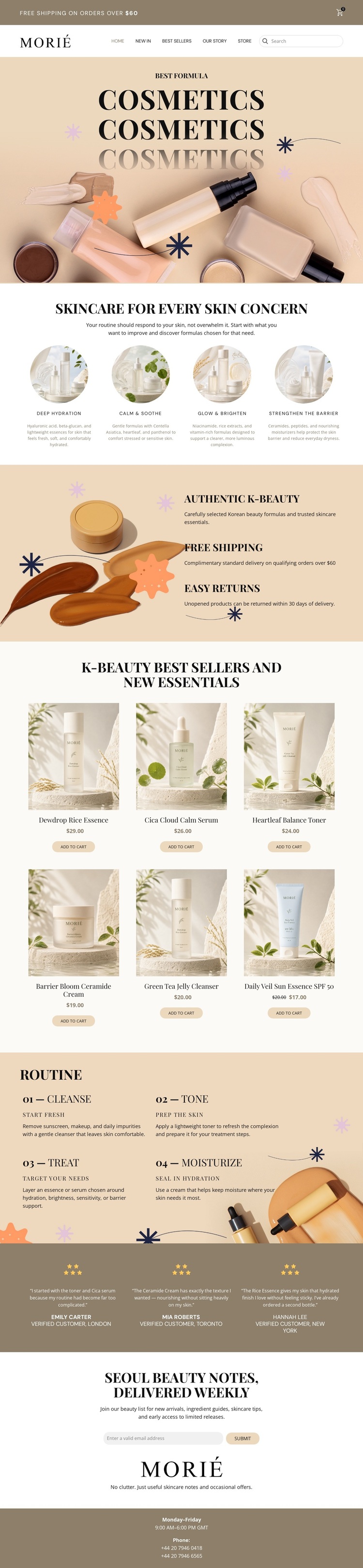
A Six-Product Editorial Storefront With Routine Guidance
The design stands out through the way it combines a calm editorial presentation with recognizable shopping content. A full-width cosmetics image and black typography establish a focused visual direction, while the four circular concern categories give the page a clear skincare vocabulary: Deep Hydration, Calm & Soothe, Glow & Brighten, and Strengthen the Barrier. This makes the design suitable for a product range that needs both visual atmosphere and organized explanation.
Its strongest practical feature is the relationship between the six-product catalog and the four-step routine. Product cards show names, prices, and add-to-cart actions, while the routine frames skincare use through Cleanse, Tone, Treat, and Moisturize. The two sections work together: one supports selection, and the other gives the storefront a more complete care narrative. The surrounding benefits—Authentic K-Beauty, Free Shipping, and Easy Returns—add additional reasons for visitors to understand the store offer.
Three testimonials and the newsletter block broaden the page beyond immediate shopping. They create space for reassurance and ongoing communication, while the footer adds business hours and phone contacts. This template is therefore a useful choice for projects that want product presentation, routine education, and brand-led content in one warm, image-focused storefront rather than a dense catalog-only layout.
Customize with Nicepage
Open this ready-made template in the Template Builder and customize it visually in the Nicepage editor. Replace demo content, edit page sections, and adapt the design to your project without rebuilding the template from scratch.
Start With a Ready-Made Template
Choose a Design for a New Page
Use a ready-made template as a starting point instead of creating every page from a blank canvas. When adding a new page in Nicepage, browse available designs, compare different layouts, and choose an option that already fits the general purpose and visual direction of your project.
Browse Different Page Designs
Explore Page Designs using search, thematic categories, Design Sets, and full-page previews. The collection includes layouts for different subjects and page purposes, making it easier to compare alternatives before selecting a design to customize.
Customize the Selected Template
After choosing a design, create the page and continue editing it visually in Nicepage. Replace the demo content, adjust images, typography, colors, sections, and other elements, and adapt the ready-made layout to your own content instead of rebuilding the design from the beginning.
Explore More Design Directions
If the first option does not match your project closely enough, return to the design collection and compare other templates before committing to a layout. This makes the template library useful not only for faster page creation, but also for exploring different visual approaches and finding a suitable starting point for a new project.
This workflow gives you access to a broad collection of ready-made designs that can be selected, compared, and customized according to the needs of each new page or project.