Modern Digital Bank Template


Edit Template Offline
2. Create new page and search for id 6657274
Edit Template Online
Create Awesome Websites


Free Nicepage Builder
Keywords
Four Finance Tools and Three Plans Give the Design a Clear Focus
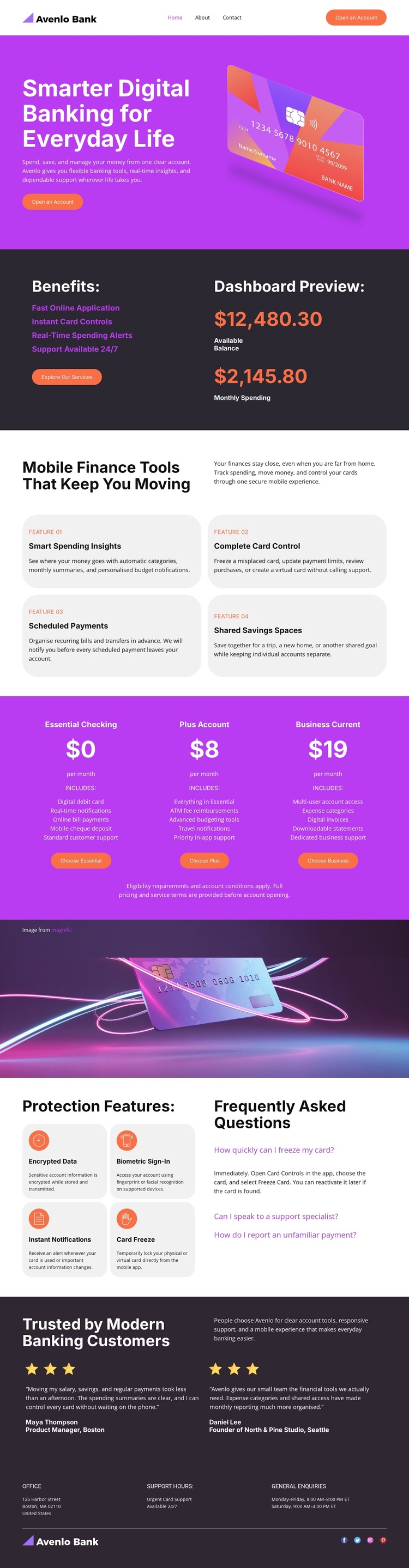
The page combines several content relationships that make it a distinctive choice for digital banking projects. The hero uses a prominent payment-card illustration beside the account-opening proposition, immediately connecting the visual subject with the service being presented. Below it, the benefits list and dashboard preview show how account features can be explained through both concise points and a product-style interface image.
The strongest differentiator is the combination of four rounded finance-tool cards with a three-plan account comparison. Spending insights, complete card control, scheduled payments, and shared savings spaces broaden the design beyond a simple bank introduction, while Essential Checking, Plus Account, and Business Current give the page a visible way to compare account options. These sections make the layout suitable for projects that need to present several financial tools without relying on dense paragraphs.
The design also gives substantial space to reassurance. Encrypted data, biometric sign-in, instant notifications, and card freeze appear beside FAQ content, followed by two testimonial entries and a footer with support and inquiry information. That balance between product breadth, plan choice, security explanation, and social proof makes this template a useful option when a digital banking page must communicate both capability and confidence.
Customize with Nicepage
Open this ready-made template in the Template Builder and customize it visually in the Nicepage editor. Replace demo content, edit page sections, and adapt the design to your project without rebuilding the template from scratch.
Start With a Ready-Made Template
Choose a Design for a New Page
Use a ready-made template as a starting point instead of creating every page from a blank canvas. When adding a new page in Nicepage, browse available designs, compare different layouts, and choose an option that already fits the general purpose and visual direction of your project.
Browse Different Page Designs
Explore Page Designs using search, thematic categories, Design Sets, and full-page previews. The collection includes layouts for different subjects and page purposes, making it easier to compare alternatives before selecting a design to customize.
Customize the Selected Template
After choosing a design, create the page and continue editing it visually in Nicepage. Replace the demo content, adjust images, typography, colors, sections, and other elements, and adapt the ready-made layout to your own content instead of rebuilding the design from the beginning.
Explore More Design Directions
If the first option does not match your project closely enough, return to the design collection and compare other templates before committing to a layout. This makes the template library useful not only for faster page creation, but also for exploring different visual approaches and finding a suitable starting point for a new project.
This workflow gives you access to a broad collection of ready-made designs that can be selected, compared, and customized according to the needs of each new page or project.