Retail POS Software Template


Edit Template Offline
2. Create new page and search for id 6652702
Edit Template Online
Create Awesome Websites


Free Nicepage Builder
Keywords
Six Retail Capabilities Framed by Dashboards and Pricing
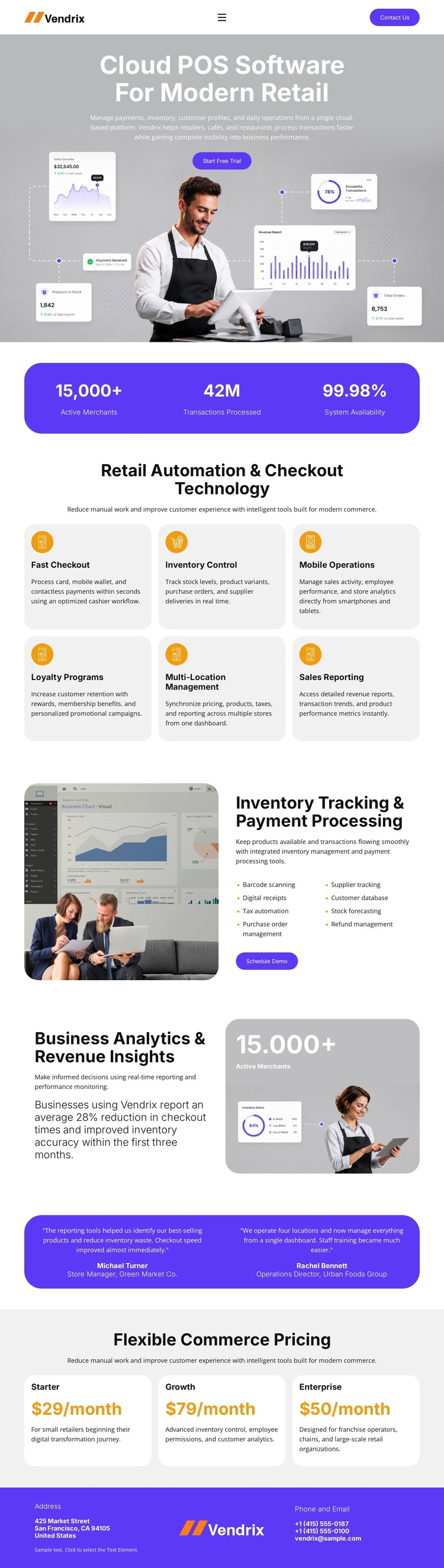
The design’s strongest selection point is the way it connects a broad retail software offer to a recognizable product story. The hero does more than state the subject: it combines “Cloud POS Software For Modern Retail” with retail photography, floating dashboard and metric panels, and a Get Started action. That makes the product interface and the retail setting visible at the same time.
The six capability cards provide unusually clear coverage for a POS-focused presentation. Fast Checkout, Inventory Control, Mobile Operations, Loyalty Programs, Multi-Location Management, and Sales Reporting give the page multiple entry points for different retail concerns while retaining one repeated card structure. Two split sections then add depth: inventory tracking and payment processing are paired with a dashboard and Schedule Demo action, while business analytics and revenue insights receive a separate image-led treatment.
The lower sequence helps the design stand apart from a layout centered only on features. Two testimonial attributions create a dedicated proof band, and Starter, Growth, and Enterprise cards make the commercial structure visible before the final contact details. A Start Free Trial action reinforces the product-led use case. Together, these relationships make the template a strong option for projects that need to explain retail software, demonstrate operational breadth, show evidence, and present a clear pricing choice within one polished visual direction.
Customize with Nicepage
Open this ready-made template in the Template Builder and customize it visually in the Nicepage editor. Replace demo content, edit page sections, and adapt the design to your project without rebuilding the template from scratch.
Start With a Ready-Made Template
Choose a Design for a New Page
Use a ready-made template as a starting point instead of creating every page from a blank canvas. When adding a new page in Nicepage, browse available designs, compare different layouts, and choose an option that already fits the general purpose and visual direction of your project.
Browse Different Page Designs
Explore Page Designs using search, thematic categories, Design Sets, and full-page previews. The collection includes layouts for different subjects and page purposes, making it easier to compare alternatives before selecting a design to customize.
Customize the Selected Template
After choosing a design, create the page and continue editing it visually in Nicepage. Replace the demo content, adjust images, typography, colors, sections, and other elements, and adapt the ready-made layout to your own content instead of rebuilding the design from the beginning.
Explore More Design Directions
If the first option does not match your project closely enough, return to the design collection and compare other templates before committing to a layout. This makes the template library useful not only for faster page creation, but also for exploring different visual approaches and finding a suitable starting point for a new project.
This workflow gives you access to a broad collection of ready-made designs that can be selected, compared, and customized according to the needs of each new page or project.