Modern Perfume Boutique Template


Edit Template Offline
2. Create new page and search for id 6622736
Edit Template Online
Create Awesome Websites


Free Nicepage Builder
Keywords
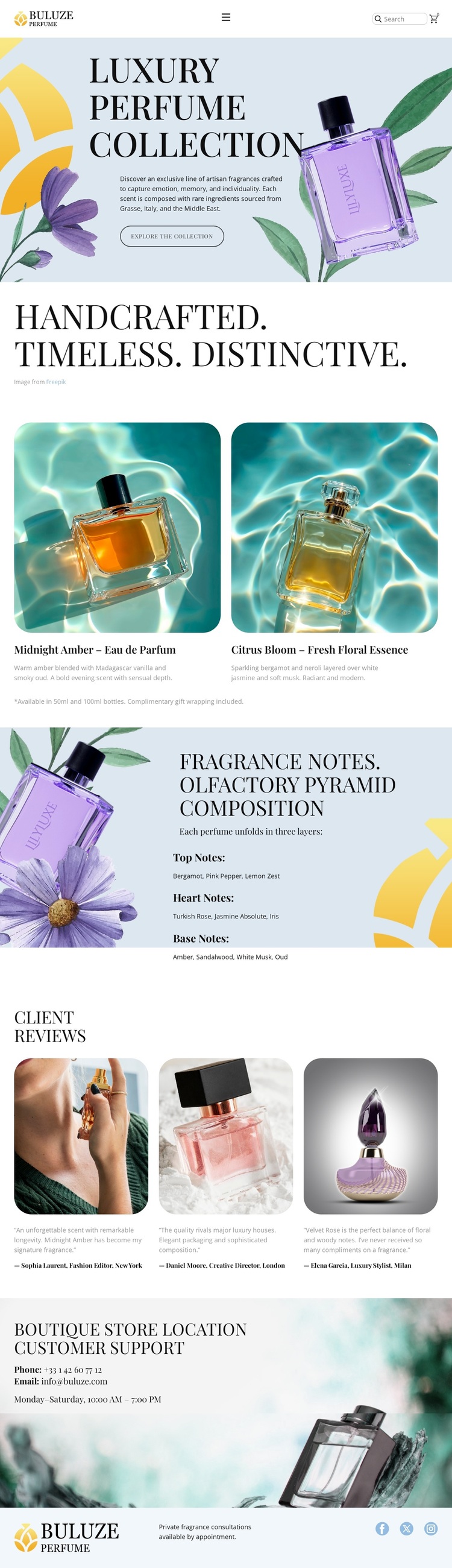
Two Named Fragrances Give the Collection a Distinctive Focus
Midnight Amber and Citrus Bloom give this design a clear centre of gravity: the page is not a generic beauty layout, but a collection showcase built around two named perfume products. Their parallel cards combine large product imagery with descriptive copy, making visual presentation and product explanation work together. That arrangement suits projects where visitors need to encounter the character of a collection before reaching practical support information.
The design also adds depth through its fragrance-note section. Organizing the explanation into top, heart, and base notes gives the page an educational layer that distinguishes it from layouts based only on product cards or decorative imagery. The soft powder-blue, cream, lavender, yellow, and botanical green palette supports the luxury boutique direction, while editorial serif typography makes the main headings feel more like collection statements than dense catalogue labels. Three client review cards broaden the content with customer-oriented evidence, and the final support area connects the visual experience to boutique assistance through contact details and consultation messaging. These relationships make the page a useful choice for fragrance, beauty, aromatherapy, or cosmetic projects that need product storytelling, sensory imagery, and service context in the same design rather than a purely transactional catalogue.
Customize with Nicepage
Open this ready-made template in the Template Builder and customize it visually in the Nicepage editor. Replace demo content, edit page sections, and adapt the design to your project without rebuilding the template from scratch.
Start With a Ready-Made Template
Choose a Design for a New Page
Use a ready-made template as a starting point instead of creating every page from a blank canvas. When adding a new page in Nicepage, browse available designs, compare different layouts, and choose an option that already fits the general purpose and visual direction of your project.
Browse Different Page Designs
Explore Page Designs using search, thematic categories, Design Sets, and full-page previews. The collection includes layouts for different subjects and page purposes, making it easier to compare alternatives before selecting a design to customize.
Customize the Selected Template
After choosing a design, create the page and continue editing it visually in Nicepage. Replace the demo content, adjust images, typography, colors, sections, and other elements, and adapt the ready-made layout to your own content instead of rebuilding the design from the beginning.
Explore More Design Directions
If the first option does not match your project closely enough, return to the design collection and compare other templates before committing to a layout. This makes the template library useful not only for faster page creation, but also for exploring different visual approaches and finding a suitable starting point for a new project.
This workflow gives you access to a broad collection of ready-made designs that can be selected, compared, and customized according to the needs of each new page or project.